Once. Someone named “Vincenzo lozzo” wrote to Epstein in email, in 2016: “I wouldn’t pay too much attention to this, Schneier has a long tradition of dramatizing and misunderstanding things.” The topic of the email is DDoS attacks, and it is unclear what I am dramatizing and misunderstanding.
Rabbi Schneier is also mentioned, also incidentally, also once. As far as either of us know, we are not related.
EDITED TO ADD (2/7): There is more context on the Justice.gov website version.
The LastPass Threat Intelligence, Mitigation, and Escalation (TIME) team has published a warning about an active phishing campaign in which fake “maintenance” emails pressure users to back up their vaults within 24 hours. The emails lead to credential-stealing phishing sites rather than any legitimate LastPass page.
The phishing campaign that started around January 19, 2026, uses emails that falsely claim upcoming infrastructure maintenance and urge users to “backup your vault in the next 24 hours.”
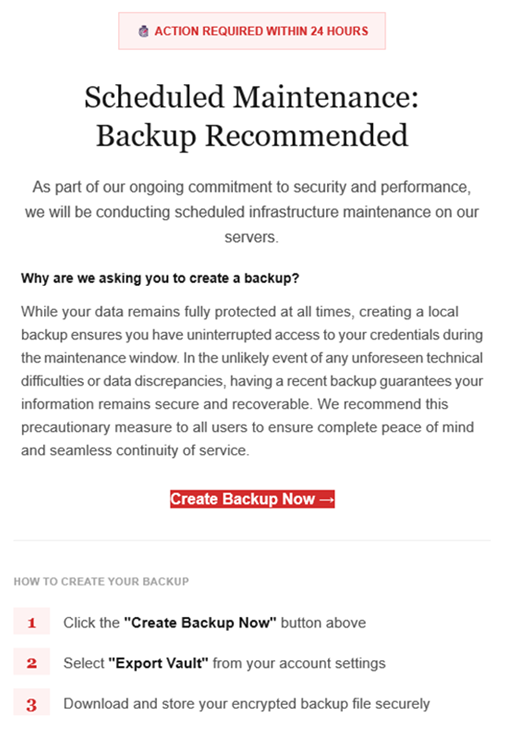
Image courtesy of LastPass
“Scheduled Maintenance: Backup Recommended
As part of our ongoing commitment to security and performance, we will be conducting scheduled infrastructure maintenance on our servers. Why are we asking you to create a backup? While your data remains protected at all times, creating a local backup ensures you have access to your credentials during the maintenance window. In the unlikely event of any unforeseen technical difficulties or data discrepancies, having a recent backup guarantees your information remains secure and recoverable. We recommend this precautionary measure to all users to ensure complete peace of mind and seamless continuity of service.
Create Backup Now (link)
How to create your backup 1 Click the “Create Backup Now” button above 2 Select “Export Vault” from you account settings 3 Download and store your encrypted backup file securely”
The link in the email points to mail-lastpass[.]com, a domain that doesn’t belong to LastPass and has now been taken down.
Note that there are different subject lines in use. Here is a selection:
LastPass Infrastructure Update: Secure Your Vault Now
Your Data, Your Protection: Create a Backup Before Maintenance
Don’t Miss Out: Backup Your Vault Before Maintenance
Important: LastPass Maintenance & Your Vault Security
Protect Your Passwords: Backup Your Vault (24-Hour Window)
It is imperative for users to ignore instructions in emails like these. Giving away the login details for your password manager can be disastrous. For most users, it would provide access to enough information to carry out identity theft.
Stay safe
First and foremost, it’s important to understand that LastPass will never ask for your master password or demand immediate action under a tight deadline. Generally speaking, there are more guidelines that can help you stay safe.
Don’t click on links in unsolicited emails without verifying with the trusted sender that they’re legitimate.
Always log in directly on the platform that you are trying to access, rather than through a link.
Use a real-time, up-to-date anti-malware solution with a web protection module to block malicious sites.
Report phishing emails to the company that’s being impersonated, so they can alert other customers. In this case emails were forwarded to abuse@lastpass.com.
Pro tip: Malwarebytes Scam Guard would have recognized this email as a scam and advised you how to proceed.
We don’t just report on threats—we help safeguard your entire digital identity
Cybersecurity risks should never spread beyond a headline. Protect your, and your family’s, personal information by using identity protection.
Cisco has identified an ongoing cyberattack campaign exploiting vulnerabilities in a subset of its appliances running Cisco AsyncOS Software. The attack specifically affects Cisco Secure Email Gateway and Cisco Secure Email and Web Manager appliances, allowing threat actors to execute arbitrary commands with root privileges. This campaign has been tracked under CVE-2025-20393 and has been classified as critical with a CVSS 10.0 rating.The vulnerability, detailed in Cisco Advisory ID cisco-sa-sma-attack-N9bf4, impacts appliances when the Spam Quarantine feature is enabled and exposed to the internet—a configuration not enabled by default according to Cisco deployment guides. Both physical and virtual instances of the affected appliances are vulnerable.Cisco noted that the attack allows attackers to implant a persistence mechanism, maintaining long-term control over compromised appliances. The company has confirmed that appliance parts of Cisco Secure Email Cloud are not affected and that there is no evidence of exploitation against Cisco Secure Web.
Attack Detection and Timeline
The cyberattack was initially identified through a routine Cisco Technical Assistance Center (TAC) case. Following the discovery, Cisco Talos documented the threat in a blog post, noting the active targeting of Cisco Secure Email Gateway and Web Manager appliances. Evidence suggests that attackers leveraged exposed ports to gain unauthorized root access, disable security tools, and establish covert channels for ongoing remote access.Administrators can check whether the Spam Quarantine feature is enabled by accessing the appliance's web management interface:
For Cisco Secure Email Gateway: Navigate to Network > IP Interfaces and select the interface configured for Spam Quarantine.
For Cisco Secure Email and Web Manager: Navigate to Management Appliance > Network > IP Interfaces and select the relevant interface.
If the Spam Quarantine checkbox is enabled, the appliance is vulnerable.
No Direct Workarounds for CVE-2025-20393
Cisco has stated that no immediate workarounds exist to fully mitigate the risk of cyberattacks. Organizations are strongly urged to follow recommended mitigation steps to restore appliances to a secure configuration. If an appliance is suspected of compromise, Cisco recommends opening a TAC case and, in confirmed cases, rebuilding the appliance to eliminate the threat actors’ persistence mechanisms.Additional security hardening recommendations include:
Restricting appliance access to known, trusted hosts and avoiding direct exposure to the internet.
Deploying appliances behind firewalls and filtering traffic to allow only authorized communication.
Separating mail and management network interfaces for Cisco Secure Email Gateway to limit internal access risk.
Regularly monitoring web logs and sending logs to external servers for post-event analysis.
Disabling unnecessary network services such as HTTP and FTP and using SSL/TLS with certificates from trusted authorities.
Upgrading appliances to the latest Cisco AsyncOS Software release.
Implementing strong authentication methods like SAML or LDAP and creating dedicated administrator and operator accounts with passwords.
Cisco also recommends reviewing deployment guides for both Secure Email Gateway and Secure Email and Web Manager to ensure all security best practices are followed.
Broader Implications
The cyberattack on Cisco Secure Email Gateway and Web Manager shows how misconfigured ports can lead to full system compromise. Organizations are urged to immediately assess exposure, restrict access, and consult Cisco TAC for potential compromises, while continuously monitoring and patching appliances. Leveraging Cyble’s real-time vulnerability intelligence can help detect zero-day exploits, new cyber threats, and high-risk vulnerabilities, enabling enterprises to prioritize and remediate critical risks efficiently. Request a Cyble demo today to strengthen your organization’s cyber resilience.

 Login
Login