
 Login
Login
How fake party invitations are being used to install remote access tools
“You’re invited!”
It sounds friendly, familiar and quite harmless. But in a scam we recently spotted, that simple phrase is being used to trick victims into installing a full remote access tool on their Windows computers—giving attackers complete control of the system.
What appears to be a casual party or event invitation leads to the silent installation of ScreenConnect, a legitimate remote support tool quietly installed in the background and abused by attackers.
Here’s how the scam works, why it’s effective, and how to protect yourself.
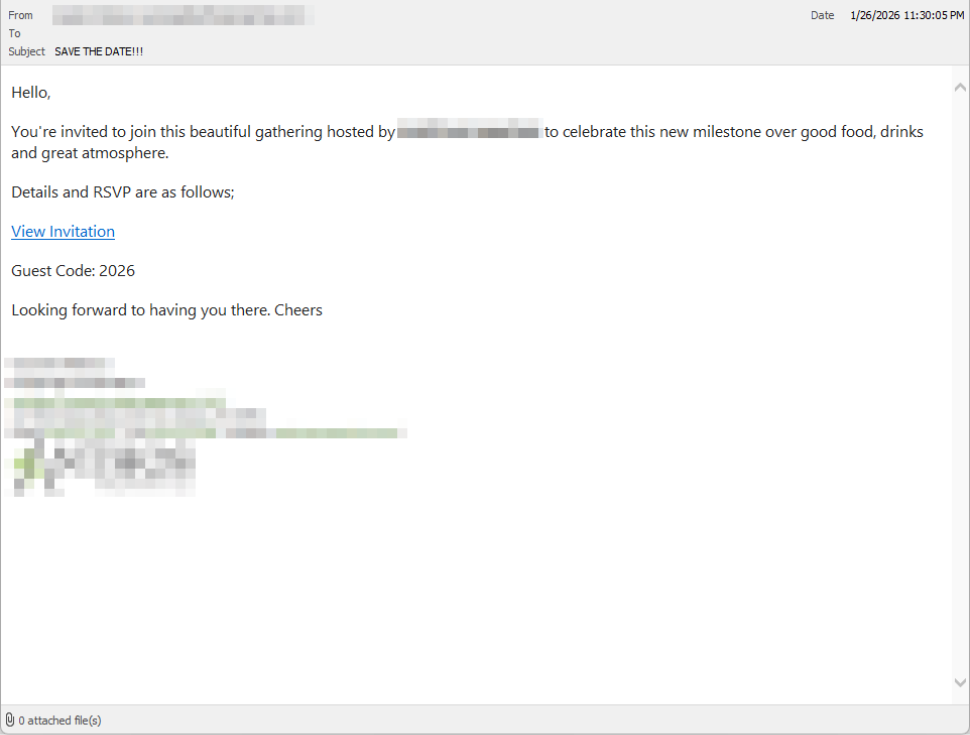
The email: A party invitation
Victims receive an email framed as a personal invitation—often written to look like it came from a friend or acquaintance. The message is deliberately informal and social, lowering suspicion and encouraging quick action.
In the screenshot below, the email arrived from a friend whose email account had been hacked, but it could just as easily come from a sender you don’t know.
So far, we’ve only seen this campaign targeting people in the UK, but there’s nothing stopping it from expanding elsewhere.
Clicking the link in the email leads to a polished invitation page hosted on an attacker-controlled domain.
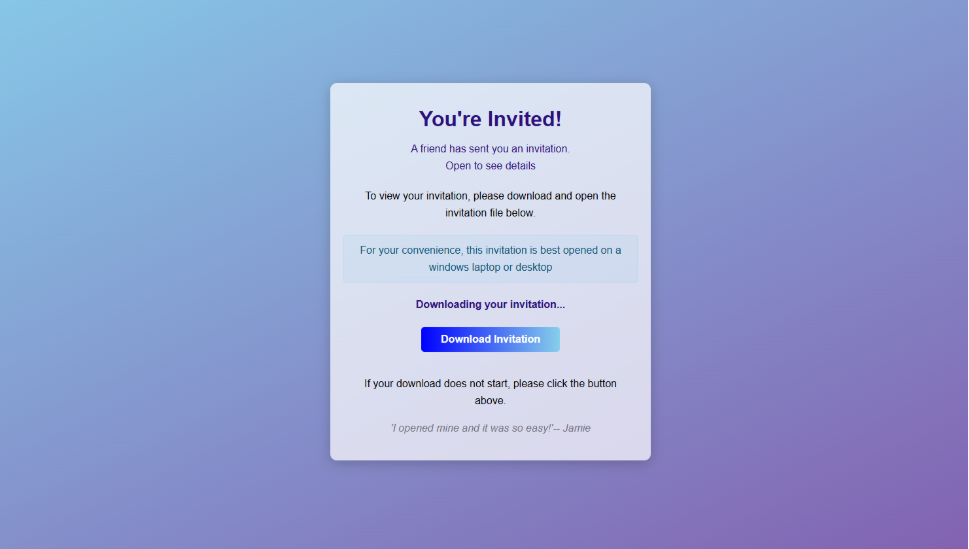
The invite: The landing page that leads to an installer
The landing page leans heavily into the party theme, but instead of showing event details, the page nudges the user toward opening a file. None of them look dangerous on their own, but together they keep the user focused on the “invitation” file:
- A bold “You’re Invited!” headline
- The suggestion that a friend had sent the invitation
- A message saying the invitation is best viewed on a Windows laptop or desktop
- A countdown suggesting your invitation is already “downloading”
- A message implying urgency and social proof (“I opened mine and it was so easy!”)
Within seconds, the browser is redirected to download RSVPPartyInvitationCard.msi
The page even triggers the download automatically to keep the victim moving forward without stopping to think.
This MSI file isn’t an invitation. It’s an installer.
The guest: What the MSI actually does
When the user opens the MSI file, it launches msiexec.exe and silently installs ScreenConnect Client, a legitimate remote access tool often used by IT support teams.
There’s no invitation, RSVP form, or calendar entry.
What happens instead:
- ScreenConnect binaries are installed under
C:\Program Files (x86)\ScreenConnect Client\ - A persistent Windows service is created (for example, ScreenConnect Client 18d1648b87bb3023)
- ScreenConnect installs multiple .NET-based components
- There is no clear user-facing indication that a remote access tool is being installed
From the victim’s perspective, very little seems to happen. But at this point, the attacker can now remotely access their computer.
The after-party: Remote access is established
Once installed, the ScreenConnect client initiates encrypted outbound connections to ScreenConnect’s relay servers, including a uniquely assigned instance domain.
That connection gives the attacker the same level of access as a remote IT technician, including the ability to:
- See the victim’s screen in real time
- Control the mouse and keyboard
- Upload or download files
- Keep access even after the computer is restarted
Because ScreenConnect is legitimate software commonly used for remote support, its presence isn’t always obvious. On a personal computer, the first signs are often behavioral, such as unexplained cursor movement, windows opening on their own, or a ScreenConnect process the user doesn’t remember installing.
Why this scam works
This campaign is effective because it targets normal, predictable human behavior. From a behavioral security standpoint, it exploits our natural curiosity and appears to be a low risk.
Most people don’t think of invitations as dangerous. Opening one feels passive, like glancing at a flyer or checking a message, not installing software.
Even security-aware users are trained to watch out for warnings and pressure. A friendly “you’re invited” message doesn’t trigger those alarms.
By the time something feels off, the software is already installed.
Signs your computer may be affected
Watch for:
- A download or executed file named
RSVPPartyInvitationCard.msi - An unexpected installation of ScreenConnect Client
- A Windows service named ScreenConnect Client with random characters
- Your computer makes outbound HTTPS connections to ScreenConnect relay domains
- Your system resolves the invitation-hosting domain used in this campaign, xnyr[.]digital
How to stay safe
This campaign is a reminder that modern attacks often don’t break in—they’re invited in. Remote access tools give attackers deep control over a system. Acting quickly can limit the damage.
For individuals
If you receive an email like this:
- Be suspicious of invitations that ask you to download or open software
- Never run MSI files from unsolicited emails
- Verify invitations through another channel before opening anything
If you already clicked or ran the file:
- Disconnect from the internet immediately
- Check for ScreenConnect and uninstall it if present
- Run a full security scan
- Change important passwords from a clean, unaffected device
For organisations (especially in the UK)
- Alert on unauthorized ScreenConnect installations
- Restrict MSI execution where feasible
- Treat “remote support tools” as high-risk software
- Educate users: invitations don’t come as installers
This scam works by installing a legitimate remote access tool without clear user intent. That’s exactly the gap Malwarebytes is designed to catch.
Malwarebytes now detects newly installed remote access tools and alerts you when one appears on your system. You’re then given a choice: confirm that the tool is expected and trusted, or remove it if it isn’t.
We don’t just report on threats—we remove them
Cybersecurity risks should never spread beyond a headline. Keep threats off your devices by downloading Malwarebytes today.