Reading view

FreeBSD debates sunsetting power64/power64le support

I have some potentially devastating news for POWER users interested in using FreeBSD, uncovered late last month by none other than Cameron Kaiser.

FreeBSD is considering retiring powerpc64 prior to branching 16, which would make FreeBSD 15 the last stable version to support the architecture. (32-bit PowerPC is already dropped as of FreeBSD 14, though both OpenBSD and NetBSD generally serve this use case, and myself I have a Mac mini G4 running a custom NetBSD kernel with code from FreeBSD for automatic restart.) Although the message says “powerpc64 and powerpc64le” it later on only makes specific reference to the big-endian port, whereas both endiannesses appear on the FreeBSD platform page and on the download server.

↫ Cameron Kaiser

There’s two POWER9 systems in my office, so this obviously makes me quite sad. At the same time, though, it’s hard not to understand any possible decision to drop powerpc64/powerpc64le at this point in time. Raptor’s excellent POWER9 systems – the Blackbird, which I reviewed a few years ago, and the Talos II, which I also have – are very long in the tooth at this point and still quite expensive, and thanks to IBM royally screwing up POWER10, we never got any timely successors. There were rumblings about a possible POWER11-based successor from Raptor back in July 2025, but it’s been quiet on that front since.

In other words, there are no modern powerpc64 and powerpc64le systems available. POWER10 and brand new POWER11 hardware are strictly IBM and incredibly expensive, so unless IBM makes some sort of generous donation to the FreeBSD Foundation, I honestly don’t know how FreeBSD is supposed to keep their powerpc64 and powerpc64le ports up-to-date with the latest generation of POWER hardware in the first place.

It’s important to note that no final decision has been made yet, and since that initial report by Kaiser, several people have chimed in to argue the case that at least powerpc64le (the little endian variant) should remain properly supported. In fact, Timothy Pearson from Raptor Engineering stepped up the place, and stated he’s willing to take over maintainership of the port, as Raptor has been contributing to it for years anyway.

Raptor remains committed to the architecture as a whole, and we have resources to assist with development. In fact, we sponsor several FreeBSD build machines already in our cloud environment, and have kernel developers working on expanding and maintaining the FreeBSD codebase. If there is any concern regarding hardware availability or developer resources, Raptor is willing and able to assist.

↫ Timothy Pearson

Whatever decision the FreeBSD project makes, the Linux world will be fine for a while yet as IBM contributes to its development, and popular distributions still consider POWER a primary target. However, unless either IBM moves POWER hardware downmarket (extremely unlikely) or the rumours around Raptor have merit, I think at least the FreeBSD powerpc64 (big endian) port is done for, with the powerpc64le port hopefully being saved by people hearing these alarm bells.

  •  

After nearly 30 years, Crucial will stop selling RAM to consumers

On Wednesday, Micron Technology announced it will exit the consumer RAM business in 2026, ending 29 years of selling RAM and SSDs to PC builders and enthusiasts under the Crucial brand. The company cited heavy demand from AI data centers as the reason for abandoning its consumer brand, a move that will remove one of the most recognizable names in the do-it-yourself PC upgrade market.

“The AI-driven growth in the data center has led to a surge in demand for memory and storage,” Sumit Sadana, EVP and chief business officer at Micron Technology, said in a statement. “Micron has made the difficult decision to exit the Crucial consumer business in order to improve supply and support for our larger, strategic customers in faster-growing segments.”

Micron said it will continue shipping Crucial consumer products through the end of its fiscal second quarter in February 2026 and will honor warranties on existing products. The company will continue selling Micron-branded enterprise products to commercial customers and plans to redeploy affected employees to other positions within the company.

Read full article

Comments

© Micron Technology

  •  

FreeBSD 15.0 released with pkgbase

The FreeBSD team has released FreeBSD 15.0, and with it come several major changes, one of which you will surely want to know more about if you’re a FreeBSD user. Since this change will eventually drastically change the way you use FreeBSD, we should get right into it.

Up until now, a full, system-wide update for FreeBSD – as in, updating both the base operating system as well as any packages you have installed on top of it – would use two separate tools: freebsd-update and the pkg package manager. You used the former to update the base operating system, which was installed as file sets, and the latter to update everything you had installed on top of it in the form of packages.

With FreeBSD 15.0, this is starting to change. Instead of using two separate tools, in 15.0 you can opt to deprecate freebsd-update and file sets, and rely entirely on pkg for updating both the base operating system as well as any packages you have installed, because with this new method, the base system moves from file sets to packages. When installing FreeBSD 15.0, the installer will ask you to choose between the old method, or the new pkg-only method.

Packages (pkgbase / New Method): The base system is installed as a set of packages from the “FreeBSD-base” repository. Systems installed this way are managed entirely using the pkg(8) tool. This method is used by default for all VM images and images published in public clouds. In FreeBSD 15.0, pkgbase is offered as a technology preview, but it is expected to become the standard method for managing base system installations and upgrades in future releases.

↫ FreeBSD 15.0 release announcement

As the release announcement notes, the net method is optional in FreeBSD 15 and will remain optional during the entire 15.x release cycle, but the plan is to deprecate freebsd-update and file sets entirely in FreeBSD 16.0. If you have an existing installation you wish to convert to using pkgbase, there’s a tool called pkgbasify to do just that. It’s sponsored by the FreeBSD Foundation, so it’s not some random script.

Of course, there’s way more in this release than just pkgbase. Of note is that the 32bit platforms i386, armv6, and 32-bit powerpc have been retired, but of course, 32bit code will continue to run on their 64bit counterparts. FreeBSD 15.0 also brings a native inotify implementation, a ton of improvements to the audio components, improved Intel Wi-Fi drivers, and so, so much more.

  •  

Big news for small OpenBSD /usr partitions

Ever ran into issues using sysupgrade on OpenBSD because /usr ran out of space? OpenBSD developers are trying to address this issue.

Firstly, Stuart Henderson (sthen@modified the installer to increase free space prior to installing. […] Theo de Raadt (deraadt@modified sysupgrade(8) so that, if space is too tight, it will fail gracefully rather than risk leaving the administrator with a broken system.

↫ OpenBSD Journal

These are very welcome additions.

  •  

FreeBSD now builds reproducibly and without root privilege

The FreeBSD Foundation is pleased to announce that it has completed work to build FreeBSD without requiring root privilege. We have implemented support for all source release builds to use no-root infrastructure, eliminating the need for root privileges across the FreeBSD release pipeline. This work was completed as part of the program commissioned by the Sovereign Tech Agency.

↫ FreeBSD Foundation blog

This is great news in and of itself, but there’s more: FreeBSD has also improved build reproducability. This means that given the same source input, you should end up with the same binary output, which is an important part of building a verifiable chain of trust. These two improvements combined further add to making FreeBSD a trustworthy, secure option – something it already is anyway.

In case you haven’t noticed, the FreeBSD project and its countless contributors are making a ton of tangible progress lately on a wide variety of topics, from improving desktop use, to solidifying Wi-Fi support, to improving the chain of trust. I think the time is quite right for FreeBSD to make some inroads in the desktop UNIX-y space, especially for people to whom desktop Linux has strayed too far from the traditional UNIX philosphy (whatever that means).

  •  

WINE gaming in FreeBSD Jails with Bastille

FreeBSD offers a whole bunch of technologies and tools to make gaming on the platform a lot more capable than you’d think, and this article by Pertho dives into the details. Running all your games inside a FreeBSD Jail with Wine installed into it is pretty neat.

Initially, I thought this was going to be a pretty difficult and require a lot of trial and error but I was surprised at how easy it was to get this all working. I was really happy to get some of my favorite games working in a FreeBSD Jail, and having ZFS snapshots around was a great way to test things in case I needed to backtrack.

↫ Pertho at their blog

No, this isn’t as easy as gaming on Linux has become, and it certainly requires a ton more work and knowledge than just installing a major Linux distribution and Steam, but for those of us who prefer a more traditional UNIX-like experience, this is a great option.

  •  

Configuring cwm on OpenBSD

For those unfamiliar, cwm is the Calm Window Manager. It’s part of the OpenBSD base distribution as one of the native window managers, along with an old version of fvwm and the venerable twm. It’s pretty simple but surprisingly powerful, a floating window manager with some basic manual tiling. It’s keyboard-centric, has an application launcher and highly configurable menus. It uses groups rather than workspaces which provides a lot of flexibility.

My configuration isn’t particularly groundbreaking, but it’s comfy and suits me well. I can happily live in it indefinitely, though I do split my time between cwm and Xfce with occasional forays into other window managers or Wayland compositors. This has nothing to do with cwm limitations and everything to do with me being curious and craving novelty. It’s cwm that I return to, because it’s entirely unsurprising and very capable, and also because it’s part of OpenBSD’s base so I know I’m dealing with software that’s been refined and audited and refined again.

↫ Antony Fox-Bramwell

If you opt for a default installation of something like OpenBSD, without any additional desktop environments like Xfce, when you start X, you’ll be served with the default OpenBSD window manager: cwm, or the calm window manager. At first glance, it looks incredibly basic and, to most people, archaic and unusable, but what it lacks in sparkles and boondoggles it more than makes up for in flexibility and configurability. The problem, however, is that it’s not exactly intuitive to mold cwm into something that works for you.

Articles like this one, by Antony Fox-Bramwell, function as great springboards into the world of configuring cwm. If you do an internet search for similar articles, you’ll find tons of other examples that can help you become more capable at configuring cwm. Most of us are probably just fine accepting something like KDE or Xfce, but if those just don’t scratch your itch, diving into cwm could be just what you’re looking for.

  •  

Hundreds of Australian Devices Compromised with BadCandy Implant

BadCandy, BadCandy Implant, Australia, ASD, ACSC

Australian cyber agency has issued a critical advisory warning that over 150 devices in Australia remain compromised with the BadCandy implant as of late October 2025—two years after patches became available for the underlying vulnerability. The persistent exploitation of CVE-2023-20198, a critical flaw affecting Cisco IOS XE Software's web user interface, is a reminder for SOC teams that no matter how old the bugs are, the threat of known vulnerabilities persists.

BadCandy, a Persistent Access Threat to Network Edge Devices

BadCandy is a Lua-based web shell implant deployed on compromised Cisco IOS XE routers and switches through exploitation of CVE-2023-20198, a vulnerability with the maximum CVSS score of 10.0. The flaw allows remote unauthenticated attackers to create highly privileged accounts on vulnerable systems, enabling complete control of affected devices.

Once deployed, the BadCandy implant consists of an Nginx configuration file named cisco_service.conf that establishes a URI path for interacting with the web shell. Despite being non-persistent—meaning the implant is removed upon device reboot—the privileged accounts created during exploitation persist across reboots, providing threat actors with continued access even after the visible implant disappears.

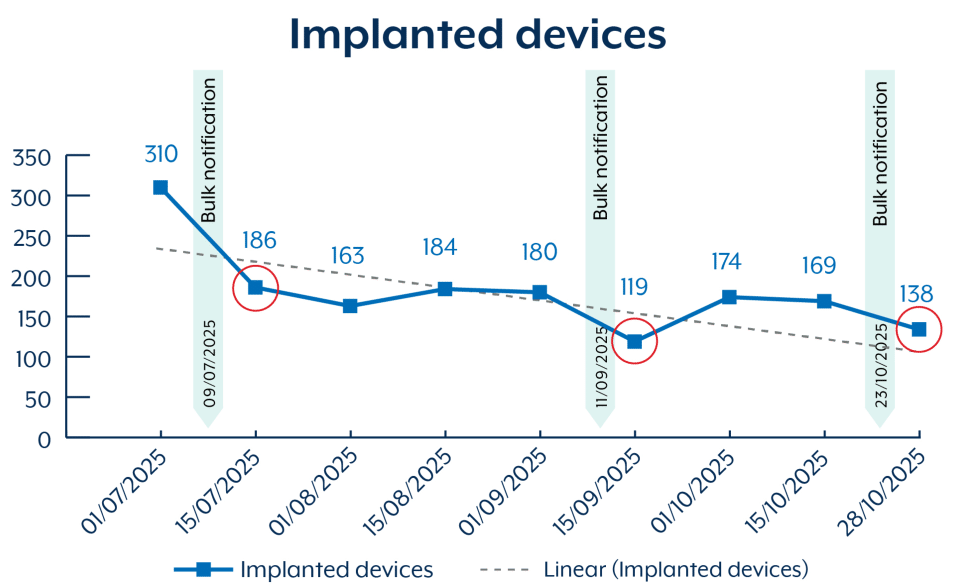
ASD's advisory reveals that since July 2025, over 400 devices were potentially compromised with BadCandy in Australia. While this number has decreased following bulk victim notifications sent by ASD through service providers, the fact that over 150 devices remain compromised years later shows the significant challenges in vulnerability management and incident response across Australian organizations.

The Vulnerability Chain

The BadCandy campaign exploits a two-vulnerability chain affecting Cisco IOS XE Software's web UI feature.

CVE-2023-20198 (CVSS 10.0 Critical): This vulnerability enables remote, unauthenticated attackers to create accounts with privilege level 15 access on affected systems. Privilege level 15 grants full administrator access, allowing attackers to take complete control of the device. The flaw affects the authentication mechanism in the web UI, essentially providing a backdoor for credential creation without any authentication requirement.

CVE-2023-20273 (CVSS 7.2 High): Once attackers establish access through CVE-2023-20198, they exploit this second vulnerability to execute commands with root privileges. This command injection vulnerability, caused by insufficient input validation, allows the deployment of the BadCandy implant to the device's file system. The combination of both vulnerabilities provides threat actors with persistent privileged access and command execution capabilities.

The vulnerabilities were first exploited in the wild in October 2023, with Cisco Talos researchers identifying and naming the BadCandy implant. Initial campaigns compromised tens of thousands of Cisco IOS XE devices globally, making it one of the most significant network infrastructure compromises in recent years.

Also read: Understanding Cisco IOS XE Vulnerabilities: CVE-2023-20198 and More

Who's Behind BadCandy

ASD's assessment indicates that while any threat actor can leverage the BadCandy implant, both criminal and state-sponsored cyber actors are believed to be exploiting this vulnerability.

State-sponsored actors target network edge devices for strategic intelligence collection, positioning for potential disruptive attacks, and establishing persistent presence in target networks. Compromised routers and switches provide valuable vantage points for intercepting network traffic, mapping internal infrastructure, and conducting man-in-the-middle attacks without requiring deeper network penetration.

Criminal actors exploit network infrastructure for various purposes including establishing proxy networks for anonymizing criminal operations, conducting distributed denial-of-service (DDoS) attacks, deploying cryptomining malware, and positioning for ransomware deployment. The privileged access provided by BadCandy enables extensive post-compromise activities regardless of attacker motivation.

Critically, ASD warns that cyber actors are known to re-exploit previously compromised devices where patches have not been applied and the web interface remains exposed to the internet. This creates an ongoing risk where organizations that remove the implant without properly patching and hardening their devices face immediate recompromise.

The Re-Exploitation Problem

The fact that over 150 devices in Australia remain compromised more than two years after patches became available reveals systemic challenges in vulnerability management. ASD's advisory explicitly warns about re-exploitation. Threat actors continuously scan for vulnerable devices and immediately compromise any systems where patches haven't been applied or web interfaces remain improperly secured.

This pattern reflects broader trends observed in the ACSC's Annual Cyber Threat Report 2024-25, which said legacy IT and inadequate patching were critical vulnerabilities across Australian organizations. Network edge devices present particular challenges because they often run specialized firmware, require careful change management to avoid service disruption, and may be managed by different teams than enterprise IT infrastructure.

The threat report also concluded that Australia faces increasing cyber threats targeting critical infrastructure, with particular emphasis on telecommunications, energy, and government networks where compromised edge devices could enable significant damage or disruption.

BadCandy shares characteristics with other network infrastructure malware families including VPNFilter (2018), which compromised hundreds of thousands of routers globally, and more recent campaigns targeting Fortinet, Pulse Secure, and other VPN and edge devices. These campaigns demonstrate that network infrastructure represents a strategic target that enables subsequent attacks rather than being merely opportunistic exploitation.

The BadCandy timeline also demonstrates this challenge:

  • October 2023: Initial exploitation and implant deployment observed
  • October 22, 2023: Cisco releases patches for both vulnerabilities
  • July 2025: Over 400 Australian devices compromised
  • Late October 2025: Over 150 devices still compromised despite bulk notifications
BadCandy

This 24-month window between patch availability and persistent compromises indicates that affected organizations either lack visibility into their Cisco IOS XE deployments, face technical or operational barriers to patching, or haven't prioritized remediation of this critical vulnerability.

Technical Indicators and Detection Methods

Organizations can detect BadCandy compromise through several technical indicators identified in ASD's advisory:

Privileged Account Anomalies: Review running configurations for accounts with privilege level 15. Remove any unexpected or unapproved accounts, particularly those with random strings as usernames or accounts named "cisco_tac_admin," "cisco_support," "cisco_sys_manager," or "cisco." These account names have been observed in BadCandy campaigns and should trigger immediate investigation if not legitimately created.

Unknown Tunnel Interfaces: Review running configurations for unexpected tunnel interfaces. Tunnels appear in configurations as "interface tunnel[number]" followed by IP addresses, tunnel sources, and tunnel destinations. Unauthorized tunnels can provide covert communication channels for data exfiltration or command and control.

Configuration Change Logs: If TACACS+ AAA command accounting is enabled, review logs for unauthorized configuration changes. This provides forensic evidence of attacker activities and helps identify the scope of compromise.

Implant File Presence: Check for the presence of /usr/binos/conf/nginx-conf/cisco_service.conf, the file path where BadCandy is saved. While the implant is non-persistent and removed by reboots, its presence indicates active compromise.

Remediation Steps

Immediate Actions

  1. Apply patches for CVE-2023-20198 and CVE-2023-20273 according to Cisco's security advisory
  2. Reboot affected devices to remove the non-persistent BadCandy implant
  3. Review and remove unauthorized privilege-15 accounts from running configurations
  4. Examine configurations for unexpected tunnel interfaces or other unauthorized changes
  5. Review TACACS+ logs (if available) for evidence of malicious configuration changes

Rebooting removes the BadCandy implant but does NOT reverse additional actions taken by threat actors and does NOT remedy the initial vulnerability. Organizations must address both the symptoms (implant and unauthorized accounts) and the root cause (vulnerability and improper hardening).

Hardening Requirements

Disable HTTP Server Feature: If the web UI isn't required for operations, disable the HTTP server feature entirely. This eliminates the attack surface that enables CVE-2023-20198 exploitation.

Restrict Web UI Access: If the web UI must remain enabled, implement strict access controls limiting which IP addresses can reach the interface. Never expose management interfaces directly to the internet.

Follow Cisco Hardening Guidance: Implement the comprehensive hardening recommendations in Cisco's IOS XE hardening guide, including disabling unnecessary services, implementing access control lists, and configuring proper logging.

Implement Edge Device Security Strategies: ASD recommends following its publication on securing edge devices, which provides comprehensive guidance for reducing vulnerabilities in critical network components.

  •  

Defense Contractor Manager Pleads Guilty for Selling Cyber Exploits to Russian Broker

Russian Broker, Cyber Exploits, APT28, Russia, Stegnography, CERT-UA

Peter Williams, a 39-year-old Australian national and former general manager at a U.S. defense contractor, pleaded guilty to theft of trade secrets charges after selling sensitive cyber exploit components to a Russian broker that costed his company $35 million.

The case, announced by the Department of Justice, reveals a deliberate insider threat operation spanning three years that compromised national security software intended exclusively for the U.S. government and select allies.

Between 2022 and 2025, Williams exploited his privileged access to his employer's secure network to steal at least eight sensitive and protected cyber-exploit components. These tools represented sophisticated offensive cybersecurity capabilities—software designed to identify and exploit vulnerabilities in computer systems—that the defense contractor developed for government intelligence and security operations.

Williams sold the stolen components to a Russian cyber-tools broker that openly advertises itself as a reseller of cyber exploits to various customers, including the Russian government. The transactions were structured through multiple written contracts involving cryptocurrency payments totaling millions of dollars, with provisions for both initial sales and ongoing support services.

Williams transferred the components through encrypted channels, obscuring the transfers from his employer's monitoring systems. He received payment in cryptocurrency, which provided perceived anonymity and complicated law enforcement tracing efforts. Williams used the proceeds to purchase high-value personal items, converting his betrayal into immediate personal enrichment.

Also read: Iranian State Hackers Act as Access Brokers for Ransomware Gangs, Target U.S. and Allies’ Critical Infrastructure

Cyber Exploits 'NOT FOR SALE' to Russian Brokers

Attorney General Pamela Bondi called out the gravity of Williams' actions: "America's national security is NOT FOR SALE, especially in an evolving threat landscape where cybercrime poses a serious danger to our citizens."

Assistant Attorney General John Eisenberg noted that Williams' "conduct was deliberate and deceitful, imperiling our national security for the sake of personal gain." The stolen cyber exploits likely enabled Russian cyber actors to conduct operations against U.S. citizens and businesses, with capabilities they couldn't have developed independently or obtained through legitimate channels.

U.S. Attorney Jeanine Ferris Pirro characterized international cyber brokers as "the next wave of international arms dealers," emphasizing that these intermediaries create markets connecting those with access to sensitive capabilities and foreign governments seeking offensive cyber tools. The $35 million loss to the District of Columbia-based contractor represents not just financial damage but the compromise of years of research and development investment.

The Insider Threat Reality

Williams' case exemplifies the insider threat that keeps cybersecurity leaders awake at night: trusted personnel with legitimate access who deliberately abuse that trust for personal gain. His position as general manager provided both the access necessary to obtain sensitive materials and sufficient authority to avoid immediate suspicion.

FBI Assistant Director Roman Rozhavsky stated that Williams "placed greed over freedom and democracy" and gave "Russian cyber actors an advantage in their massive campaign to victimize U.S. citizens and businesses." The three-year duration of Williams' theft operation suggests either insufficient monitoring of privileged user activity or inadequate detection capabilities that allowed sustained data exfiltration.

Williams' Australian Signals Directorate Connection

While the U.S. authorities only revealed Williams' recent job credentials, the Australian media established a deeper concern by linking him to the ASD, Australia's national cyber agency. ABC network said several sources confirmed with the publication that Williams' worked at ASD somewhere around 2010 but it could not confirm the claims as ASD declined to comment on the matter.

"ASD is aware of reporting regarding an Australian national,...[but it] does not comment on individual cases," an ASD spokesperson told ABC network. "ASD has layered security controls and procedures to protect our people, information, assets and capabilities."

Consequences and Deterrence

Williams faces two counts of theft of trade secrets, each carrying a statutory maximum of 10 years in prison and fines up to $250,000 or twice the pecuniary gain or loss. While these penalties may seem modest compared to the $35 million value of stolen materials, the guilty plea demonstrates law enforcement capability to identify, investigate, and prosecute insider threats even when they employ sophisticated tradecraft.

The case was investigated by the FBI's Baltimore Field Office and prosecuted by multiple Justice Department divisions, reflecting the cross-jurisdictional complexity of insider threat cases involving national security materials. The prosecution sends a clear deterrent signal: privileged access creates obligations, and betraying those obligations for personal enrichment carries serious consequences regardless of operational security measures employed.

  •  

OpenBSD 7.8 released

Like clockwork, every six months, we have a new OpenBSD release. OpenBSD 7.8 adds support for the Raspberry Pi 5, tons of improvements to sleep, wake, and hibernate, the TCP stack can now run in parallel on multiple processors, and so much more. DRM has been updated to match Linux 6.12.50, and drivers for the Qualcomm Snapdragon DRM subsystem and Qualcomm DisplayPort controller were added as well.

The changelog is, as always, long and detailed, so head on over for the finer details. OpenBSD users will know how to upgrade, and new users can visit the download page.

  •  

NLnet sponsors development of WPA3 support for OpenBSD

The NLnet foundation has sponsored a project to add WPA3 support to OpenBSD, support which in turn can be used by other operating systems.

This project delivers the second open-source implementation of WPA3, the current industry standard for Wi-Fi encryption, specifically for the OpenBSD operating system. Its code can also be integrated by other operating systems to enable modern Wi-Fi encryption, thereby enhancing the diversity and resilience of the global IT ecosystem.

↫ NLnet foundation announcement

WPA3 support in Linux seems to be the only other open source implementation of WPA3, so this is great news not only for OpenBSD, but also for other operating systems who rely on BSD network drivers through compatibility layers, like Haiku. FreeBSD, meanwhile, is planning to build its own WPA3 implementation, so they, too, might benefit form the work that’s going to be done through OpenBSD.

October is listed as the start of this project, so work is probably already underway.

  •  

Running FreeBSD using Windows Subsystem for Linux

What if you are forced to use Windows, but want to use a real operating system instead? You could use WSL2 to use Linux inside Windows, but what if FreeBSD is more your thing? It turns out someone is working on making FreeBSD usable using WSL2.

This repository hosts work-in-progress efforts to run FreeBSD inside Windows Subsystem for Linux (WSL2) with minimal to no changes to the FreeBSD base system. The project builds on the open-source components of WSL2 to enable FreeBSD to boot and run seamlessly in a Windows environment.

↫ WSL for FReeBSD GitHub page

The project is experimental, and definitely not ready for production use. It’s also important to note that this project is not part of Microsoft or FreeBSD. At this point in time, FreeBSD boots using WSL2 with basic functionality, and work is currently focused on networking, I/O, and process management.

  •  

KDE Plasma 6 on FreeBSD using Wayland

This year, 2025, the KDE Community held its yearly conference in Berlin, Germany. On the way I reinstalled FreeBSD on my Frame.work 13 laptop in another attempt to get KDE Plasma 6 Wayland working. Short story: yes, KDE Plasma 6 Wayland on FreeBSD works.

↫ Adriaan de Groot

Adriaan de Groot is a long-time KDE developer and FreeBSD package maintainer, and he’s published a short but detailed guide on setting up a KDE Plasma desktop on FreeBSD using Wayland instead of X11. With the Linux world slowly but finally leaving X11 behind, the BSD world really has little choice but to follow, especially if they want to continue offering the two major desktop environments. Most of KDE and GNOME are focused on Linux, and the BSDs have always kind of tagged along for the ride, and over the coming years that’s going to mean they’ll have to invest more in making Wayland run comfortably on BSD.

Of course, the other option would be the KDE and GNOME experience on the BSDs slowly degrading over time, but I think especially FreeBSD is keen to avoid that fate, while OpenBSD and NetBSD seem a bit more hands-off in the desktop space. FreeBSD is investing heavily in its usability as a desktop operating system, and that’s simply going to mean getting Wayland support up to snuff. Not only will KDE and GNOME slowly depend more and more on Wayland, Xorg itself will also become less maintained than it already is.

Sometimes, the current just takes you where it’s going.

  •