Say hello to the upgraded Malwarebytes for Mac—now with more robust protection, more control, and the same trusted defense you count on every day.
We’ve given our Mac scan engine a serious intelligence boost, so it thinks faster and digs deeper. The new enhanced scan searches across more of your system to hunt down even the most advanced threats, from stealthy infostealers to zero-hour malware, all while keeping the straightforward experience you love.
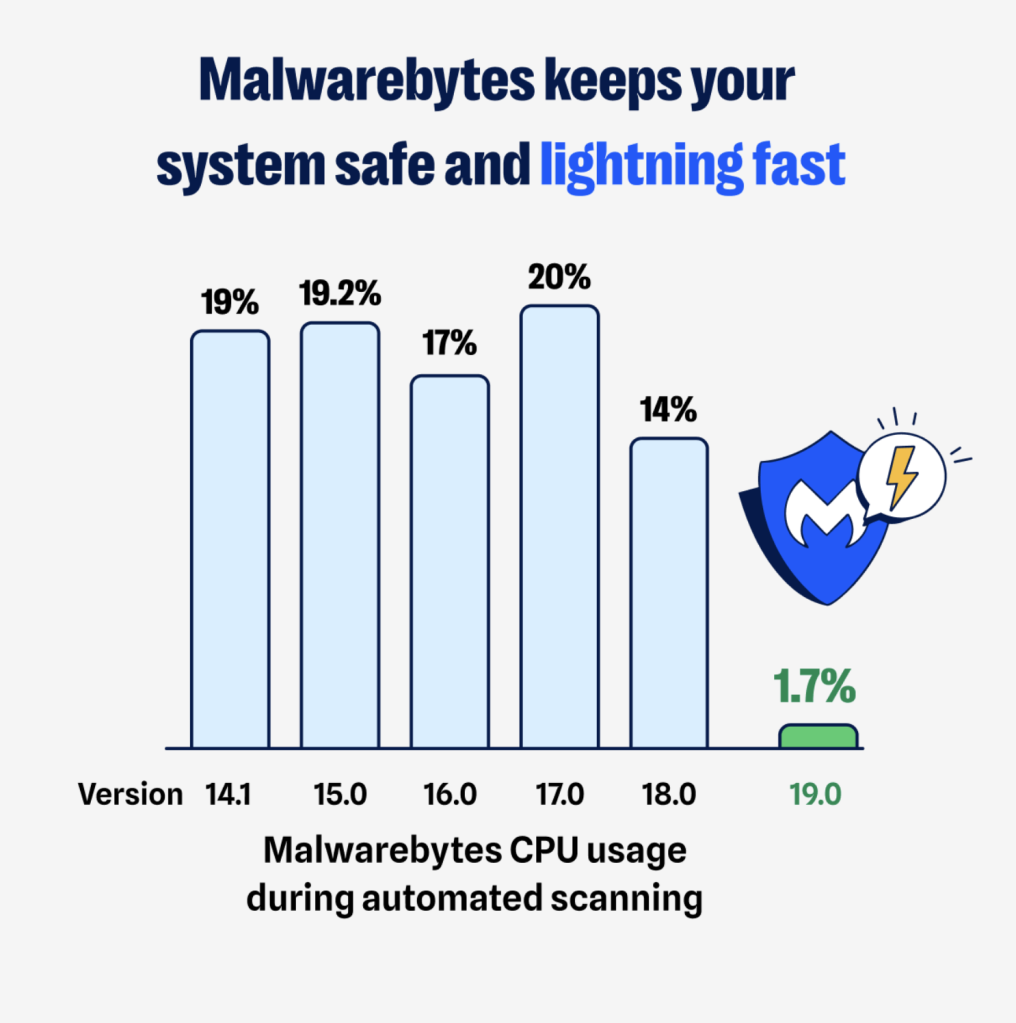
But that’s not all. We’ve also achieved a major performance boost, with up to 90% lower CPU usage for Malwarebytes for Mac.
What’s new
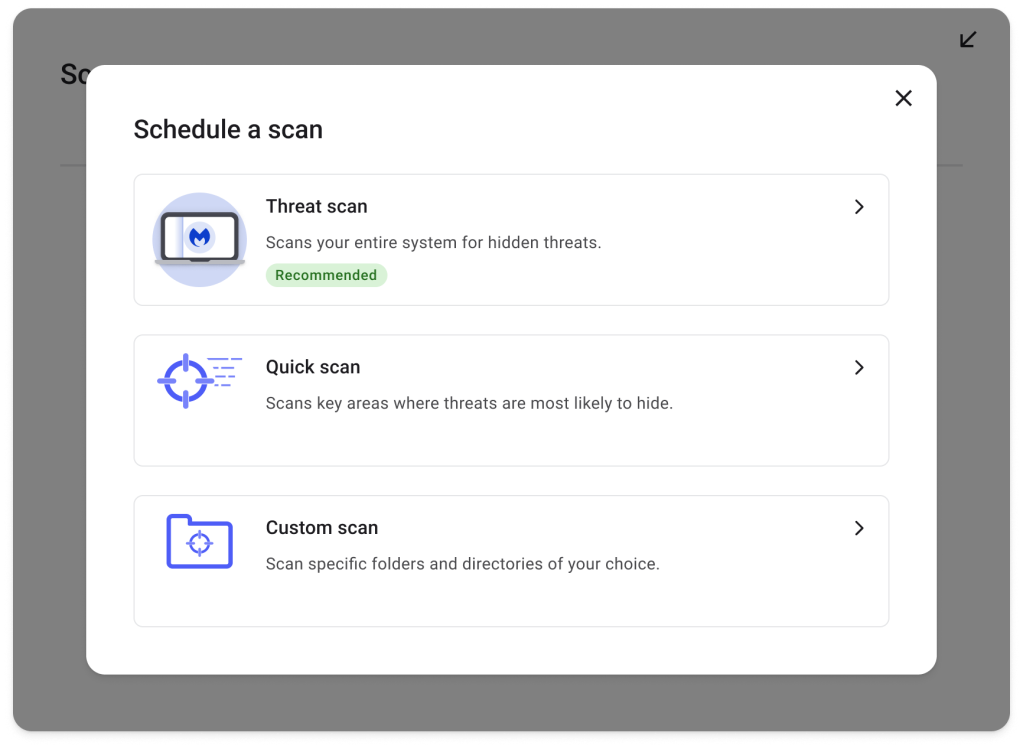
The upgrade comes with three new scan options designed to fit the way you work:
Quick scan: A speedy sweep of the usual suspects.
Threat scan: A full system check that is now your default.
Custom scan: Total control, letting you choose exactly what to scan, including folders and external drives.
It’s smarter protection that adapts to your needs.
What to expect
Your first enhanced scan may take a little longer. That’s because it’s covering more of your system than ever before to make sure nothing slips through the cracks. And with external drive scanning and WiFi security alerts, there is nowhere for viruses, infostealers, or spyware to linger.
After that, you’ll notice the difference. Scans will feel faster, lighter, and more intuitive.
In fact, the always-on, automated protection from Malwarebytes for Mac has always kept your Mac safe by monitoring every file you open, download, or save. Now, we have made it significantly more efficient. Our latest enhancements reduced CPU usage by up to 90%. What that means for you is a faster, snappier, and more responsive experience.
No action needed. Your protection just got better.
You don’t have to lift a finger; your protection simply levels up. Open Malwarebytes and explore the new scan options when you’re ready. Don’t see them yet? Make sure you’re on the latest version (5.18.2) under Profile → About Malwarebytes. If you aren’t, go to the Malwarebytes menu and select Check for updates.
Welcome to the next era of Mac security from Malwarebytes. More robust coverage, harnessing the same trusted protection you know, directly in your control.
Imagine this scenario: Your protection software is running perfectly. Systems are protected, definitions are up to date, behavioral analysis is active. Then, suddenly, files across your network start getting encrypted. Backups are being deleted. Ransom notes appear across your machines. Your security software shows nothing. No alerts, no detections, no blocked processes. How is this possible?
This isn’t a hypothetical situation. It’s a real attack technique that ransomware operators are actively using to bypass even sophisticated protection systems. The attack exploits a fundamental assumption in how security software operates: that the malicious process and the files being attacked are on the same machine. When that assumption breaks down, traditional defenses fail.
Malwarebytes ransomware protection works through multiple defensive layers. These include AI-based analysis, machine learning models, signature detection, runtime sandboxing, exploit mitigation, and web protection. Each layer stops threats at different stages. The Anti-Ransomware behavioral layer monitors actual file encryption behavior in real time. Malwarebytes continuously enhances all layers of its defense.
This article discusses a recent innovation in our Anti-Ransomware behavioral monitoring technology. The result is a comprehensive enhancement incorporating innovations in file monitoring, network session tracking, behavioral analysis, and real-time threat correlation.
Why traditional protection fails
To understand why a ransomware attack over a network is so effective, we need to understand how this technology typically works. The Anti-Ransomware component sits between applications and the file system, allowing it to see every file operation before it completes.
When a process tries to open, read, or write a file, specialized callbacks are triggered. Think of these as security checkpoints where the security driver can inspect what’s happening and decide whether to allow the operation. The software looks at patterns: Is this process rapidly encrypting many files? Is it adding suspicious extensions? Is it attempting to delete backup Copies? These behavioral indicators, when combined, signal ransomware.
This architecture works brilliantly when the ransomware process and the files being encrypted are on the same machine. The driver sees the process, tracks its behavior over time, builds a threat profile, and can block it before significant damage occurs.
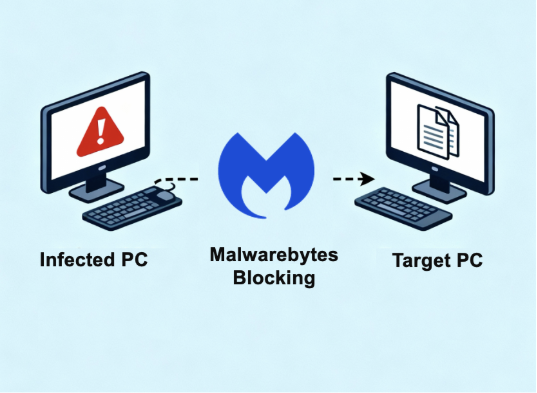
But what happens when ransomware runs on one device and attacks files on another? For example, an attacker compromises an unprotected device, a legacy device without current protection or an unmanaged guest device, and uses it to encrypt files on protected systems through network shares. Your machine doesn’t see any suspicious programs running. It just looks like someone is accessing files over the network, which happens all the time.
This creates a perfect hiding spot for ransomware. On the attacking device, there might be no security software installed. On your main PC where files are being encrypted, the security software sees files changing but can’t tell which program is causing it. The connection between the malicious program and your files is hidden.
Multiple ransomware variants have adopted this technique. They use specific commands to target network folders and shared drives. These aren’t random attacks. They’re carefully designed to bypass security software through remote encryption
These aren’t opportunistic attacks. They’re carefully engineered for bypassing traditional anti-ransomware protection through remote encryption.
Two-part protection architecture
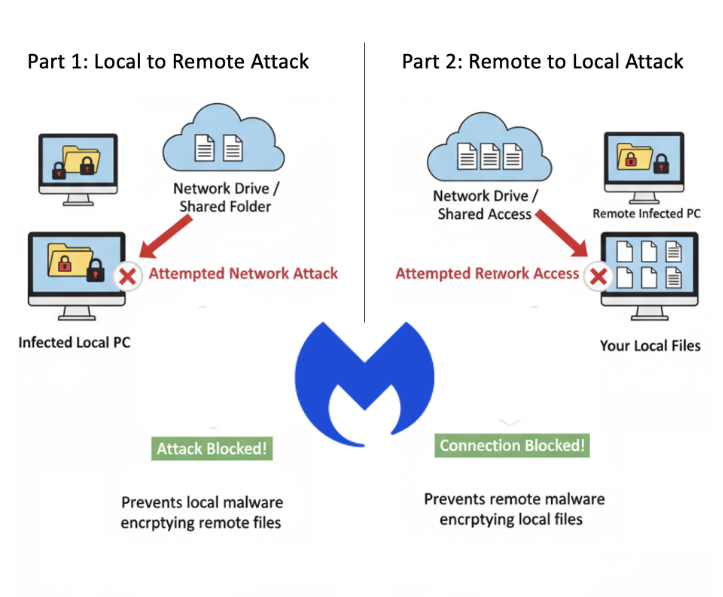
Solving this problem required addressing two distinct attack vectors. Part 1 involves a local process attacking remote files, while Part 2 involves a remote process attacking local files. Each required different technical approaches.
Part 1: Detecting local to remote attacks
When a program tries to access files on your network or shared folders, Malwarebytes checks if it’s behaving suspiciously. If the program is rapidly changing many files and creating ransom notes, the system builds a threat score in real time.
The key innovation is that Malwarebytes tracks local and network activity separately. A program might be safely working with files on your computer while attacking files on another device through the network. By monitoring both, we can catch ransomware without false alarms. When Malwarebytes detects ransomware behavior, it blocks the malicious program immediately, stopping the attack before your files are encrypted.
Part 2: Detecting remote to local attacks
The second challenge is harder: what if the ransomware is running on another device and attacking your files remotely? There’s no malicious program on your computer to block.
Our solution tracks network connections. When files are accessed from another device on your network, Windows keeps information about which device is connecting. Malwarebytes captures this information and watches for suspicious behavior, like rapidly changing many files, adding suspicious file extensions, or creating ransom notes. When we detect an attack coming from another device, we block that specific connection from accessing your files.
Innovation in ransomware protection
Our implementation operates through our specialized components. This architecture is essential for both performance and security. Every file operation goes through our filter, so we need to process decisions in microseconds to avoid impacting system responsiveness.
We implemented multiple optimization layers. First, we filter out file operations that categorically cannot be ransomware related. Opening a file for read only access is not a threat, so we skip detailed analysis. Operations that only query metadata happen constantly in Windows and can be safely ignored for ransomware detection purposes.
For operations that require analysis, we implemented a sophisticated indicator time-to-live (TTL) system. Behavioral indicators decay over time. This prevents false positives from legitimate activities like file synchronization tools or backup software.
The network session tracking component required deep integration with Windows networking. We extract session information by accessing internal structures that Windows uses for network file serving. Our exclusion system supports IPv4, IPv6, hostnames, and CIDR notation for network ranges.
What makes this protection different
Several factors distinguish the Malwarebytes approach from other solutions.
The first is comprehensiveness. Many security vendors address this partially. Remote processes attacking local files or where local processes attack remote files. An attacker who compromises a single endpoint can still encrypt the shared resources. Malwarebytes protects against both vectors.
Second is precision. Many solutions block entire network connections or lock accounts when they detect threats. Malwarebytes is more precise. We block only the specific malicious connection. Other activities from the same device continue working normally. Only the ransomware’s access is stopped.
Third is performance. Malwarebytes runs efficiently without slowing down your computer.
Fourth is proven protection. This technology has been tested and deployed across many different business and home networks. It is proven to work in real world situations.
The broader implications
This protection does more than just stop one type of ransomware attack. It represents a new way of thinking about network-aware security. The old approach treated each device separately, but that doesn’t work when attackers use network connections to spread threats. Security solutions need to understand that attacks can come from any device on the network and target any accessible files.
The technology we’ve built can do more than stop ransomware. The same system that tracks network connections and monitors suspicious behavior can help detect other threats, like someone trying to steal your data or access files they shouldn’t have permission to view.
Attackers will keep evolving their methods. The attacks we’re seeing now will become more sophisticated. They might try to disguise themselves as normal computer maintenance or file management. Our protection is designed to adapt. Because it watches for suspicious patterns of behavior rather than looking for specific known attacks, it can detect new variations without needing constant updates.
Ransomware keeps evolving, and attackers constantly find new ways to bypass security. Malwarebytes is committed to staying ahead with real innovation. This enhancement closes a critical gap that many security programs don’t address until it’s too late.
If you’re choosing security software or reviewing your current protection, ask yourself: Does it protect against ransomware that spreads through network shares? This is becoming increasingly important as more ransomware attacks use this technique.
We don’t just report on threats—we remove them
Cybersecurity risks should never spread beyond a headline. Keep threats off your devices by downloading Malwarebytes today.
It’s getting harder to keep your Windows space truly yours, as Microsoft increasingly serves annoying ads and tracks your data across third-party apps.
Pushing back against your eroding privacy has been a scattered and sometimes complicated process… but we’re making it easier for you. With the latest version of Malwarebytes for Windows, we’ve introduced Privacy Controls—a simple screen that brings several privacy settings together in one place, so you can easily decide how Microsoft handles your data.
With four simple toggles, you can decide whether to:
Allow third-party apps to use your Advertising ID
Allow third-party content on your lock screen
Allow third-party content on your Start screen
Allow Microsoft to use Windows diagnostic data
You can also disable all privacy-impacting features at once.
There’s more good news for your privacy. Malwarebytes now also alerts you when “Remote Desktop Programs” are installed on your device.
Remote Desktop Programs are powerful, often legitimate tools used by IT teams and tech support to fix problems remotely—especially since remote work became common. But the remote access these programs provide is powerful, which makes them a target for cybercriminals. If a real tech support account is compromised, a hacker could use the remote desktop program to tamper with your devices or spy on sensitive information.
There’s also a type of scam—called a tech support scam—where criminals trick people into installing remote desktop programs so they can take control of the victim’s device, potentially stealing data or money down the line.
By flagging these programs, Malwarebytes gives you more visibility into what’s on your computer, so you can stay in control of your privacy and security.
We don’t just report on threats—we remove them
Cybersecurity risks should never spread beyond a headline. Keep threats off your devices by downloading Malwarebytes today.
PCMag’s Readers’ Choice Awards celebrate the technology brands users trust and love the most, based on real-world feedback from thousands of readers.
Malwarebytes delivered outstanding performance and earned praise from readers for its reliability, ease of use, powerful protection, and overall trustworthiness—scoring more than half a point above competitors and excelling in every subcategory, including ransomware protection, phishing protection, and integrated VPN.
“According to our readers, there’s no better security option for PCs or mobile devices than Malwarebytes. The software racks up nearly perfect scores in categories like reliability, ease of use, spam filtering, and most importantly, antivirus and malware protection. It’s also trusted more than any other product in the rankings.”*
Continuing our streak of excellence, Malwarebytes also received the latest badge in AVLab Cybersecurity Foundation’s “Advanced In-The-Wild” series, following our earlier 2025 Product of the Year award—our third consecutive win.
In September, AVLab Cybersecurity Foundation tested 443 unique malware samples against 18 cybersecurity products. Malwarebytes Premium Security detected all 443, with an average remediation time of 8.4 seconds—almost 8 seconds faster than the industry average.
These results highlight our mission to reimagine security and protect people and data across all devices and platforms.
Running a small business today can hardly be done from a single device, a single location, or a single network.
Staying cybersecure is quite the same.
To extend the security and privacy of small business owners, no matter where you are, Malwarebytes for Teams now includes personal VPN access, for no additional cost, for all registered devices. Whether you’re typing up a draft on your tablet at a café, answering urgent emails from your smartphone at the airport, or just protecting your browsing activity on your laptop, connecting to a personal VPN provides that extra comfort that what you’re doing online is your business and your business only.
With a personal VPN you can:
Guard your online activity from prying eyes, whether on your laptop, smartphone, or tablet.
Access information, content, and resources that are typically restricted by location.
Maintain high speed connections for everything you do.
VPNs (Virtual Private Networks) have a bit of a dual reputation right now: They’re either IT tools that help multinational enterprises connect to corporate networks, or they’re covert programs that help paranoid privacy hawks slip by undetected online. The truth is that VPNs are for everyone, and that’s because what they offer is a benefit to all.
VPNs encrypt and protect your online traffic so that eavesdroppers can’t spy on your browsing behavior. This is useful both at public locations and in your office or home, because not all cyber snoops are hackers or criminals. In fact, some of the most active eavesdroppers are Internet Service Providers themselves, that sell consumer data for profit.
VPNs also provide a simple way to connect to an increasingly segmented internet. Despite the name, “the world wide web” can appear quite different when you travel to another country. The streaming platforms you enjoy at home can be blocked, their digital libraries can differ, and entirely benign resources can be gated behind separate laws. By connecting to any variety of servers through a VPN, you can access the internet you know and rely on, no matter your physical location.
It’s important to remember, however, that a VPN is just one part of a larger cybersecurity strategy. You still need to protect your small business’s devices from malware infections, rogue viruses, shady websites, and online scams.
For those threats, Malwarebytes for Teams also keeps you safe, especially when you’re mobile.
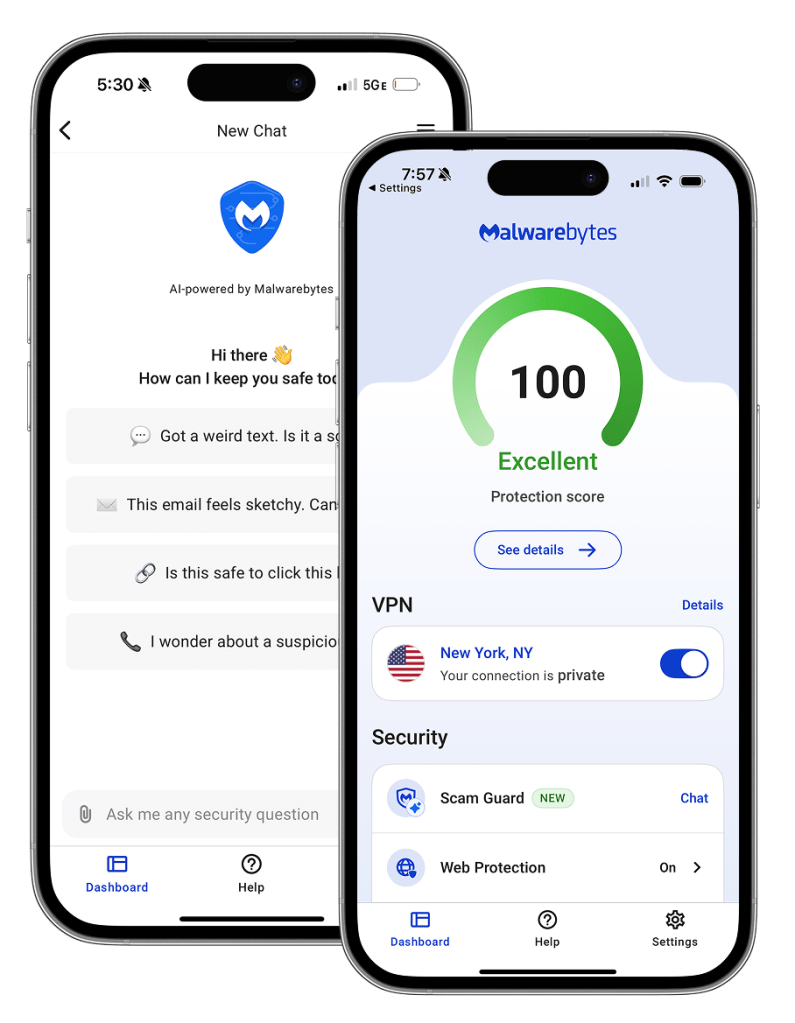
Malwarebytes Scam Guard is available on iOS and Android
Malwarebytes Browser Guard is a free browser add-on that stops invasive ad trackers and flags dangerous websites connected to cybercriminal networks that are cleverly disguised to steal your information or infect your device. And for every other type of concerning message, email, link, or QR code, Malwarebytes Scam Guard for iOS and Android provides 24/7, AI-powered evaluations on who to trust, where to click, and what to ignore.
As every small business is unique, every security plan must adapt. Malwarebytes for Teams is proud to offer the security and privacy options that keep a modern mobile business safe online from hackers, scammers, and digital snoops.
If you ever have the feeling your computer is dragging its feet, or shows odd behavior, you’re not alone. In some cases, the culprit is indeed malware, but often it’s something more mundane. Over time, baggage accumulates, much like a toddler’s backpack after a day in the forest.
Too many apps starting up at once, Windows settings not tuned for your needs, or even a firewall that’s too confusing to manage.
That’s why we’re launching Malwarebytes Tools, a new set of free features designed to give your Windows PC a breath of fresh air.
Think of Malwarebytes Tools as spring cleaning for your computer: clearing out what slows you down, tidying up behind the scenes, and strengthening defenses—without having to read a manual as lengthy as The Lord of the Rings trilogy.
And the best part? They’re completely free, available today in preview mode inside the Malwarebytes app.
As Michael Sherwood, VP of Product at Malwarebytes, explains:
“For years, people have come to Malwarebytes when something’s not right with their computer. But issues aren’t always caused by malware. Sometimes it’s slow performance, privacy settings, or other configuration issues. With our new optimization tools, we’re making it easier for users to spot these problems and take proactive steps to keep their devices running smoothly and securely.”
Here’s what you get with Malwarebytes Tools:
Startup Applications: If your PC takes forever to start up, it could be because too many apps are trying to start all at the same time. Our feature gives you a clear view of what’s booting up with Windows, and the power to say “no thanks” to the ones that don’t need to be there.
System Tweaks*: These are like quick-fix buttons for your PC. You can use them to repair common issues, adjust privacy settings, and fine-tune how Windows behaves.
Firewall Control: Firewalls are essential for online security, but for many people, managing them can be challenging. That’s why we don’t give you another firewall to figure out, we simplify the one you already have. With our new Firewall Control, you can block unwanted traffic, manage which apps have internet access, and switch filtering modes with just one click. Simple, powerful, and built right into what you already use.
*Windows 11 only
Malwarebytes Tools are available now in preview, meaning you get early access, free of charge, and can help shape what the full version becomes.
Your computer deserves to run light, fast, and secure, without you having to become its full-time mechanic. With Malwarebytes Tools, we’re making that possible.
Curious to try it out? Open Malwarebytes on Windows, test its user-friendliness, and immediately feel the difference it makes to your digital experience.
We’re excited to announce that MRG Effitas, a globally recognized security assessment firm, has awarded Malwarebytes the prestigious MRG Effitas Android 360° Certificate, one of the toughest independent tests in mobile security.
Our mobile protection received the highest marks, achieving a near-perfect detection rate in MRG Effitas’ rigorous lab testing, reaffirming what our customers already know: Malwarebytes stops threats before they can cause harm.
Our smartphones have become more than just a device; they are our digital lifelines. With this evolution comes an increased vulnerability to cyber threats.
Our research showed that half of mobile users face scam attempts daily, and two-thirds admit it’s difficult to spot the difference between a scam and the real thing.
The consequences can be serious: 52% of scam victims experienced financial loss or fraud, and 27% lost access to important accounts, devices, or files.
There’s no doubt that people should be protecting their mobile devices in the same way they protect their computers.
Speaking about the award, our founder and CEO Marcin Kleczynski said:
“At Malwarebytes, we know that mobile threats are constantly evolving—and so are we. Independent certifications like the MRG Effitas 360° Certificate aren’t just badges; they’re proof of our relentless focus on security, innovation, and protecting real people against real threats.”
MRG Effitas’ Android 360° certification requires a 99% effectiveness rate, making it one of the most challenging benchmarks for mobile protection. MRG Effitas tests a variety of real-life scenarios and in-the-wild pieces of malware, like SMS payments, banking trojans and spyware, alongside benign samples to test for false positives.
Chris Pickard, CEO of MRG Effitas, commented:
“There are no participation trophies with this test; it’s a real achievement. Malwarebytes mobile security stood out in our real-world scenarios, confirming its ability to stop and block dangerous mobile threats.”
We believe in earning trust the right way, with real-world results and transparent testing. That’s why we regularly engage with respected labs like MRG Effitas and AVLab.
Recently, Malwarebytes Premium Security was also awarded the May 2025 AVLab Seal of Excellence for outstanding performance in its Advanced In-The-Wild Malware Test.
But we’re not stopping there. We’re constantly looking at new ways to protect you while using your mobile devices. Here are some recent updates we’ve made to Malwarebytes Mobile Security:
Scam Guard: We’ve enhanced Malwarebytes’ AI-powered scam detector to streamline the submission process for users, including a new welcome screen and media picker experience.
Advanced text filtering: Recent updates to our text filtering feature have more than quadrupled efficacy for keeping scams and junk out of a user’s inbox. The Android solution now denotes URL shorteners for more advanced scanning and identification of malicious links. Additionally, text message content may now be flagged for suspicious concepts, such as romance themes or money requests, providing an additional layer of detection and protection.
Expanded Safe Browsing: Our Safe Browsing feature now supports Brave, DuckDuckGo, Edge and Outlook—protecting users wherever they connect. (*Android only)

 Login
Login