
❌

Reading view

Convincing Free Mobile phishing emails appear after data breach

Free Mobile, one of France’s main cellular providers, was fined €27 million by France’s data protection regulator, the CNIL, in January over failures to protect customer data. The October 2024 breach allowed an unauthorized party to access sensitive customer records, including bank account details and login information. Since the breach, we’ve seen many poorly written scam campaigns targeting Free Mobile customers.

However, over the past few weeks, a well-written scam has appeared, closely copying the design of the official Free Mobile website and email templates.

One of our employees, who is a Free Mobile customer, received this phishing email on Wednesday, September 30. The message used the same logo and template as legitimate emails from the company, but came from the suspicious email address freemobile-regularisation[@]knowledgegrowthcenter[.]help. It included a link that appeared to point to regularisation.free.fr :
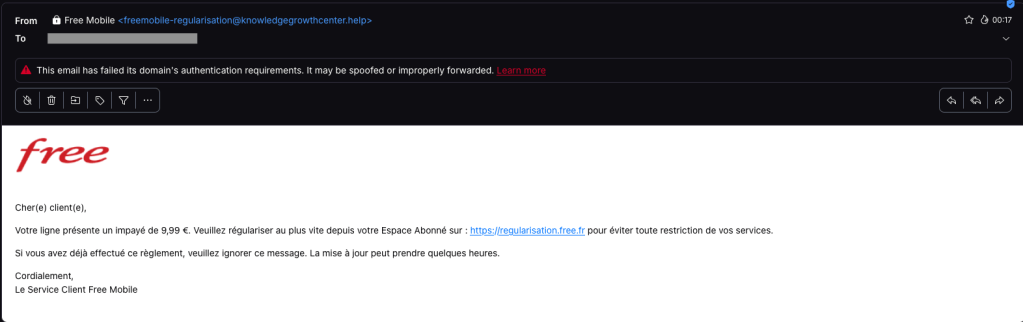
Free Mobile phishing email

The email tells the user that an invoice of €9.99 needs to be paid to avoid having the customer’s service suspended. Clicking the link opens a redirection chain:

1. https://u2l.ai/Q5YwFz301
2. https://espace-free-mobile.pro/Ds41LE/302
3. https://espace-free-mobile.pro/Ds41LE/regularisation/?impaye=92a9e77d…200

This final domain, espace-free-mobile.pro, is hosted by Cloudflare and was registered just a month ago.

The final link opens a convincing page with a form asking for credit card details:
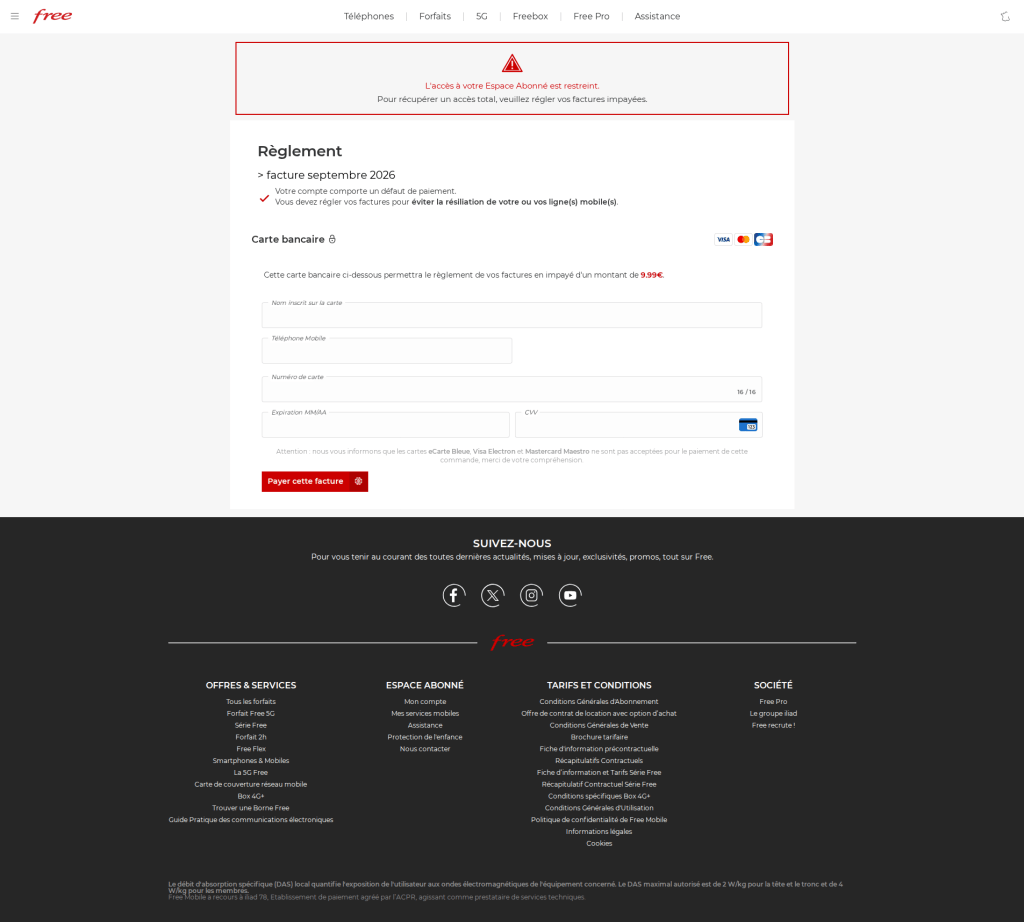
Free Mobile scam

The phishing page looks authentic, which sets this campaign apart from many of the Free Mobile scams we’ve seen since the breach.

We initially saw the same campaign using less convincing redirection chains, like this example from July:

1. https://bly.to/93kie5u
2. https://s1181402.ha026.t.mydomain.zone/mbl/
3. https://s1181402.ha026.t.mydomain.zone/mbl/regularisation/?impaye=505…

More recently, we’ve seen more authentic-looking domains, all hosted by Cloudflare:

1. https://s.ink/jmCnZZ
2. https://freesas.info/Cf4tP/
3. https://freesas.info/Cf4tP/regularisation/?impaye=f13fa919d1a22833557…

And another example:

1. https://bly.to/jabwpf6
2. https://regularisation-free.info/portail/
3. https://regularisation-free.info/portail/regularisation/?impaye=83f91…

How to stay safe

Malwarebytes can help protect you from these threats, but treat unexpected messages about your accounts and invoices with caution:

  • Don’t follow links in unsolicited emails. If a message concerns your account, open the official Free Mobile app or website directly, or call the official help line at 3244.
  • Check the actual domain in your browser’s address bar to see if it matches what you expect—https://mobile.free.fr in this case.
  • Malwarebytes Browser Guard detects and blocks this scam directly in your browser.
  • Use an up-to-date, real-time anti-malware solution with a web protection component on all your devices.
  • Malwarebytes Scam Guard can help you determine whether an email is a scam and advise you on what to do next.

Stop threats before they can do any harm.

Malwarebytes Browser Guard blocks phishing pages and malicious sites automatically. Free, one click to install. Add it to your browser →

  •  

Convincing Free Mobile phishing emails appear after data breach

Free Mobile, one of France’s main cellular providers, was fined €27 million by France’s data protection regulator, the CNIL, in January over failures to protect customer data. The October 2024 breach allowed an unauthorized party to access sensitive customer records, including bank account details and login information. Since the breach, we’ve seen many poorly written scam campaigns targeting Free Mobile customers.

However, over the past few weeks, a well-written scam has appeared, closely copying the design of the official Free Mobile website and email templates.

One of our employees, who is a Free Mobile customer, received this phishing email on Wednesday, September 30. The message used the same logo and template as legitimate emails from the company, but came from the suspicious email address freemobile-regularisation[@]knowledgegrowthcenter[.]help. It included a link that appeared to point to regularisation.free.fr :

Free Mobile phishing email

The email tells the user that an invoice of €9.99 needs to be paid to avoid having the customer’s service suspended. Clicking the link opens a redirection chain:

1. https://u2l.ai/Q5YwFz301
2. https://espace-free-mobile.pro/Ds41LE/302
3. https://espace-free-mobile.pro/Ds41LE/regularisation/?impaye=92a9e77d…200

This final domain, espace-free-mobile.pro, is hosted by Cloudflare and was registered just a month ago.

The final link opens a convincing page with a form asking for credit card details:

Free Mobile scam

The phishing page looks authentic, which sets this campaign apart from many of the Free Mobile scams we’ve seen since the breach.

We initially saw the same campaign using less convincing redirection chains, like this example from July:

1. https://bly.to/93kie5u
2. https://s1181402.ha026.t.mydomain.zone/mbl/
3. https://s1181402.ha026.t.mydomain.zone/mbl/regularisation/?impaye=505…

More recently, we’ve seen more authentic-looking domains, all hosted by Cloudflare:

1. https://s.ink/jmCnZZ
2. https://freesas.info/Cf4tP/
3. https://freesas.info/Cf4tP/regularisation/?impaye=f13fa919d1a22833557…

And another example:

1. https://bly.to/jabwpf6
2. https://regularisation-free.info/portail/
3. https://regularisation-free.info/portail/regularisation/?impaye=83f91…

How to stay safe

Malwarebytes can help protect you from these threats, but treat unexpected messages about your accounts and invoices with caution:

  • Don’t follow links in unsolicited emails. If a message concerns your account, open the official Free Mobile app or website directly, or call the official help line at 3244.
  • Check the actual domain in your browser’s address bar to see if it matches what you expect—https://mobile.free.fr in this case.
  • Malwarebytes Browser Guard detects and blocks this scam directly in your browser.
  • Use an up-to-date, real-time anti-malware solution with a web protection component on all your devices.
  • Malwarebytes Scam Guard can help you determine whether an email is a scam and advise you on what to do next.

Stop threats before they can do any harm.

Malwarebytes Browser Guard blocks phishing pages and malicious sites automatically. Free, one click to install. Add it to your browser →

  •  

Revolut phishing texts appear days after data breach

Only days after Revolut acknowledged that it disclosed sensitive customer records to an unauthorized party, affected customers are receiving phishing texts. However, we don’t know yet if the phishing texts are linked to the breach.

The company had accepted fraudulent information requests sent from an email address on a legitimate government agency domain.

Through this social engineering attack, rather than by gaining access to Revolut’s systems, the criminals obtained the following types of information about customers:

  • Identity and contact information such as dates of birth, postal addresses, email addresses, and phone numbers
  • Copies of IDs such as passports and driver’s licenses
  • Verification selfies
  • Account statements and transaction histories

Revolut has said only that a “limited” or “very limited” number of customers were affected, and that it contacted them directly.

One affected customer received a phishing text on Monday, September 14, two days after Revolut publicly acknowledged the data breach. The message appeared in the same conversation as other Revolut texts, making it look as though it had come from the bank.

Scammers target Revolut customer
Phishing text to a Revolut customer

According to VirusTotal, the phishing domain was first scanned that same day.

In a separate example, another customer said that opening the link took them to a web page that requested access to their device’s camera. If you tap Allow, the page reportedly imitates Revolut’s live-video “turn your head” identity check before prompting you to enter a password.

This makes the phishing page appear more authentic. It may also allow the scammers to collect a selfie or video that could be used for further social engineering, identity fraud, or to make subsequent scams more convincing.

A convincing fake liveness check followed by a password screen is a common way to lower suspicion and obtain the information attackers need to attempt a real login or account-recovery flow.

If the campaign is connected to the breach, the information obtained from Revolut, combined with login details entered by victims or their approval of a login request, could be enough to take over their accounts.

How to stay safe

We don’t yet know whether the phishing campaign is using data exposed in the breach or whether unrelated scammers are exploiting news of the incident to target Revolut customers more broadly.

Either way, treat unexpected messages about your account with caution:

  • Don’t follow links in unsolicited messages. If a message concerns your account, open the official Revolut app directly.
  • Check the actual domain in your browser’s address bar to see if it corresponds with what you expect.
  • Use an up-to-date, real-time anti-malware solution on your device, preferably with a web protection component.
  • Malwarebytes Scam Guard can help you determine whether a message is a scam and advise you on what to do next.

Stop threats before they can do any harm.

Malwarebytes Browser Guard blocks phishing pages and malicious sites automatically. Free, one click to install. Add it to your browser →

  •  

Loyalty points fraud is funding hacker holidays (Lock and Code S07E18)

This week on the Lock and Code podcast…

Crooks are taking a holiday. They’re counting on you to fund it.

For decades, cybercriminals have stolen roughly the same types of data. Biographical and personal details—like Social Security numbers, birthdates, addresses, and phone numbers—can be stolen to commit identity fraud. Credit card numbers, expiration dates, and CVC codes can be stolen to make fraudulent purchases. Usernames and passwords can, in the wrong hands, let a cybercriminal impersonate someone, steal sensitive photographs to later use for extortion, or abuse a reputation.

All of these attack models seek to turn sensitive or important data into currency. But an emerging form of digital fraud is targeting data that, when used strategically, practically is currency: Loyalty points.

Loyalty points programs are run by nearly every type of consumer-facing business today, from hotels to airlines to grocery stores to donut shops. As repeat customers accrue these points, they can exchange them for discounted prices on future purchases, cutting the costs of hotel stays, flights, rental cars, and even entire vacations.

But the value stored within these loyalty points makes them a high target for cybercrime, said Kim Sutherland, Global Head of Fraud and Identity at LexisNexis® Risk Solutions.

“Most loyalty currency is worth about one cent per point, and then there are premium programs that can be worth more than that,” Sutherland said, explaining that 100,000 airlines points, for example, can be worth $1,000 in the US. “Why criminals care so much about this is because most of us are not paying attention to our loyalty programs the same way we would our bank account.”

But diligence is much needed here, Sutherland said, noting that one Chicago teacher only learned that 240,000 of his airlines points had been stolen because he received a basic confirmation email about their use. In another example, a man’s airline miles were stolen and fraudulently used to book rental cars in New York and Memphis.

Today, on the Lock and Code podcast with host David Ruiz, we speak with Sutherland about loyalty points theft— how it happens, what companies are doing to protect customers, and what people can do to stay safe.

“Some of us don’t even know how to access those points, right? Or we don’t even know we’re accumulating them, but the fraudsters do.”

Tune in today to listen to the full conversation.

Show notes and credits:

Intro Music: “Spellbound” by Kevin MacLeod (incompetech.com)
Licensed under Creative Commons: By Attribution 4.0 License
http://creativecommons.org/licenses/by/4.0/
Outro Music: “Good God” by Wowa (unminus.com)


Listen up—Malwarebytes doesn’t just talk cybersecurity, we provide it.

Protect yourself from online attacks that threaten your identity, your files, your system, and your financial well-being with our exclusive offer for Malwarebytes Premium for Lock and Code listeners.

  •  
❌