❌

Reading view

Apple stops pretending macOS is UNIX

Early 2025, I wrote about how I think macOS’ UNIX certification was basically a lie. It required so many convoluted and cumbersome changes to macOS that literally nobody applies to their system that it the certification had kind of become a farce. At the end of the article I wondered for how much longer Apple would be playing this little charade to hammer macOS through a meaningless UNIX-shaped hole, and it turns out the answer was “about 18 months”.

When you go to the Open Group’s website and the list of certified UNIX operating systems, macOS is no longer listed. For the past few weeks, it was still listed if you drilled down specifically to the UNIX 03 certification, but that, too, has now been removed. Assuming macOS 27 doesn’t return in the near future with a brand new certification, we can safely say that Apple got tired of paying a few employees to get its desktop operating system certified.

With one more operating system gone from the list, there’s now only one UNIX operating systems left: AIX. While the registry also lists HP-UX, z/OS, and UnixWare/OpenServer, those either only conform to really old UNIX certifications (from the ’90s), or simply aren’t developed anymore (HP sunset HP-UX at the end of last year). Only one operating system version conforms to the latest version of the certification, UNIX 07, and that’s AIX 7.2 TL5 “and later”, which possibly includes AIX 7.3, the most recent version of AIX.

Not that any of this really matters.
  •  

Apple adds mystery folder to your PATH and everyone is apparently just okay with that

Apparently, macOS 27 comes with a small mystery people are trying to figure out.

Recently, while troubleshooting a PATH issue, I noticed an entry for /pkg/env/global/bin. At first, I worried that something had gone horribly wrong. Turns out, this is part of macOS 27.0… though no one is sure what it’s for yet.

[…]

In a post about how macOS’s boot volume structure has been updated, Howard Oakley explains that the pkg directory was added to the Data volume in macOS 26.4, but not added to the root of the Signed System Volume until 27.0. He also notes that this is sort of a big deal.

The weird thing is, as far as I can tell, no one seems to know what this new directory is for! It’s odd that Apple would update their filesystem structure, add it to everyone’s PATH, and there not be some explicable reason.

↫ Gavin Anderegg

I guess we’ll find out eventually, but this does highlight something that I find extremely unsettling about this. With proprietary software like macOS, you literally are at the mercy of whatever Apple decides to do to “your” operating system. You install an update, and aside from all the documented changes, there’s going to be changes you simply have no idea what they’re for, or why they’re there. Don’t get me wrong, there’s obviously not something nefarious going on in this particular case, but it still feels wild to me that people just willingly accept this.

In the open source world, stuff like this simply does not happen. You’re not going to install a bunch of Fedora updates one day and find a mysterious, undocumented folder in your PATH. Such a change will be documented, but even in the unlikely event it’s not, you can just go through the commit history and find out exactly why the new folder is there, and what its intended purpose is or is going to be.

Considering the state of the world and the people corporations like Apple really answer to, I would not be comfortable with letting them dictate even something as simple as my PATH.

  •  

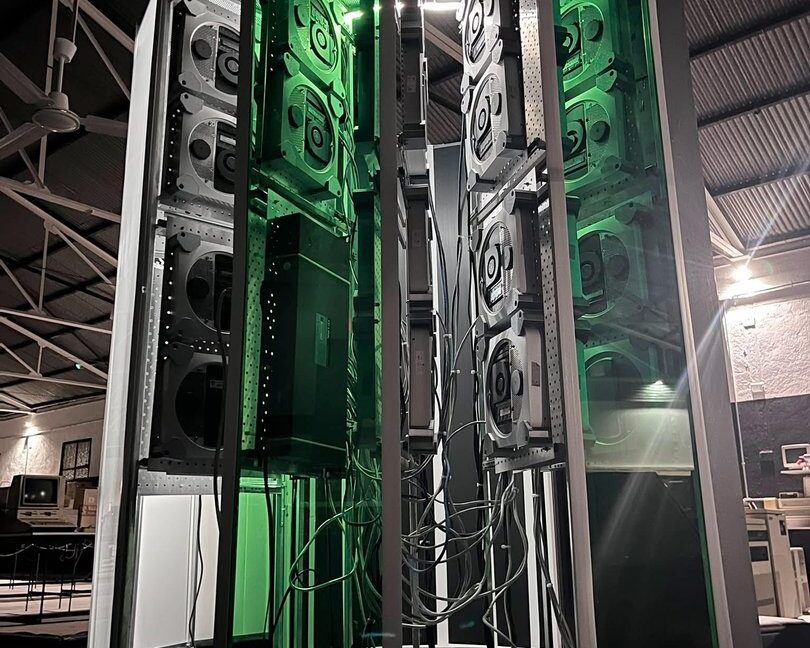
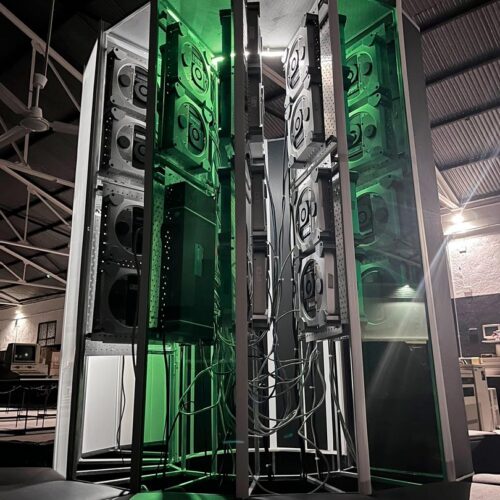
A Cray-1 supercomputer replica from 30 "obsolete" Mac Minis

The Museo de Historia de la Computación in Spain has unveiled a 1:1 scale visual replica of the famous Cray-1 supercomputer from 1976. Instead of sourcing expensive, cutting-edge tech to run the system, the creative team powered the project with 30 2012-era Mac Minis. Developed over 18 months, the project serves as a 50th-anniversary tribute to the Cray-1 and Apple's founding.

Mac Minis from over a decade ago might not seem like the obvious first choice for building a cluster supercomputer, but when networked together, the developers can orchestrate the 64 active processing cores into a combined 1.3 teraflops of performance in their most recent tests. The museum reportedly achieved 1.5 teraflops previously using all 70 available cores, prior to one node going offline. Benchmarks were obtained using a custom matrix-multiplication Python script. Five PCs are quad-core i7s, and the remaining 25 are dual-core i5 models. Except for two units from 2014, the rest of the array dates to 2012.

The replica is a valuable tool for museum-goers to understand the shifts in computer architecture since 1976. The original Cray-1 used vector processing, applying a single instruction to multiple data elements simultaneously, whereas the replica distributes work across independent processors in a parallel cluster. The peak theoretical performance of the original Cray-1 was approximately 160 megaflops. What was originally a purpose-built research machine has been re-created with consumer hardware that's vastly more capable than the machine that inspired it.

Read full article

Comments

  •  

Apple changes Full Disk Access permission in macOS

Apple’s macOS has a Full Disk Access permission, designed to allow backup applications full access to, well, the disk, so they can perform their job properly. Apple posted a notice on its website that it’s going to further restrict this permission, because some applications were abusing this permission to gain access to users’ messages, emails, and so on, which it obviously isn’t intended for.

What kind of applications, you may ask?

Going forward, we will introduce additional controls to ensure that users who genuinely wish to grant an app this extraordinary level of access can only do so with very explicit user action. Addressing this is critical. As AI agents become increasingly capable and autonomous, the risks associated with this level of access will grow substantially. We are committed to ensuring users clearly understand these risks before granting such access, so they can make informed decisions about their own data and privacy.

↫ Announcement from Apple

This was prompted by a story a few weeks ago, where Facebook’s Muse “AI” tool was apparently reading people’s private messages and other data, and even sent messages on users’ behalf, without informing its users. It’s incredibly naive to think Facebook software in 2026 would not do creepy things, so I’m honestly not at all surprised. It makes sense in Apple’s worldview to further restrict permissions in response, but I’m sure more experienced macOS users are not going to like this.

  •  

Command-line tool quickly removes Apple Intelligence from macOS 27

A new tool is allowing Mac users the ability again to easily turn off Apple Intelligence with one click and free up to 12GB of storage.

Unlike with previous versions of macOS, macOS 27 Golden Gate doesn’t have a toggle for turning off Apple Intelligence. That makes disabling AI features that you may not want more difficult. It also means that the AI models necessary for running Apple Intelligence will take up space on your disk, even if you don’t use them or if you go through your settings to individually find and disable AI capabilities.

In response, a developer known as Om Lahore on GitHub last week created RemoveMacAI, a command-line tool that allows macOS 27 users to “turn off Apple Intelligence on macOS 27" in a way that is “fully reversible,” per the GitHub page. They said that Apple's Intelligence models take up "about 12GB," but the models can actually take up over 30GB, The Verge noted.

Read full article

Comments

© Apple

  •  

“macOS Golden Gate is a buggy mess”

In June 2008 Apple announced Mac OS X Snow Leopard, proudly boasting that it would have “no new features”. Instead of piling on new things, Snow Leopard aimed to build on the success of its predecessor, Leopard, opting to focus on under-the-hood performance and stability improvements throughout the system.

18 years later, Apple is taking a similar approach with macOS 27. Golden Gate aims to fix the missteps of last year’s Tahoe, promising an expansive set of improvements and “a more responsive and delightful experience”.

Does it hold up? Here are just some of the bugs I’ve encountered in my daily use over the past couple of weeks.

↫ Chester at SquareOrbits

I’m getting some real Windows 11 vibes from this long list of bugs and issues, further underlining my perception that Apple completely lost the plot when it comes to Mac OS X (in the past) and MacOS (today). These are not the kind of things you’d find in the heydays of Mac OS X, back when I was a devout user, and makes me glad I abandoned ship long, long ago (around the time of the Intel transition). I don’t see stuff like this in GNOME or KDE, and while not nearly as bad as Windows 11, the cracks are obvious.

I am by no means an expert at how Apple is run and how it organises itself, but as a layperson I do wonder if the company is simply trying to do too much – too many different platforms, too many different crucial components it all develops internally, too many different markets to please. Things are going to fall through the cracks when you try to keep this many plates spinning.

  •  

Apple Fixes CoreGraphics Flaw Used in Targeted Attacks

CVE-2026-86950

Apple has released iOS 26.7.1 and iPadOS 26.7.1 to address CVE-2026-86950, a CoreGraphics vulnerability the company says may have been used in targeted attacks. The updates came out on September 28, 2026, along with matching fixes for macOS Tahoe 26.7.1 and macOS Sequoia 15.8.1.  The flaw is in CoreGraphics, a core Apple framework that handles graphics rendering. According to Apple, processing a maliciously crafted file may lead to arbitrary code execution. In practice, an attacker could run their own code on a vulnerable device by getting it to open a specially prepared file.  Apple described the root cause as an out-of-bounds write issue. This type of memory bug happens when software writes data past the edge of the memory area set aside for it. The company said it fixed the problem with improved bounds checking.  In its advisory, Apple stated: "Apple is aware of a report that this issue may have been exploited in an extremely sophisticated attack against specific targeted individuals on versions of iOS before iOS 27."  Apple credited Meta Product Security with reporting the vulnerability. 

Devices Covered by the iOS and iPadOS Update 

The iOS 26.7.1 and iPadOS 26.7.1 fix is available for iPhone 11 and later. On the iPad side, it covers: 
  • iPad Pro 12.9-inch (3rd generation and later) 
  • iPad Pro 11-inch (1st generation and later) 
  • iPad Air (3rd generation and later) 
  • iPad (8th generation and later) 
  • iPad mini (5th generation and later) 

CVE-2026-86950 Also Reaches macOS 

The issue is not limited to iOS and iPadOS. Apple published separate security notes for macOS Tahoe 26.7.1 and macOS Sequoia 15.8.1, both released on September 28, 2026. Each describes the same CoreGraphics flaw, the same arbitrary code execution risk, and the same out-of-bounds write fix. Each also credits Meta Product Security.  The macOS notes repeat Apple's statement that the bug may have been exploited against specific individuals on versions of iOS before iOS 27. The Tahoe update applies to macOS Tahoe, and the Sequoia update applies to macOS Sequoia.

Advisory Rates CVE-2026-86950 as High Risk 

A separate advisory, also dated September 28, 2026, classifies the problem as a remote code execution vulnerability in Apple products. It warns that a remote attacker could exploit the flaw to trigger remote code execution on a targeted system.  The advisory rates the risk level as High for two reasons. The flaw is being exploited in an extremely sophisticated attack on specific targeted individuals running versions of iOS before iOS 27. A crafted file is also enough to achieve arbitrary code execution.  The advisory lists the following as affected: 
  • Versions prior to iOS 26.7.1 and iPadOS 26.7.1 
  • Versions prior to macOS Tahoe 26.7.1 
  • Versions prior to macOS Sequoia 15.8.1 
It recommends that users visit the vendor's website for details before installing and then apply the vendor's fixes. The related Apple support pages are: 

Apple's Disclosure Approach 

Apple says that, to protect customers, it does not disclose, discuss, or confirm security issues until it has investigated them and patches or releases are available. The company references vulnerabilities by CVE-ID when possible, as it did with CVE-2026-86950. Recent releases are listed on its security releases page, and more information is on its Product Security page.  Apple's notes also state that information about products not made by Apple, or about independent websites it does not control, is provided without recommendation or endorsement. Apple directs users to contact those vendors for further details.  Since attackers have reportedly already used the flaw, owners of supported iPhones and iPads should install iOS 26.7.1 or iPadOS 26.7.1. Mac users should update to macOS Tahoe 26.7.1 or macOS Sequoia 15.8.1, depending on which version they run. 
  •  
❌