
 Login
Login
EasyEffects should be part of every Linux distribution and desktop environment to massively improve laptop speaker sound quality
Virtually all laptop speakers suck. It’s the one area where even really expensive laptops tend to fall on their ass, leaving users with a tinny, harsh, and hollow sound experience. While you can’t exactly overcome physics – laptop speakers are necessarily small and thus just cannot ever sound as good as proper speakers – there’s a lot you can do with proper tuning and software magic. If you’re a desktop Linux user, you actually already possess all the plumbing needed to fix your audio; it’s just not exposed to you in any way. Luckily, an application called EasyEffects allows you to actually make use of desktop Linux’ advanced audio features to massively improve the sound quality of your laptop’s speakers.
The OSNews 2026 Fundraiser
➡️ Donate through Ko-Fi ➡️ Donate through SEPA transfer* ➡️ Buy merch from our store ➡️ Why a fundraiser?
€5000 incentive: Make me use Windows 11 for a month (the results were not great)
> €10000: Video tour of my office and my computers/devices collection <
€15000: Buy a Mac and use macOS for a month (and review it)
€20000: I get an OSNews tattoo
*Name: Thom Holwerda – IBAN: SE08 8000 0820 1684 4657 8414 – BIC: SWEDSESS
EasyEffects’ own description on its GitHub page doesn’t really explain what it does or what it’s capable of, so here’s the description from Wikipedia instead.
EasyEffects uses PipeWire to process incoming and outgoing audio streams independently and can apply various sound effects in the form of plug-ins made by different developer teams such as Calf Studio Gear, MDA.LV2 and GStreamer. All plugins have their own presets and can be applicable inside the suite rather than having to use a different mixer or executing a script from the command line.
Available output effects are limiter, auto volume, compressor of dynamic range, filter, 30 bands parametric equalizer, bass enhancer, exciter, reverbation, crossfeed, delay, maximizer and spectrum analyzer. Available input effects are WebRTC, limiter, compressor, filter, equalizer, de-esser, reverbation, pitch shift and spectrum analyzer.
↫ EasEffects’ Wikipedia page
None of this matters, and you can forget everything from these two paragraphs.
What matters is that using EasyEffects, you can tune the audio coming out of your speakers to make them sound a lot better. The few laptops on the market that do have decent audio – MacBooks, some Dell XPS laptops, and surely a few more – aren’t magically defying physics. While they probably do have objectively higher-quality speakers, the main difference between those laptops and laptops with crappy-sounding speakers is that the former come with built-in tuning from the factory to make them sound much better than they would without any software trickery.
If you know your way around audio, you can very much use EasyEffects and tune your laptop speakers from scratch to massively improve how they sound. However, that requires time, experience, knowledge, and expertise that most people lack, including myself. Lucky for us, though, there are countless downloadable presets out there for EasyEffects designed specifically to make laptops sound better.
In an ideal world, you’d pick a preset created specifically for your laptop make and model, but odds are you won’t find one, so for most laptops you’ll have to settle for a generic preset that tries to do its best. I’ve long settled on the Advanced Auto Gain.json preset from JackHack96, which greatly improves the audio performance on any laptops I’ve tried it on, but of course, there’s countless other presets for you to try to see if there’s anything that suits your particular laptop and ears better.
Getting all of this up and running is really easy. EasyEffects is most likely packaged by your Linux distribution, and the latest version is always available as a Flatpak from Flathub. Download the preset(s) you want to try, copy them either to ~/.config/easyeffects (if you use your distribution’s package) or to ~/.var/app/com.github.wwmm.easyeffects/data/easyeffects/output/ (if you use the Flatpak version). They’ll show up right away in the Presets tab in EasyEffects, ready to be turned on and off whenever you want, making it very easy to compare and contrast to find the one you like best. EasyEffects can live in your system tray giving you easy access to your presets without having to open the main window, and it can be set to start automatically at boot. EasyEffects can also be turned on and off on the fly.
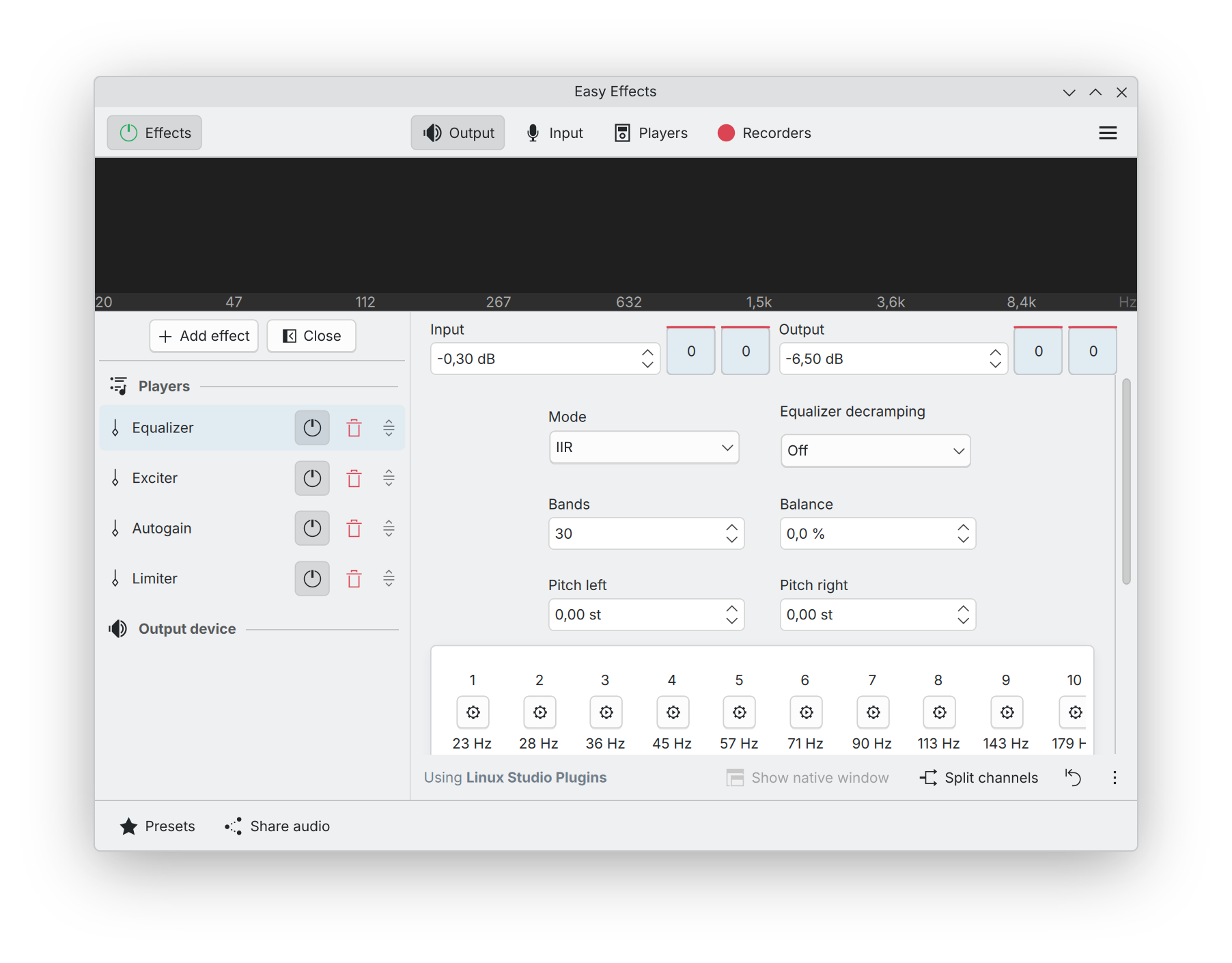
There’s obvious downsides to all of this, too, of course. First, since you’re most likely going to be using a generic preset not specifically crafted for your laptop, there’s no guarantee the results will be positive for you. Second, not every preset is ideal for every type of audio. Most of my audio consists of YouTube videos with mostly speech; if you listen mostly to music, different presets may yield better results. Third, audio quality is deeply subjective, and what sounds good to my ears may sound like total garbage to yours. Fourth, EasyEffects does take up a tiny fraction of CPU power (I’m talking 0.1-0.2% according to KDE’s System Monitor), but I have never seen it have any noticeable performance impact on anything.
Even the generic preset I use makes such a massive difference for me on every laptop I’ve ever tried it on, that I’ve become convinced EasyEffects and a few of the generic presets should be installed by default by any desktop-oriented Linux distribution. On top of that, Linux laptops OEMs like System76, Nova Custom, Star Labs, and so on, should really take the time to create proper presets for their laptops to improve their sound quality out of the box. I feel like if you’re already designing and selling laptops, you probably also have the skills and means to create a decent preset.
In fact, I’d take it a step further and urge desktop environments like KDE and GNOME to properly integrate EasyEffects into their sound settings. They shouldn’t include the entire application and its user interface, but should make it so that you can configure and manage presets right from the sound settings panels, and switch between presets from their volume applets (as well as turn it off entirely, of course). This would leave the full EasyEffects application for people who need more control, manual tuning, and more advanced features.
There’s absolutely no reason why speakers on Linux laptops should sound tinny, harsh, and hollow. The Linux desktop has all the technologies and features built right in to make speakers sound much better than they do without any tuning, and yet, very few people seem to actually be aware of this. This needs to change, and I think it’s up to distributions, desktop environments, and Linux OEMs to make this happen.
