Apparently, macOS 27 comes with a small mystery people are trying to figure out.
Recently, while troubleshooting a PATH issue, I noticed an entry for /pkg/env/global/bin. At first, I worried that something had gone horribly wrong. Turns out, this is part of macOS 27.0… though no one is sure what it’s for yet.
The weird thing is, as far as I can tell, no one seems to know what this new directory is for! It’s odd that Apple would update their filesystem structure, add it to everyone’s PATH, and there not be some explicable reason.
I guess we’ll find out eventually, but this does highlight something that I find extremely unsettling about this. With proprietary software like macOS, you literally are at the mercy of whatever Apple decides to do to “your” operating system. You install an update, and aside from all the documented changes, there’s going to be changes you simply have no idea what they’re for, or why they’re there. Don’t get me wrong, there’s obviously not something nefarious going on in this particular case, but it still feels wild to me that people just willingly accept this.
In the open source world, stuff like this simply does not happen. You’re not going to install a bunch of Fedora updates one day and find a mysterious, undocumented folder in your PATH. Such a change will be documented, but even in the unlikely event it’s not, you can just go through the commit history and find out exactly why the new folder is there, and what its intended purpose is or is going to be.
Considering the state of the world and the people corporations like Apple really answer to, I would not be comfortable with letting them dictate even something as simple as my PATH.
In what is quite a major achievement, Wine has been ported and made to work on OpenBSD.
We have since tested several dozens of 64-bit Windows software, mostly successfully. See screenshots, livestream recordings for example. Even the Remaster of The Witcher 3 which released just last month runs, and runs well (requires adding in vkd3d-proton; see README; livestream which looks less fluent than it is due to the on-system recording with ffmpeg).
The biggest limitation seems to be the lack of support for WoW64, so 32bit Windows software won’t work. Still, this is a massive milestone for OpenBSD, and makes especially gaming a somewhat viable option on OpenBSD.
In 1980, Intel introduced the 8087, a chip that made floating-point operations much faster in the IBM PC and other systems. Although the 8087 supports advanced operations such as tangents, square roots, and logarithms, this article focuses on basic arithmetic operations: addition and subtraction. The 8087 provided a spectacular speed improvement over the 8086 processor, speeding up addition by a factor of almost 100, and complicated operations by even more. In this article, I examine the 8087’s microcode and circuitry to explain exactly how floating-point addition and subtraction are implemented, including numerous special cases for infinities and other special values.
Shirriff took an actual chisel to the 8087 coprocessor to gain access to the insides for highly detailed photographs, taken with a microscope. They look amazing.
Only a few day ago I linked to a massive collection of original Palm OS development resources, and today we can take a look at what it was like to put all of those resources into practice: the original source code for the Palm OS port of Lemmings. With these resources combined, there’s no excuse to not building any Palm OS applications. I’d really like a modern email client, a Fediverse client, and a slightly more modern browser surely wouldn’t hurt.
It’s been two years since my initial post about making GNOME OS an end-user general purpose OS. Today, we’re excited to announce that we’ve hit a major milestone!
TL;DR: We’re launching a new edition called “GNOME OS Preview”, which is built from the latest stable GNOME release. This means that GNOME OS is no longer just a nightly OS for GNOME developers and testers!
A number of changes and improvements have made the move from nightly status to preview status possible. They’ve made GNOME OS handle environments with limited amounts of RAM much better – not a luxury, these days – including the ability to dynamically increase the swap space if needed. In addition, the work to make it much easier to install and test daily Flatpak builds of applications is now part of GNOME OS, as is the effort to make command-line utilities manageable in the same way as Flatpaks.
As the blog post notes, there’s still a ton of work left to do before GNOME OS is ready for everyone. They’re going to bet heavily on systemd-homed to enable, among other things, per-user disk encryption, and there’s a new installer coming, as well. They also want to ship GNOME’s preinstalled applications as Flatpaks, integrate delta updates, and much more. It all looks incredibly appealing, even if I am not the target user for something like GNOME OS.
This repository contains approximately 1 GB of historical Palm OS development material, collected over many years of working with the platform.
The archive includes a mixture of publicly distributed development resources, personal development material, technical references, and historical artifacts.
OpenVMS isn’t exactly the easiest platform to get into, with even the first major hurdle – licensing! – being a bit of a complex issue. To address this and other issues people new to OpenVMS might run into, VSI, the company currently developing OpenVMS, launched its new VSI How-to Portal. For now, it covers things like licensing, installing and updating OpenVMS for x86, TCP/IP configuration, and setting up SSH. The company plans to expand the portal with more articles based on customer and user feedback, so hopefully more information will appear soon.
Most of us are probably not particularly not particularly experienced with OpenVMS, so having a portal like this can really help get you started.
Microsoft’s been claiming for a while now that they’re working on improving performance and responsiveness in Windows, with a particular focus on making more efficient use of memory. This is probably the only positive thing to come out of the RAM crisis Microsoft helped create and is currently still fueling. The company’s now claiming that Windows 11 is “up to 20% more responsive” thanks to these efforts.
The result is a Windows experience that’s up to 20% more responsive, with improvements you can feel as soon as you boot into your PC and extending to Start, File Explorer, Search, Snipping Tool, Microsoft 365, Edge and more.
A big part of that work is making smarter use of memory and system resources. We’ve improved memory management and efficiency across Windows to help keep more of your PC’s resources focused on what you’re actively doing. That work can make an especially meaningful difference on PCs with 8GB of memory. Windows can now keep up to 2GB more of your active data in memory instead of moving it to slower storage, helping your PC stay responsive as you open more apps or browser tabs. Windows is also making additional memory-saving improvements that reduce background memory use. For example, on PCs with 8GB of memory or less, Widgets load only when you open them, making more than 200 MB of memory available for your apps and other work. It’s one example of the broader work underway to reduce the Windows memory footprint and deliver a fast, responsive experience across the PCs people use every day, an area we’ve made an explicit focus for Windows.
If, for a moment, we take these claims at face value, they’re simply good news for every Windows 11 user, and legitimately the only good thing to come out of the RAM crisis. These kind of claims are always hard to measure, especially considering just how varied the Windows software and hardware ecosystem is, but I’m sure people good at benchmarking are going to try and find some more definitive answers here.
In the same blog post, Microsoft also highlights several other recent improvements it’s made to Windows 11, like the new search experience we talked about recently, a brand new Photos application, some new whiteboard-like application, and several more things. Considering how complex Windows’ versioning scheme and various branches have become, I have no idea when these features and improvements actually make their way to your machine.
On a slightly related note, Microsoft also unveiled that it’s bringing Microsoft Defender to Linux, with a particular focus on desktop Linux. Even Microsoft has to face the reality of the rising popularity of Linux on the desktop.
Graphical user interfaces for DOS were a dime-a-dozen back in the ’90s, but of course faded into irrelevance as time went on. But what if you still run DOS today, and want a maintained graphical shell instead of the rather limited DOS command line?
Costa is a small and lightweight application which runs on top of MS-DOS or compatible operating systems. It replaces the DOS-prompt with a clean, user-friendly interface – a so-called GUI (Graphical User Interface). Costa comes packed with a bunch of useful accessories and can be used with or without a mouse.
Developed by Jacob Palm, a Danish IT-professional and hobby developer, the first release of Costa came way back in 2004. Over the years – and through several releases – Costa has gradually evolved into what it is today, with new releases still coming out regularly as of 2025.
Costa comes bundled with a number of useful utilities, a few games, and useful features like a desktop with custom icons, virtual desktop support, a file selector, and much more. The latest release, version 1.8.0, was released in late 2024, and should run on just about any IBM PC-compatible, but a 386 is recommended. It’s been tested with a variety of DOS flavours, including FreeDOS ad DOSBox, so it should run pretty much anywhere.
Ubuntu 26.10 brings significant progress for security, and strengthens the platform with the full adoption of Rust-based coreutils, post-quantum-ready package signing, and expanded TPM-backed full-disk encryption support. Enterprise authentication gains deeper integration with Microsoft Entra ID, including password and multi-factor authentication. Linux kernel 7.3 extends support for the latest hardware, alongside new RISC-V desktop images and optimized amd64v3 installation images.
Of course, it comes with the latest version of GNOME, and the whole family of Ubuntu variants focusing on other desktops have also been updated. While I doubt many people here run Ubuntu, it’s still quite popular, and serves as the base for countless other distributions.
KDE turns 30 today, and they’re celebrating it with a brand new KDE Plasma release: version 6.8 is here. On the accessibility front, 6.8 brings a new dwell clicker function (meaning a click will register if the pointer is held still for a short while) and support for the Bikram Sambat calendar and the Amharic language. I always love it when I see support for new languages and scripts, especially when, as is the case here, it’s a language spoken as a first language by 25 million people.
The Plasma remote desktop has also been improved with bi-directional copy/paste, performance and quality improvements, and more, and you can now record microphone and audio while screen recording with Spectacle. In System Monitor, you can now assign processes and tasks to specific processors/cores, which is a great feature for people running intensive tasks but who would still like to, you know, do other things while those tasks are running.
KDE 6.8 drops support for X11, focusing entirely on Wayland. Of course, X11 applications will remain usable thanks to Xwayland, and KDE’s applications will continue to support X11 in case you’re using them outside of KDE. This release also further expands the Union theming system, now adding support for styling Qt Widgets. Union is still in beta, so you’ll have to enable it to test it. There’s a ton more, too, but these are some of the highlights.
KDE Plasma 6.8 will find its way to your distribution of choice soon enough.
You know the drill by now – a new month, a new Haiku activity report. This past month doesn’t seem to have any big ticket items, but instead contains a long list of smaller but still welcome fixes. Various filesystem drivers saw some work, a few bugs in virtio drivers were fixed, and NVMM execution is now easily interruptible by signals which should improve performance in various emulators like QEMU. Be sure to comb through the complete list to see if there’s anything in there that impacts you.
The ESA – not, not the cool one – a lobby group made up of various videogame and entertainment companies, has asked the US Trade Representative (USTR) to add Anbernic to its list of companies that are supposedly notorious for engaging in and facilitating piracy. If you’re unaware, Anbernic is one of the bigger names in Android and Linux-based handheld gaming devices targeted at the retrocomputing market.
While many online sellers do include an SD card full of ROMs alongside emulation hardware of all types, Anbernic itself does not appear to do the same when selling directly from its website. Regardless, the ESA argues that these ROM-laden Anbernic devices selling through “normal retail channels” help to “normalize hardware-based piracy by delivering illicit catalogues through a polished consumer product.” This, the ESA says, meets the threshold for a “superfake,” an ill-defined designation that applies to “high-quality counterfeit trademark goods … on a commercial scale.”
There’s a lot of murkiness surrounding whether or not Anbernic sells their devices with preloaded ROMs or not. The number of reports from people who say they did get a ton of ROMs on their Anbernic devices, bought from Anbernic’s own store, is large enough that it’s clearly something they do. However, there’s an equal number of people who say their Anbernic devices were completely free of ROMs, and I’m one of them – I’ve bought like three or so devices from their store over the years, and they never came with any ROMs. My most recent purchase was an RG 35XXPro Linux-based model, and there were no ROMs on it (I replaced the stock operating system with Knulli, which has been a great experience).
If Anbernic does indeed ship at least some of their devices with ROMs preinstalled, then it’s their own damn fault if that lands them in legal trouble. It’s not like downloading ROMs is particularly difficult (just do an internet search for your preferred system and something like “ROM pack” and you’ll get the console’s complete library in a single download), so they really have no need to do so.
There’s one extra layer here though. Third-party resellers like Amazon offer loads of Anbernic devices preloaded with SD cards full of ROMs, all from third parties not affiliated with Anbernic. And wouldn’t you know it – Amazon is a member of the ESA lobby group. In other words, the problem also lies with lax retailers not properly vetting what they’re offering, but instead of going after places like Amazon, they’re going after Anbernic instead.
Amazon is a haven for illegal and counterfeit products, but they’re so wealthy and powerful they just get away with it.
Are you aware of ReFS, Microsoft’s next-generation file system for Windows? I’m sure the average OSNews reader is, but I really wonder how many people are using it out in the wider world, even though Microsoft keeps improving it. Since earlier this year, Windows Server and Windows 11 can boot from ReFS volumes, and it’s used by Windows’ Dev Drive feature as well.
What Microsoft doesn’t seem to want, though, is people using ReFS on removable drives.
Starting with Windows updates released on and after October 13, 2026, Microsoft is making hardening changes to the Resilient File System (ReFS).
This article describes Windows hardening changes for ReFS volumes that are mounted from removable media. ReFS on removable media, such as a USB disk, is not a supported configuration. The changes add auditing and enforcement controls that help administrators identify these volumes and prevent them from being mounted.
I’m oddly fascinated by this. Apparently, there are enough people out there trying to use ReFS on removable media to warrant the above auditing and enforcement controls, which is fascinating in an of itself. On top of that, using ReFS on removable media is apparently also dangerous enough – which raises the question of why, exactly, it’s so dangerous in the first place. Microsoft doesn’t really explain itself here, other than saying it’s “not a supported configuration”.
I wonder if and when Microsoft will move from NTFS to ReFS as the default file system for new Windows installations. It’s been around for quite a while now, and there’s no denying that competing operating systems, especially in the server space, have file systems that are far superior to NTFS (like Btrfs, ZFS, and others), and I’m assuming Microsoft would love to catch up. It’s been a long time since Microsoft changed Windows’ default file system, however, and with the massive number of people using Windows, it’s not something to take lightly.
Then again, Apple migrated hundreds of millions of iPhones, iPads, and Macs to a brand new file system without anybody noticing a thing, and as far as I can recall, without any problems.
Both NeXT and Improv brought innovative solutions to their respective computing questions of the day. NeXT made UNIX palatable to those scared of the terminal, debuted Display Postscript on a mega-pixel display, and made development for the system a snap. Improv rethought multi-dimensional data modeling, offered English-like formulas, and made it easy to rearrange data views on a whim.
The bones of both remain to this day. NeXT’s operating system, NeXTSTEP / OPENSTEP, morphed into macOS, and by extension iOS. Lotus abandoned Improv fairly quickly, but a quick survey of today’s spreadsheets shows a universal embrace of pivot tables.
Many of us are interested in retrocomputing. There’s such a rich history of eras and machines to choose from, and countless niches and nuances to get lost in. Some people make it easy for themselves and are into old computers that are readily available at low prices, like the Commodore 64 or mid-’90s Macs, while others make it a bit harder on themselves by focusing on, say, computers from the former Soviet Union or NEC machines from Japan, which are harder to find and probably require a bigger purse, too.
And then there’s people like me. I’m making things incredibly hard on myself, because I am obsessed with a very specific set of computers – just five machines, to be exact. “Surely,” I hear you think, “collecting a mere five specific machines can’t be that hard, no? That’s how many spare Pismos I have in a box in case my primary one needs spare parts!” Sadly for me, the five computers I want to own more than any other are not particularly easy to find, and even when you do find one of them, pricing can easily reach the level of a decent used car.
Support OSNews
OSNews is ad-free, fully independent, not owned by any media conglomerate; we answer to nobody. We need your donations and support to survive.
Regular OSNews readers will know: I am infatuated with UNIX workstations, or more specifically, UNIX workstations of the early 2000, and even more specifically, the final five models built by the last commercial UNIX vendors. So far, I’ve managed to get my hands on a mere two of them, but before my time on this earth come to an end, I intend to complete my Holy Quinity of UNIX Workstations. Let’s go down the list, roughly ordered by attainability.
HP c8000: PA-RISC/HP-UX
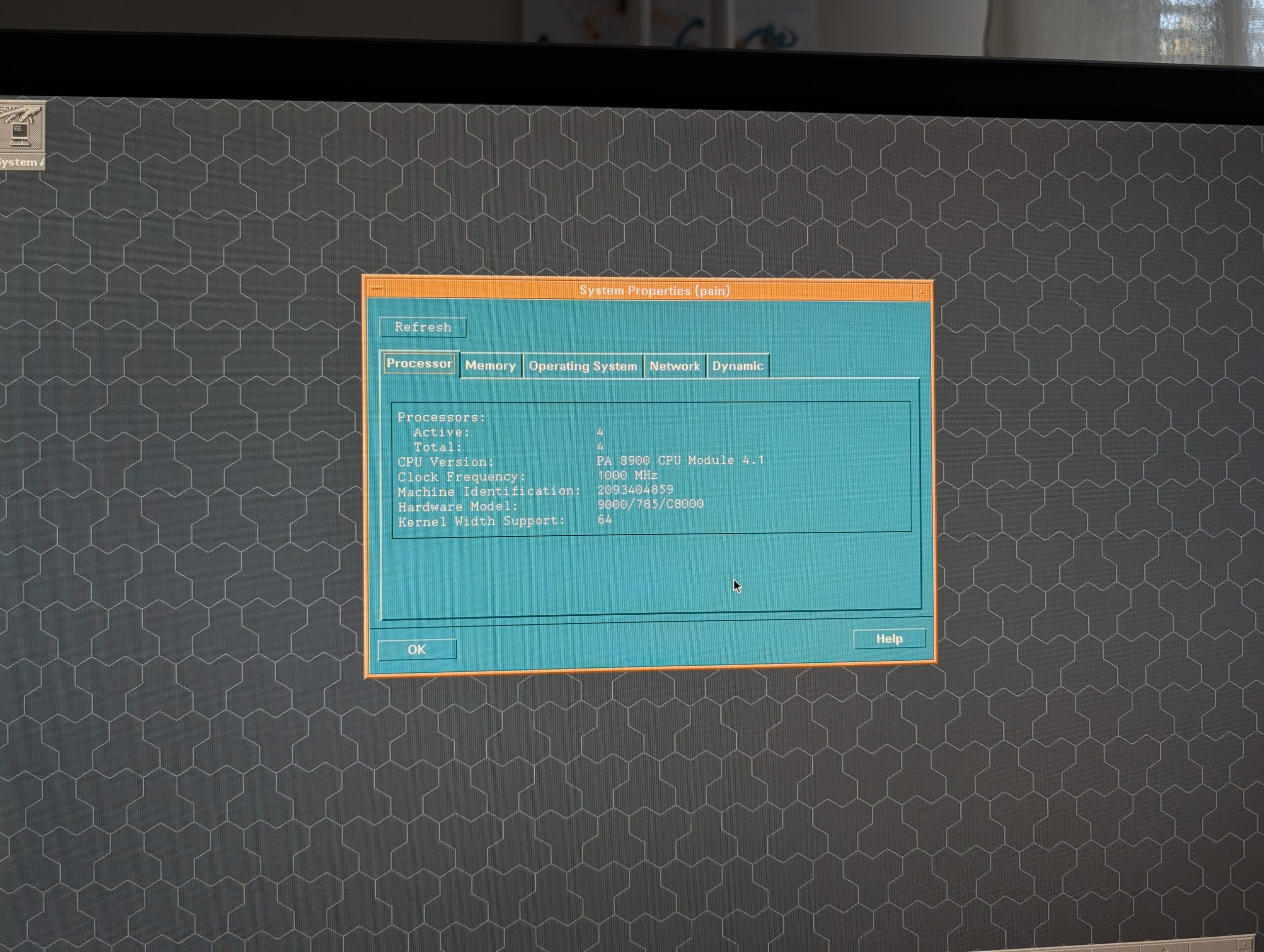
The HP c8000 is the absolute pinnacle of HP’s long-running line of workstations based on the PA-RISC architecture. The first PA-RISC workstation was launched in 1986, and HP would continue to improve the architecture and release new workstations all the way up until 2004, when the c8000 would be their last model. For the c8000, HP actually went all-out: it came with two dual-core PA-RISC processors running between 900MHz and 1.1GHz (depending on configuration), a maximum of 24GB of RAM, and a variety of graphics cards to choose from. It was a veritable swan song for the architecture.
HP’s commercial UNIX operating system, HP-UX, is even older than PA-RISC, with the first version being released in 1982, and its final version, HP-UX 11i v3 (or 11.31) released in 2007. This final version of HP-UX was updated and supported all the way up until 31 December 2025, but things are actually a bit more complicated than that. The last workstation release of HP-UX for PA-RISC was 11i v1 (released in 2000), while the last workstation release for Itanium workstations was 11i v2 (released in 2005). Do note that HP would provide updates, fixes, and patches to these versions long after the mentioned release dates.
Speaking of Itanium, HP’s final Itanium workstation was the zx6000, released in 2002, which can pack up to two single-core 1.5Ghz Itanium 2 processors. There’s a very real case to be made that the zx6000 should also be part of this list, since it’s both a little faster than the c8000 (in its dual 1.5GHz configuration) and runs a newer version of HP-UX. However, since Itanium workstations never really had much of an impact in the market (even HP only ever released two models), and since it lacks the decades of pedigree that comes with PA-RISC, I consider them a mere curiosity. A very cool curiosity that I’d love to own, but a curiosity nonetheless.1
Anyway, this is one of the two machines I already own. I have a new-in-box (when I bought it a few years ago) HP c8000 with two dual-core 1.0Ghz PA-RISC processors, 8 GB of RAM, and an ATI FireGL X3 AGP graphics card with 256 MB, the fastest the c8000 will take. It’s also got two SCSCI 74 GB hard drives in a striped RAID for better performance, and I added an LTO 4 tape drive so I could create bootable backups that will restore the machine if anything ever goes wrong.
It’s running HP-UX 11i v1, with as many of the updates, patches, and fixes I could find – which is one of the major roadblocks for anyone trying to get into HP-UX. Installation media are relatively easy to come by if you know where to look (assuming you know which specific version you need), but any updates, patches, and fixes from roughly later than 2005 are almost impossible to find. Some can be discovered through My HPE Software Center, if you have the patience of an angel and the perseverance of a honey badger (it’s a really terrible website), but most things are all locked away behind expensive support contracts or just gone entirely.
I’ve contacted HPE several times in several different ways about the preservation of HP-UX, but they never replied – clearly, they just don’t care about the preservation of their legendary UNIX platform or the enthusiast community buying PA-RISC hardware on eBay for personal use and experimentation. Sad, but par for the course.
The c8000 is quite easy to find on eBay, but do be aware that the “cheap” offerings of around €800 are the versions with just one processor. To get the version with two processors, expect to shell out twice as much. Spare parts and upgrades are readily available, too.
Sun Ultra 45: SPARC/Solaris
The Sun Ultra 45 needs no introduction here on OSNews, as I published an in-depth article about this machine and all the cool things you can do with it late last year. My Ultra 45 was an incredibly generous gift by Adriaan de Groot, who owned this machine as part of his work on porting KDE to Solaris way back in the day. I then ordered various upgrades to the machine to max it out with two UltraSPARC IIIi processors running at 1.6GHz, 8 GB of RAM, and the Sun XVR-2500 with 256MB, the fastest GPU it supports. I also bought the SunPCI IIIpro (an entire x86 PC on a PCI-X card) and a flash accelerator card.
The Ultra 45 is not supported by Solaris 11, so the most recent version you can run is Solaris 10, and more specifically, Solaris 10 1/13 (from January 2013). Solaris 10 is still receiving patch sets to this day, but like HPE, Oracle hides them behind expensive, unobtainable support contracts. My attempts at contacting Oracle have been more lacklustre than my attempts at contacting HPE, but either way, no response from Oracle either. They, too, do not care about the enthusiast community.
The Ultra 45 also tends to be readily available on eBay, and you can expect to pay about €1000 or so for a single-processor model, and anything between €1500-2000 for a dual-processor one. Spare parts and upgrades abound, but do note that Ultra 45 processor coolers are weirdly expensive.
SGI Tezro: MIPS/IRIX
SGI and IRIX are well-loved in the retro computing community, and there’s no shortage of hardware to choose from if you want to get into IRIX. However, if you’re obsessed with the final models of UNIX workstation lines like I am, you’re going to be in a bit of trouble – you’re going to want an SGI Tezro, the final MIPS workstation SGI made. The company launched this top-of-the-line model in 2003, and kept updating and selling it until 2007. In its most powerful configuration, you’re looking at four MIPS processors running at 1GHz each, with a maximum of 8GB of RAM, and a V12 VPro GPU with 128MB of RAM (with a DVI port instead of the more cumbersome 13W3 connector).
The Tezro can run IRIX all the way up until the operating system’s final version, 6.5.30, released in August of 2006. The operating system discs and patches are readily available all over the web, which is quite nice. Out of all the commercial UNIX platforms mentioned in this article, the SGI and IRIX community is definitely the most active and lively, with people developing and maintaining software for IRIX to this very day. There are also people working on maintaining modern Linux kernels for SGI machines, and there’s a ton of forum activity out there.
The Tezro is an incredibly rare beast, and they rarely come up for sale. I’ve only ever seen one Tezro’s final price, and I think it was sold for well in excess of €6000. I have never owned or even seen a single SGI machine, let alone a Tezro,
IBM IntelliStation POWER 285: POWER/AIX
Out of all the architectures mentioned in this article, IBM’s POWER is the only one still under active development; all the others were phased out and cancelled long ago. However, even though IBM is still developing POWER and releasing new generations every few years, the company hasn’t built a POWER workstation in a long time. The last one built by IBM2 was the IntelliStation POWER 285, released in October of 2005, and sold up until 2009. It packed a single-core or dual-core POWER5+ processor running at 1.9 or 2.1GHz, supported a maximum of 32GB of RAM, and there were three graphics cards to choose from, with the GXT6500P with 128MB being the most powerful option (a card from 2002!).
At roughly the same time as the POWER 285, IBM also sold the IntelliStation POWER 185. This was a very different beast, though, as instead of using a POWER5+ processor, it used one or two PowerPC 970 processors, which was a slightly beefed-up POWER4 design, making it a generation behind the 285. It also had a much stricter maximum RAM limit (8GB), but could run the same outdated GPUs as the 285. Regardless, the 285 is clearly the more powerful machine.
By the way, if the “970” moniker sounds familiar, it’s because Apple used these very same processors under the marketing name “PowerPC G5” for their various G5 Macs. My pet conspiracy theory about the origins of the POWER 185 is that with Apple switching to Intel, IBM was left with a pallet of unused 970s, and thus created the 185 to get rid of at least some of them. The timeline adds up, as Apple announced the switch to Intel in June 2005, and the POWER 185 was announced in February 2006. I don’t actually believe this, but it’s a funny theory nonetheless.
The IntelliStation POWER 285 can run AIX up to version 7.1 TL5, released in 2017, which is remarkably modern. Do note that AIX 7.1 was originally released in 2010, and the number of changes and patches released for 7.1 probably dropped off sharply after its first few years on the market. AIX installation discs, patches, and documentation is easy to find, and I’ve heard from enthusiasts who play with older POWER servers that IBM is remarkably friendly to the hobbyist community, and will gladly answer any emails and provide help when they can. Of course, that’s just what I’ve heard through the grapevine, and I can’t vouch for any of it.
These machines seem to be quite rare. I have never seen an IntelliStation POWER 285 (or 185, for that matter) come up for sale, so I have no clue what people would be charging for these. My uneducated prediction is that a reasonably configured 285 will probably go well north of €2000, maybe even €3000.
HP AlphaStation ES47: Alpha/Tru64
Through various acquisitions (Compact acquired DEC; HP acquired Compaq), Alpha ended up at HP3. It was under their brand that the final Alpha workstation was let loose onto the world in 2002/2003 (I’m not 100% sure): the AlphaStation ES47. It contained one or two Alpha EV7 processors running at 1Ghz (also known as the Alpha 21364 or Marvel and the last Alpha processor ever made), a maximum of 16GB of RAM, and an optional ATI Radeon 7500 graphics card with an unspecified amount of video memory. From what I’ve read online, this machine is an absolute monster, weighing in at close to 60kg, with noise levels that aren’t exactly office-friendly.
Alpha-based workstations and servers ran Tru64 UNIX, which was initially known as OSF/1 AXP and then as Digital UNIX, before Compaq renamed it to Tru64. The AlphaStation ES47 supports the final release of the operating system from 2010, version 5.1B-6, and its installation media, patches, and even its multitude of license files are readily available online. An interesting bonus is that like most Alpha machines, the ES47 can also run OpenVMS, up to the final Alpha release of OpenVMS from 2017, V8.4-2L2.
This machine, too, I have never seen come up for sale. Seeing the absolutely insane prices people are asking for Alpha hardware, though, I’m not sure I even want to know what an ES47 would go for. An AlphaStation 500 from 1997, with a 400MHz processor, goes for €2500. A DS15 from the same era as the ES47, a desktop form-factor with a single 1GHz processor, already has an asking price of almost €6000. It wouldn’t surprise me if an ES47 would hit close to €10000.
Why these machines?
Why not just settle for lower-end, older, more readily available machines? This is a valid question, with answers that are probably not satisfactory to everyone. Of course, there’s the simple monkey brain “bigger number better” feeling, where I want the fastest, “newest” hardware to get the best experience out of these commercial UNIX machines. Another important point is that these machines will all be able to run the latest workstation versions of their various UNIX flavours, which also helps in realising the best possible experience and potentially makes compiling modern software easier.
Since they’re newer, they also tend to be easier to work with in a more practical sense; you won’t need special monitors or keyboards or whatever, since they’re all compatible with standard PC monitors, keyboards, and mice. Having just one dedicated desk with a monitor, keyboard, and mouse that work on both my c8000 and Ultra 45 saves a ton of space and time, since I just need to move a few cables from one machine to the other if I want to change machines.
There’s also a more intangible reason, one that I value a great deal. All of these machines were developed and introduced well past the point where everybody knew full well the dedicated UNIX workstation market was basically dead. The x86 platform was improving at an incredible pace, and offered better performance at far lower prices than any of the architectures in this article ever could. Meanwhile, the kind of software these workstations were designed for had long been ported to Windows, negating the need for commercial UNIX on workstations even more.
In fact, all of these five machines were developed and introduced after their respective companies had already announced they would be leaving the UNIX workstation market (with the sole exception of possibly IBM). All of them represent the final hurrahs of platforms that for decades had been the envy of computer enthusiasts the world over, designed by people who already knew this would be the last UNIX workstation they’d ever make. This gives these machines a certain melancholy that I personally really enjoy, even if I can’t fully explain why.
Even before you turn these machines on, simply by looking at their specifications, feeling the build quality, and weighing the component choices, you can tell exactly just how much of their heart and soul its creators were allowed to put into it. The Ultra 45 and c8000 are great examples of this. As I detailed in my Ultra 45 article, the Ultra 45 is not materially different from the two machines that came before it, making it an already outdated machine by the time it came out. Hell, the processors in the Ultra 45 were three generations behind the state-of-the-art in SPARC at the time. The c8000, on the other hand, got brand new processors that were substantially faster than what had come before (the first dual-core PA-RISC processors!), a brand new chipset, and even brand new GPU options, and thus delivered a true upgrade over its predecessors.
For whatever reason, it seems that HP decided to put considerably more effort into its final UNIX workstation than Sun did, and I find that fascinating. I desperately want to experience these other three machines, so I can get an even better understanding of where these companies put their priorities. Each of these computers were developed and built under the same somber assumption – the last one we’ll ever make – but each company put their own unique spin on it through the people and means they assigned to the project, all in a time-frame of only a few years.
It’s the same story told in five different ways.
What’s stopping you?
There’s countless reasons why trying to collect these five machines is such an incredibly difficult endeavour. First and foremost, it’s obviously a money issue – I’m not even remotely wealthy enough to casually spend decent-used-car-money on what is essentially a hobby. Second, availability is a huge problem, as the three machines I do not yet have simply rarely, if ever, come up for sale. Even if I had the money to burn on this rather silly hobby, I couldn’t.
Availability is further hindered by the fact that I’m European and live in the Swedish Arctic. From experience, I know that rare hardware like these UNIX workstations seem to have been more common in the United States than in Europe. Furthermore, even if someone is trying to sell one of these in Europe and they choose to do so on one of the local, country-specific classifieds platforms, I’m going to be locked out. Importing any of these machines from the US is basically a non-starter, since shipping machines that easily weigh in excess of 30kg across the Atlantic is not only expensive, but often also simply not an option since US sellers don’t want to do so. The EU import duty lottery isn’t exactly helping either.
I am absolutely green with envy whenever I watch YouTube videos of people visiting the various Vintage Computer Festival events in the US, where I often spot countless of these machines in the background, sometimes for sale at very reasonable prices, just sitting there like it’s no big deal. Similar events in Europe seem to be much smaller in scope and more locally-oriented, making it much harder to build up a network of like-minded friends who might let you know of great finds in other parts of the continent.
Basically everything is working against me.
With the possible exception of certain computer museums, I don’t think there is anyone in the world who owns all five of these machines, and I definitely will not be the first. Sadly.
Fun fact: the HP zx2000/zx6000 Itanium workstations and the c8000 PA-RISC workstation shared the same chipset and general architecture. They’re far more alike than it seems at first sight. ↩︎
While IBM didn’t, Raptor Computing Systems did. I reviewed their small Blackbird POWER9 desktop, but also have their big, dual-processor POWER9 workstation. These machines cannot run any commercial UNIX, though, so they’re not UNIX workstations by my own, admittedly arbitrary, definition. ↩︎
It’s kind of wild that out of these five platforms, three are currently owned by HPE (which split off from HP in 2015). Not only do they own HP-UX and Tru64, but also IRIX, since they acquired SGI in 2016. ↩︎
Amos B. Batto has published an incredibly detailed look at the state of Linux on smartphones. It’s an excellent read you really shouldn’t skip.
Five years ago, Linux phones looked like they were poised to become a viable alternative to the Android/iOS duopoly that has an iron grip on the mobile phone industry. Sadly, after a brief flash of activity and community engagement with the release of the Purism Librem 5 and the PINE64 PinePhone in 2020, the Linux phone market has generally stagnated. This stagnation occurred partly because of the problems at Purism and PINE64, but also because the available Linux SoC’s weren’t up to the task of running a modern smartphone, and the hardware industry wasn’t providing any good alternatives with good free/open source drivers. In addition, Plasma Mobile and Phosh were still inchoate mobile interfaces at the time, and there wasn’t a good distro option to run these interfaces on Android kernels with a normal integrated mobile SoC. The poor performance of the PinePhone and Librem 5 and the problems with the PinePhone Pro and the Librem 5 refunds sapped people’s enthusiasm and willingness to take a chance on the next Linux phone.
Fortunately, all of these conditions are changing, and I believe that there is now the possibility that Linux could finally become a viable alternative to Google’s Android and Apple’s iOS in the mobile space, just like desktop Linux has become a viable alternative to Windows and Mac OSX on the PC over the last three decades. This isn’t to say that mobile Linux will fundamentally challenge the business of Google or Apple, but the conditions are ripe for a small market to arise for Linux phones, similar to the way that people can currently buy Linux PCs from a number of small companies, such as TUXEDO, System76, Purism, Slimbook, ThinkPenguin, Ubuntushop.biz, Entroware, Star Labs, Juno, Laptop with Linux, Linux Certified, ArkPC, etc.
I’m not quite as optimistic as Batto, and that’s almost exclusively down to how running Android applications through compatibility layers will remain an absolute necessity for anyone trying to use one of these Linux smartphones today. As long as crucial applications and services required to function in a modern society, like banking, messaging, government services, and so on, require the use of an Android application when using a Linux smartphone, I just don’t think any significant number of people will be switching over.
What’s needed is something that will force these crucial services to become available on platforms other than Android and iOS, since I don’t think any of them will do so of their own volition. The only way I can see this happening is if the European Union, spurred on by our desire to reduce our dependence on adversarial US companies, mandates that several services marked as crucial must make themselves available on platforms other than Android and iOS.
I doubt that will happen, but I honestly don’t see Linux smartphones becoming anything more than a mere curiosity you fiddle with at home, while carrying an Android phone or iPhone as your actual phone.
LineageOS has released its first version based on Android 17 – earlier than expected.
We’ve been hard at work rebasing all of our changes and features since Android 17’s release in June. Android 17’s first release mainly contained iterative improvements and some UI/UX refinements, but due to our previous efforts adapting to Google’s heavy refactoring over the last several versions, we were able to rebase onto Android 17’s code-base faster than anticipated. Yes you read that right: We’re early this year!
This release also includes the latest Android security patches (October 2026), as well as a brand new browser-based USB flash tool to make installation easier. Many of the applications included with LineageOS have also been updated and improved, like its music player, image editor, web browser, and so on. The project also did a full accessibility audit of its installation process and application suite, which has already resulted in severalk accessibility improvements.
LineageOS serves as the base for countless custom Android ROMs, so it’s great to see the project do this well.
Over the years, I learned about many gotchas and strange differences between keyboard handling on Mac and Windows – pertinent especially to web apps, which use the same codebase to cater to both. I thought it might be helpful to someone if I compile them all in one place.
In this article. I am going to explain the different steps the I/O manager follows when initializing an I/O operation starting from determining the right target, choosing the right path and finally sending the request to be processed by the right drivers. To make it easier I choose to focus on read requests only since the major steps are common by all types of requests.
At OSNews, we love us a hobby operating system project.
I started a small experiment: writing a very basic kernel in Swift, and running on QEMU.
The goal is obviously not to replace Linux or any other popular kernel, but just to have fun and understand what is required to make a program run without an operating system underneath it. Actually I made a similar experiment years before with arOS 10 years ago.
For the moment, the kernel does only one thing: it prints a message through QEMU and then waits forever, which is enough for a first deep dive.
This is effectively a “hello world” kernel, as it doesn’t actually do much else at this point. Still, there’s a ton of details in the article for the aspiring kernel developers among you.
Whenever Microsoft starts messing with something like the search function in Windows, a lot of people are going to be holding their breath and expecting the worst. Well, get ready, because they’re redesigning the whole thing.
Today, we’re carrying those investments forward with a new Windows Search experience built on WinUI 3. This modern foundation makes Windows Search faster and more efficient with resources, while delivering an even more streamlined and focused design.
The company claims this new version of search is faster and uses less memory, which, if true, are very welcome improvements. It’s also just a single column of results now, and they’re adding inline previews for things like weather and files on your machine, as well as for answers to all kinds of queries you might normally go to an online search engine for. You can now also use search to perform all kinds of tasks in Windows, like turning on dark mode, managing windows, and so on.
All of this can be done using relatively natural language, and Microsoft claims they’ve implemented better detection of typing errors and synonyms, which is quite welcome. Weirdly enough, though, it’s not yet integrated into the Start menu, since it’s a preview just for testers, but that’s something they’re working on for future releases.
Judging by the videos and screenshots, I’m actually kind of positively surprised. This looks quite decent and nice, and if the promised performance improvements actually materialise, this may actually be an upgrade to search worth looking forward to. Of course, this is still Microsoft, so it’s just as likely they’ll screw up somewhere between now and when this goes live to regular users.
Chimera Linux is a relatively new Linux distribution, and quite a unique on at that, as it combines the core tools from FreeBSD, the LLVM toolchain, and the Musl C library instead of the usual suspects. Despite being relatively new, it still has some serious pedigree as the project was started by Nina “q66”, who was part of the Void Linux team. At Void, she maintained the various PowerPC/POWER ports of the distribution until Chimera became her sole focus.
Nina published a detailed blog post today about how the Chimera team builds the tooling for their distribution, as well as the goals it’s trying to achieve. It covers everything from a bit of personal history, the rationale behind the project, who it’s catering to, how its tooling works and why, and the infrastructure they’ve built that underpins it all. There’s a lot to process here, with one of the most interesting little details – at least to me, as someone who has two POWER9 machines – the fact that Chimera started with the ppc64le target only.
The article is an incredibly interesting look at not just the how of Chimera, but also the why, which makes for some really fascinating reading.
KDE contributor and developer Niccolò Venerandi has published an article about COSMIC, System76’s brand new desktop environment.
It’s been almost a year since I’ve last tried COSMIC; though development since then has mostly been centered around stability (going from late alpha to stable releases now!) there have been a fair bit of user-facing changes too which I adore. I thus have to ask myself: should I switch to COSMIC? The answer obviously is no, but that’s just because I got addicted to KDE Plasma, so let’s try to be more objective here.
Honestly, this is one of the best “reviews” I’ve seen of COSMIC, and paints System76’s hard work in a really positive light. Venerandi spots countless really nice touches he’d love to see adopted by KDE, while also hitting on what I agree is COSMIC’s biggest shortcoming at this point: there’s basically no ecosystem around it. COSMIC uses its own Rust-based toolkit instead of GTK or Qt, but of course, there’s very few other applications that actually use said toolkit.
The end result is that if you run COSMIC, you’re going to have to supplement it with countless GTK and Qt application, none of which will inherit all the nice features, touches, and graphics from COSMIC. This isn’t really a complaint about COSMIC itself or the work its developers are putting into it, but more a fact of life for such a new desktop environment using an otherwise unpopular (as of right now) toolkit. This may very well change in the future, but for now, if you choose to run COSMIC, you’re going to have to accept a very inconsistent and messy desktop.
This won’t matter to everyone, but it sure does matter to me, and it’s the one reason why at this point I have zero interest in running COSMIC. I really hope this changes in the future – competition is good – but it’s going to be a long road.
Speaking of Windows and performance, how about that RAM crisis? Microsoft is feeling the squeeze too, and is apparently doing work up and down the Windows stack to improve its memory consumption.
Microsoft’s Windows chief Pavan Davuluri has admitted that the rising cost of memory is pushing the company to make Windows 11 use less RAM. Microsoft is working on the Windows memory manager, memory compression, WinUI 3 and WebView2, and has made “memory optimization for 8GB and above” an official priority for the rest of 2026.
To this day, Windows retains full support for the old MS-DOS 8.3 filename limitation, and it does this by creating 8.3 aliases for files with longer names. Apparently, this has a measurable effect on performance, so naturally, people are going to turn it off to make their Windows installations perform better.
According to the user, this resulted in noticeably smoother scrolling in Tile view. They subsequently repeated the process on several folders they regularly use and reported that searching through files became much faster. The user also claimed that external hard drives became faster and that browsing an Android directory over USB or FTP behaved more like a regular Windows folder, including when copying large numbers of music files.
You can disable this legacy feature in Windows per volume or globally, but Microsoft is warning users not to do so. Even in 2026, applications and registry entries may depend on 8.3 filenames being available, so removing them can lead to unexpected outcomes. It’s just one of those things you wouldn’t expect to still be around or have a measurable impact in the days of fast SSDs, but there’s enough credibly evidence out there to suggest that yes, it actually does negatively affect performance.
If you’re doing a lot of file operations in Windows, it might be worthwhile to do some testing of your own to see if you can speed things up. Or, you know, you can just not use a house of cards disguised as a serious operating system.
Apple’s macOS has a Full Disk Access permission, designed to allow backup applications full access to, well, the disk, so they can perform their job properly. Apple posted a notice on its website that it’s going to further restrict this permission, because some applications were abusing this permission to gain access to users’ messages, emails, and so on, which it obviously isn’t intended for.
What kind of applications, you may ask?
Going forward, we will introduce additional controls to ensure that users who genuinely wish to grant an app this extraordinary level of access can only do so with very explicit user action. Addressing this is critical. As AI agents become increasingly capable and autonomous, the risks associated with this level of access will grow substantially. We are committed to ensuring users clearly understand these risks before granting such access, so they can make informed decisions about their own data and privacy.
This was prompted by a story a few weeks ago, where Facebook’s Muse “AI” tool was apparently reading people’s private messages and other data, and even sent messages on users’ behalf, without informing its users. It’s incredibly naive to think Facebook software in 2026 would not do creepy things, so I’m honestly not at all surprised. It makes sense in Apple’s worldview to further restrict permissions in response, but I’m sure more experienced macOS users are not going to like this.
The KDE project recently brought back its classic Oxygen and Air themes, but what if you prefer something… A little older?
A modern recreation of the classic KDE 3 desktop experience for KDE Plasma 6, built entirely using Qt 6 and Qt Quick, with full support for Wayland and fractional scaling.
I like squirrels. Apparently, there’s a SquirrelOS. It’s a small hobby OS learning project from five years ago, developed by Immanuel Daviel A. Garcia.
A simple DOS like OS made in Assembly and C with a ported version of Stephen Brennan’s Shell.
Google launched its Googlebooks platform a week ago, and a lot of people were wondering what this meant for Chrome OS and Chromebooks. Since Googlebooks and its Android-based Googlebook OS lack the management frameworks markets like schools require, Chromebooks will continue to be available for now, until such time Googlebooks catch up in that regard. However, in a support document, Google states that update support for all Chromebook devices will end in 2034:
ChromeOS devices will continue to receive regular updates and security patches through mid-2034. For qualifying devices purchased today whose 10-year support lifecycle extends beyond 2034, Google is committed to supporting your transition to Googlebook OS, with many devices offering direct migration paths.
Google promised 10 years of updates for all Chromebooks, and it’s now breaking that promise for anyone buying a Chromebook between now and whenever the last Chromebook rolls off the production line. Sadly, we live in a world where corporations are free to make and break whatever promises they want virtually free of consequences, and as society we’re so used to it that anti-consumer behaviour like this barely elicits a shrug.
Google does state that “many newer commercial Chromebook models will be capable of upgrading to Googlebook OS”, but that, too, is just another promise – and a vague, one at that – so who knows how many devices will actually be capable of upgrading out in the real world. On top of that, we have no idea if Googlebooks will just be yet another in a long line of quickly abandoned Google tablet/laptop projects, further adding to the uncertainty.
In June 2008 Apple announced Mac OS X Snow Leopard, proudly boasting that it would have “no new features”. Instead of piling on new things, Snow Leopard aimed to build on the success of its predecessor, Leopard, opting to focus on under-the-hood performance and stability improvements throughout the system.
18 years later, Apple is taking a similar approach with macOS 27. Golden Gate aims to fix the missteps of last year’s Tahoe, promising an expansive set of improvements and “a more responsive and delightful experience”.
Does it hold up? Here are just some of the bugs I’ve encountered in my daily use over the past couple of weeks.
I’m getting some real Windows 11 vibes from this long list of bugs and issues, further underlining my perception that Apple completely lost the plot when it comes to Mac OS X (in the past) and MacOS (today). These are not the kind of things you’d find in the heydays of Mac OS X, back when I was a devout user, and makes me glad I abandoned ship long, long ago (around the time of the Intel transition). I don’t see stuff like this in GNOME or KDE, and while not nearly as bad as Windows 11, the cracks are obvious.
I am by no means an expert at how Apple is run and how it organises itself, but as a layperson I do wonder if the company is simply trying to do too much – too many different platforms, too many different crucial components it all develops internally, too many different markets to please. Things are going to fall through the cracks when you try to keep this many plates spinning.
A brand new Tcl/Tk release, in the form of Tcl/Tk 9.1. The new features in Tcl are a bit difficult for me to properly parse as a non-developer, but Tk’s improvements are easy to understand: it brings supports for screen readers, initial supports for bidirectional and RTL scripts, improved listbox selection colours, and more. It also happens to drop support for Windows XP appearances, if that’s something that matters to you.
Microsoft has announced WSL containers for developers who aren’t already using Docker, Podman, or Rancher on their Windows workstations.
WSL containers is now generally available! Check out this blog post to learn more about this overall feature enabling seamless access to Linux containers on Windows via the new “wslc.exe” command. This new Linux container platform comes with multiple architectures changes compared to WSL, which we’ll detail in this post.
Over the last few days and weeks or so, a few of the people I follow and interact with on Fedi have been talking about centralising information, tools, applications, and expertise from the Motif (and Xt, Xlib, and X11) ecosystem. There’s a ton of information, resources, and actively maintained applications out there, but it’s all spread out and sometimes difficult to find, and so Thomas Adam – one of the core developers of FVWM, among other things, as well as creator of CoW (FVWM for Wayland, more or less) – has created an effort to centralise all of this.
Motif Central brings together information about Motif, Xt, Xlib and X11: how they fit together, how to program with them, and where to find the manuals, examples and historical material that explain them.
There’s been a whole flurry of activity around Motif lately, including the updated and maintained fork we talked about a few weeks ago. The people loosely collaborating on MotifCentral also submitted patches to CDE to make sure it works on the new Motif fork, with the CDE developers setting up a build pipeline for easier testing. Making sure CDE, the classic Motif desktop environment, works well with the maintained Motif fork quite a few people seem to be rallying around is a worthwhile effort.
We’re still quite far from a complete(-ish) modern Motif ecosystem, but it’s very heartwarming to see just how many people are actually still interested in it. My perhaps misguided hope is that we can somehow get to a modernised Motif/CDE desktop environment and applications, making it possible to more easily run a modern Motif environment on Linux and the BSDs.
Windows 11 received its September update on the 8th of this month, and within days Microsoft had acknowledged or investigated problems involving Remote Desktop, USB audio, Linux and WSL-based apps like Claude Cowork, and enterprise domain issues. Windows Latest also found File History failures, Explorer.exe crashes, and AMD GPU instability, with an emergency update following on September 14 that still did not fix everything.
This got us curious, and we looked back across the nine monthly updates released from January through September 2026 and, rather unsurprisingly, Windows 10 update history isn’t infected with nearly as many bugs as that of Windows 11.
Of course, Windows 10 also isn’t getting nearly as much attention from Microsoft, but that’s kind of the whole point, isn’t it? Whenever Microsoft touches something, especially over the last 5 years or so, it’s one cascade of failures after the other, eroding trust in Windows’ updates even more (if that’s even possible). In that light, why would you want to use Windows 11 and all the headaches that come with it, when Windows 10 is right there, still being supported, albeit without the latest bells and whistles that only seem to break Windows 11 anyway?
If you really do need or want to use Windows, consider switching back to Windows 10 whenever the usual Windows reinstallation time draws near. You won’t lose much, but will gain quite a bit in the process. Of course, this won’t be a responsible or usable choice forever, but at this point in time, I definitely think it’s the optimal choice for quite a few people.
One of the unwritten rules of the Internet seems to be that whenever something Amiga-related is mentioned, at least one Amiga fan (myself included) must show up and try to explain the concept of screens. Amiga screens can have different resolutions, we’ll tell you, and one can drag them, we’ll say, and other Amiga users rally in agreement, while non-Amiga users probably still don’t get what’s so great about screens. Until now, when this text has been written, in the hope of converting unsuspecting normies into full-blown Amiga screen lovers.
A deeply technical look at not just how the Amiga managed to achieve this stunning functionality way back in the ’80s on machines with 7MHz and less RAM than a keyfob, but also how this functionality can be useful. I’ve always found the concept of screens on the Amiga quite interesting, and Svensson’s article does a great job at demystifying the whole concept.
Of course, expect a lot of lovely Amiga OS screenshots.
It’s time for an overview of another month of Redox OS progress, and over the month of August – they’re a bit late, don’t believe the publication date – they’ve implemented multicore support for ARM, and considerably improved the I/O performance for the NVMe driver, RedoxFS, and RAMFS by implementing a ring buffer communication API. There’s also initial support for NUMA-based memory management, QEMU is now working on Redox, and much more.
Of course, there’s also the usual long list of improvements to the kernel, relibc, drivers, and more.
Can you run an operating system with a graphical user interface and applications on the Atari Jaguar? Well, you can.
A long time running idea and work-in-progress, I’d like to finally announce the current version of JagOS ‘Spot’ for the Atari Jaguar, running from the RetroHQ GameDrive.
I’m slow at releasing things and try not to announce in-progress stuff due to lack of free time but would like to push this along. Maybe it’ll motivate me to work on it more if the interest is there or just release it as-is if not. The idea is based on the unreleased Atari Jaguar Painter Computer prototype, that a merged Falcon with Jaguar chipset-based computer would have found its way into consumer hands after the Falcon030.
The screenshots and YouTube video are quite impressive, but as it’s not actually released, it’s difficult to really say anything more about this project for now. I hope there’s enough interest to get this project’s code out there so it can be further improved and expanded.
Qualcomm, yesterday, promising Linux support for the new Snapdragon X2 processors:
Linux on Snapdragon X2 Series is moving from early bring-up toward a more complete upstream developer experience. Core support is landing, Hexagon NPU and Adreno GPU work is progressing, and real laptops with Snapdragon X2 Series processors are already beginning to boot Linux.
Interesting, but I feel like I’ve heard these exact words before. Qualcomm, two years ago, promising Linux support for the then-new Snapdragon X processors:
It’s been our priority not only to support Linux on our premium-tier SoCs, but to support it pronto. In fact, within one or two days of publicly announcing each generation of Snapdragon 8, we’ve posted the initial patchset for Linux kernel support. Snapdragon X Elite was no exception: we announced on October 23 of last year and posted the patchset the next day. That was the result of a lot of pre-announcement work to get everything up and running on Linux and Debian.
These promises were not at all kept. Two years later, Linux support for Snapdragon X laptops is still spotty, broken, and limited, confined to just a few bespoke Ubuntu builds, which don’t even offer full support either. It’s a complete mess, effectively unusable, and highlights once again that big technology companies are compulsive liars. I have little faith in these new promises, but who knows – maybe this time it’ll be different.
Raymond Chen, longtime Microsoft employee and author of the very popular The Old New Thing blog, published an interesting post about the Win32 scrollbar. It turns out there’s actually quite a few interesting shortcuts and useful hidden features, like clicking inside a scrollbar while holding down shift will make the content jump to that point. Halfway through the article, though, Chen laments how nobody really uses proper Win32 scrollbars anymore.
Sadly, almost nobody uses Win32 scroll bars any more. Everybody uses frameworks that provide their own custom scroll bars.
And as you might expect, none of these scrollbars work like the Win32 one, making even something as basic as the scrollbar a fragmented mess. He doesn’t just blame things like Electron, either, as Microsoft’s own WinUI framework, which is used for most “new” Windows UI developed by Microsoft for Windows 11, also uses custom scrollbars that do not work like the Win32 one does.
Great, so by the time I learn about a shortcut for scroll bars (Shift+click), the ecosystem has fragmented so much that I can’t even rely on it working.
The Solaris branch for paying customers has been updated to SRU95.
Oracle Solaris 11.4 SRU95 updates a broad set of platform, runtime, developer, networking, desktop, and open source components. Notable updates include Ansible Core to 2.21.1, Apache HTTP Server to 2.4.67, Apache Tomcat to 9.0.120, BIND to 9.20.23, Django to 5.2.15, Elixir to 1.20.1, Erlang to 28.5.0.2, Firefox to 140.10.0esr, Go to 1.25.11, ImageMagick to 7.1.2-27, MySQL 8.4 to 8.4.10, NSS to 3.125, OpenSSH to 10.4p1, Rust to 1.96.0, SQLite to 3.53.2, Thunderbird to 140.10.0esr, and Vim to 9.2.0513.
Additional updates include CMake, CUPS, Cython, GnuTLS, libarchive, libexpat, pip, rsync, and a range of Python modules, X11 libraries, graphics libraries, printing components, and desktop utilities.
One of the major changes is the deprecation and removal of NTLM authentication of local users; only NTLMv2 is supported now for security reasons. This release also brings GCC 16, with GCC 13 being removed in the next version. The detailed release notes go into some of the more low-level, esoteric changes in Solaris 11.4 SRU 95.
It is impossible to go anywhere in a technology space online without hitting a wave of commentary about how stupid GDPR is. It was written by bureaucrats who don’t understand the amazing potential of unrestricted technology. These US-based critiques almost always lean on the oldest trick in cyberlibertarianism: we don’t have time to regulate, we must simply adapt and ride the wave. Nobody has time for government.
Of all GDPR’s consequences, none gets more attention than the cookie banner, which critics present as the inevitable result of government meddling. Blaming GDPR for the cookie banner is like blaming the health inspector for the roaches. The banner is deliberate vandalism, a dark pattern engineered to exhaust you before you can learn anything about the surveillance apparatus humming behind the “OK.” Ironically the banner designed to hide the machine has taught the public more about the machine than a thousand podcasts ever will. Even non-technical people stop at “your data is shared with 996 partners.”
There is so much misinformation about the cookie banner, it’s honestly quite hard to believe it’s not deliberately spread. You don’t need a cookie banner for functional cookies, so as long as you don’t share your users’ data with anyone else, you don’t need a cookie banner at all. On top of that, most cookie banners you encounter are actually not compliant with the GDPR at all, because they don’t present a single-click option to block your data from being shared with those 996 partners.
What the cookie banner has done is inform millions – maybe even billions – of people the world over of just how insipid the online advertising and data harvesting industry really is. It put the issue on the map, and by now, everyone, no matter their level of computer literacy, is fully aware of what’s happening to their data every time they see one of these (non-compliant) banners. No else had the guts to do this – except for the European Union.
The wider GPDR has set the baseline for online privacy protections, and while we have a long way to go before we’ve fully solved this issue, the EU at least gave us a good point to jump off from. Smoking and asbestos weren’t banned in a day, either.
A few months ago, Google announced it was going to put Android on laptops (and eventually, desktops), serving as eventual replacements for Chromebooks. Unlike those, though, these new Android laptops wouldn’t be low-quality, cheap, underpowered devices for school children to spill milk on, but devices actually competitive with Windows and macOS laptops. Today, the company finally allowed the press to use these new things.
Google describes Googlebook as a “totally fresh approach to computing,” bringing together Android, ChromeOS, Gemini, and premium laptop hardware from major manufacturers.
The idea is to create a laptop that feels more natural to use for Android phone users while retaining what makes a desktop OS useful, such as a full Chrome browser, desktop apps, a proper file manager, Linux support, and a full terminal environment.
Google is also trying to solve some of the biggest problems Android users have had when moving between their phone and laptop, and make the two devices feel like part of the same ecosystem.
I’ve been looking at some of the videos of people using and playing with these new Android laptops, and to be honest, I’m not impressed. I’m seeing quite a bit of jank, a complete lack of consistency, and apparently, a lack of Android applications optimised for desktop use. The close integration with your Android phone are nice, but of course, this also means another dollop of slimy lock-in, as I highly doubt Google will make it easy or even possible at all for, say, iPhones or other platforms to integrate quite as nicely as Android devices will.
Worse yet, there’s the elephant in the room: for just how long will Google care about this new platform? These laptops start at $900 and go all the way up to $1300 (and will be considerably more expensive here in Europe), which is a lot to ask for something Google might get bored of and abandon in a few years’ time. Ten or more years ago, in a slightly more innocent time, I might’ve been excited about Google bringing Android to laptops and desktops, but in 2026, I just can’t be bothered to care.
Also, and this doesn’t really matter, but “Googlebook OS”?
The GIMP will never magically become software beloved by artists—not without radically changing its culture, and making the artists the ones who call the shots. The GIMP will remain what it has always set out to be: a tinkerer’s toolbox, more concerned with the purity of its software politics than with garnering a loyal userbase of photographers and designers.
But because everyone insisted to poise it as a viable Photoshop killer, Linux is left with an obvious hole in its software offering, a hole nobody managed to fill with their own challenger.
Passkeys are a fantastic technology. Since they are bound to the site they are created for, they cannot be phished by a hacker’s fake login screen. If a site suffers a data breach, passkeys are asymmetric and cannot be recovered from the server-side details.
This leads to passkeys being the perfect fit for a corporate environment, but a poor fit for personal security. To an individual, the greatest risks are instead permanent account lockout, automated account bans, and device loss. By using passkeys, you gain better security against man-in-the-middle attacks but face the higher probability scenario of losing access to your accounts.
Phishing through the standard login flow is eliminated by passkeys, but it creates a false sense of security. An account’s security is still dictated by the weakest recovery method: SMS, email links, security questions, and so on. If these recovery methods aren’t enabled, then the risk of permanent lockout remains for the user.
I’ve always felt something was off about passkeys, and have never used them. They’ve become – or were always intended to be – tools for further lock-in by especially Google and Apple, tying their entire usage flow to their respective operating systems. They also don’t seem to work well if you often work on devices not your own, which is a major hassle. None of these shortcomings come into play when using a traditional password manager, even if they require more manual work.
Just let me use a password manager with random password generation, instead of trying to force passkeys down my throat.
Speaking of unsexy programming, we’ve got a new Java release.
Featuring thousands of performance, stability, security, and productivity improvements, Java 27 (Oracle JDK 27) provides a strong foundation for continued Java innovation. To help organizations prepare for more secure communications in a post-quantum world, Java 27 advances its post-quantum cryptography (PQC) capabilities with hybrid key exchange for TLS 1.3.
Look, nobody’s going to argue .NET is sexy, but the truth of the matter is that it’s quite popular in less visible circles, so any new release is going to have a big impact on a ton of people and product. In other words, performance improvements in .NET 11 are going to matter.
In contrast, .NET 11 is actually one higher, one louder. The sections that follow are full of real improvements. A bounds check removed, an allocation that no longer happens, a lock that isn’t taken, a loop that runs in fewer cycles than it did a year ago, a comparison folded to a constant here, a redundant check hoisted out of a loop there, a couple of instructions fused into one, a syscall sidestepped, an array copy handed off to SIMD, and on and on. That’s how real performance work goes, accumulating gain after gain, each compounding on the last, until the whole thing is measurably, provably louder. And so, in this post, as I’ve done in past years with .NET 10, .NET 9, .NET 8, .NET 7, .NET 6, .NET 5, .NET Core 3.0, .NET Core 2.1, and .NET Core 2.0 before it, we’ll take an unhurried tour through hundreds of them.
GNOME 51 has been released, with a whole slew of new features and improvements. Most notably, at least in my experience, will be the work done on GNOME’s graphics stack, which seems to stutter and jitter more than KDE’s on the same hardware – at least in my experience. In particular, GNOME’s compositor, Mutter, has improved frame scheduling for smoother animations, even under load. This hopefully addresses the stutters I generally experience when using GNOME.
They’ve also done a lot of work on the Settings, Maps, Calendar, Web, and other applications. Of note to many will be the array of improvements to GNOME’s file manager, including better performance, although I doubt it will convince those of us who aren’t particular fans of Nautilus in general. They’ve also improved the remote desktop experience by, among other things, adding support for smart cards and improving support for Kerberos.
GNOME 51 will make its way to your distribution of choice soon enough.

 Login
Login