
 Login
Login
The holy quinity of UNIX workstations
Many of us are interested in retrocomputing. There’s such a rich history of eras and machines to choose from, and countless niches and nuances to get lost in. Some people make it easy for themselves and are into old computers that are readily available at low prices, like the Commodore 64 or mid-’90s Macs, while others make it a bit harder on themselves by focusing on, say, computers from the former Soviet Union or NEC machines from Japan, which are harder to find and probably require a bigger purse, too.
And then there’s people like me. I’m making things incredibly hard on myself, because I am obsessed with a very specific set of computers – just five machines, to be exact. “Surely,” I hear you think, “collecting a mere five specific machines can’t be that hard, no? That’s how many spare Pismos I have in a box in case my primary one needs spare parts!” Sadly for me, the five computers I want to own more than any other are not particularly easy to find, and even when you do find one of them, pricing can easily reach the level of a decent used car.
Support OSNews
OSNews is ad-free, fully independent, not owned by any media conglomerate; we answer to nobody.
We need your donations and support to survive.
➡️ Donate through Ko-Fi ➡️ Donate through SEPA transfer* ➡️ Become a Patreon ➡️ Buy merch from our store
*Name: Thom Holwerda – IBAN: SE08 8000 0820 1684 4657 8414 – BIC: SWEDSESS
Regular OSNews readers will know: I am infatuated with UNIX workstations, or more specifically, UNIX workstations of the early 2000, and even more specifically, the final five models built by the last commercial UNIX vendors. So far, I’ve managed to get my hands on a mere two of them, but before my time on this earth come to an end, I intend to complete my Holy Quinity of UNIX Workstations. Let’s go down the list, roughly ordered by attainability.
HP c8000: PA-RISC/HP-UX
The HP c8000 is the absolute pinnacle of HP’s long-running line of workstations based on the PA-RISC architecture. The first PA-RISC workstation was launched in 1986, and HP would continue to improve the architecture and release new workstations all the way up until 2004, when the c8000 would be their last model. For the c8000, HP actually went all-out: it came with two dual-core PA-RISC processors running between 900MHz and 1.1GHz (depending on configuration), a maximum of 24GB of RAM, and a variety of graphics cards to choose from. It was a veritable swan song for the architecture.
HP’s commercial UNIX operating system, HP-UX, is even older than PA-RISC, with the first version being released in 1982, and its final version, HP-UX 11i v3 (or 11.31) released in 2007. This final version of HP-UX was updated and supported all the way up until 31 December 2025, but things are actually a bit more complicated than that. The last workstation release of HP-UX for PA-RISC was 11i v1 (released in 2000), while the last workstation release for Itanium workstations was 11i v2 (released in 2005). Do note that HP would provide updates, fixes, and patches to these versions long after the mentioned release dates.
Speaking of Itanium, HP’s final Itanium workstation was the zx6000, released in 2002, which can pack up to two single-core 1.5Ghz Itanium 2 processors. There’s a very real case to be made that the zx6000 should also be part of this list, since it’s both a little faster than the c8000 (in its dual 1.5GHz configuration) and runs a newer version of HP-UX. However, since Itanium workstations never really had much of an impact in the market (even HP only ever released two models), and since it lacks the decades of pedigree that comes with PA-RISC, I consider them a mere curiosity. A very cool curiosity that I’d love to own, but a curiosity nonetheless.1
Anyway, this is one of the two machines I already own. I have a new-in-box (when I bought it a few years ago) HP c8000 with two dual-core 1.0Ghz PA-RISC processors, 8 GB of RAM, and an ATI FireGL X3 AGP graphics card with 256 MB, the fastest the c8000 will take. It’s also got two SCSCI 74 GB hard drives in a striped RAID for better performance, and I added an LTO 4 tape drive so I could create bootable backups that will restore the machine if anything ever goes wrong.
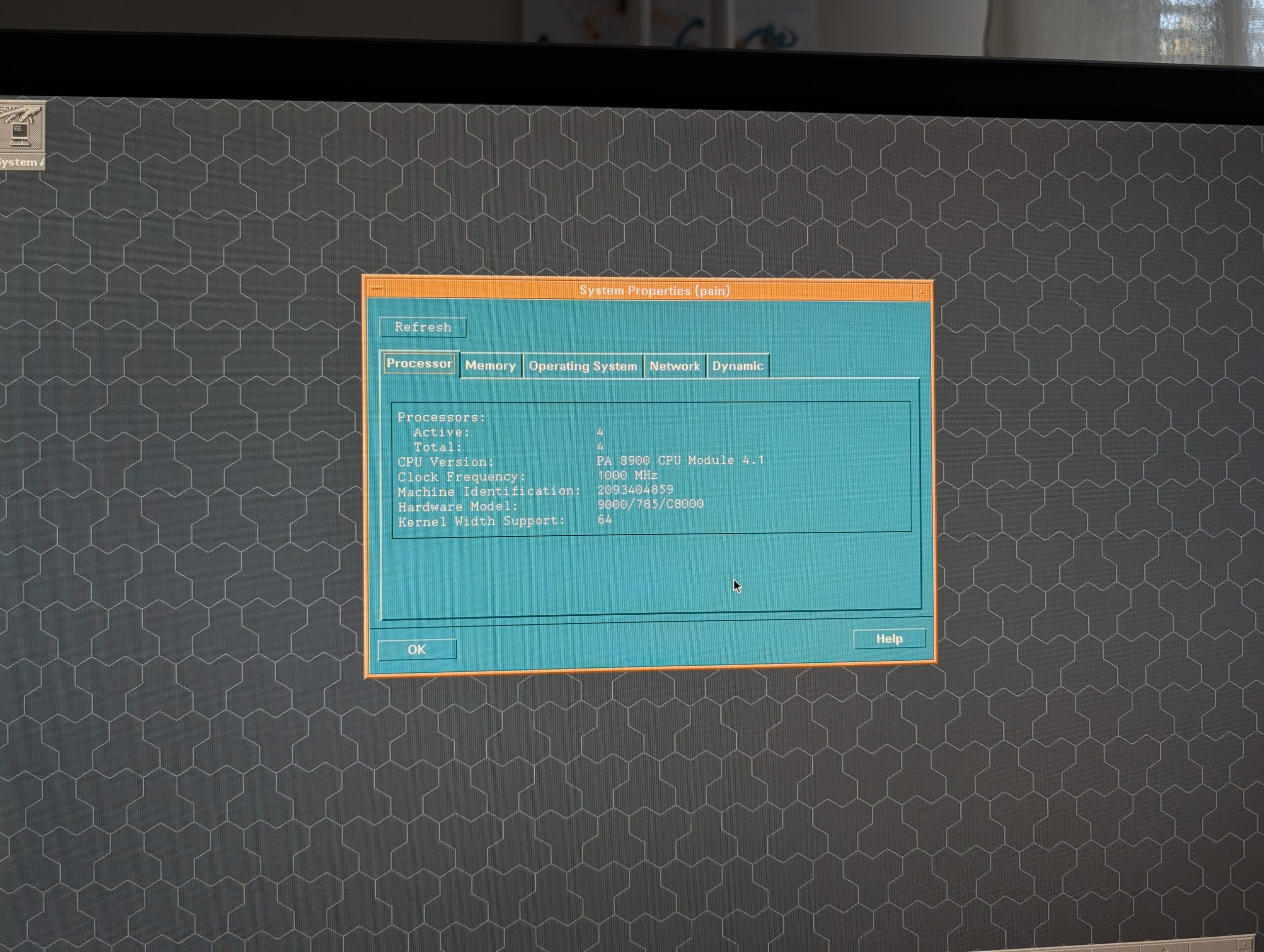
It’s running HP-UX 11i v1, with as many of the updates, patches, and fixes I could find – which is one of the major roadblocks for anyone trying to get into HP-UX. Installation media are relatively easy to come by if you know where to look (assuming you know which specific version you need), but any updates, patches, and fixes from roughly later than 2005 are almost impossible to find. Some can be discovered through My HPE Software Center, if you have the patience of an angel and the perseverance of a honey badger (it’s a really terrible website), but most things are all locked away behind expensive support contracts or just gone entirely.
I’ve contacted HPE several times in several different ways about the preservation of HP-UX, but they never replied – clearly, they just don’t care about the preservation of their legendary UNIX platform or the enthusiast community buying PA-RISC hardware on eBay for personal use and experimentation. Sad, but par for the course.
The c8000 is quite easy to find on eBay, but do be aware that the “cheap” offerings of around €800 are the versions with just one processor. To get the version with two processors, expect to shell out twice as much. Spare parts and upgrades are readily available, too.
Sun Ultra 45: SPARC/Solaris
The Sun Ultra 45 needs no introduction here on OSNews, as I published an in-depth article about this machine and all the cool things you can do with it late last year. My Ultra 45 was an incredibly generous gift by Adriaan de Groot, who owned this machine as part of his work on porting KDE to Solaris way back in the day. I then ordered various upgrades to the machine to max it out with two UltraSPARC IIIi processors running at 1.6GHz, 8 GB of RAM, and the Sun XVR-2500 with 256MB, the fastest GPU it supports. I also bought the SunPCI IIIpro (an entire x86 PC on a PCI-X card) and a flash accelerator card.

The Ultra 45 is not supported by Solaris 11, so the most recent version you can run is Solaris 10, and more specifically, Solaris 10 1/13 (from January 2013). Solaris 10 is still receiving patch sets to this day, but like HPE, Oracle hides them behind expensive, unobtainable support contracts. My attempts at contacting Oracle have been more lacklustre than my attempts at contacting HPE, but either way, no response from Oracle either. They, too, do not care about the enthusiast community.
The Ultra 45 also tends to be readily available on eBay, and you can expect to pay about €1000 or so for a single-processor model, and anything between €1500-2000 for a dual-processor one. Spare parts and upgrades abound, but do note that Ultra 45 processor coolers are weirdly expensive.
SGI Tezro: MIPS/IRIX
SGI and IRIX are well-loved in the retro computing community, and there’s no shortage of hardware to choose from if you want to get into IRIX. However, if you’re obsessed with the final models of UNIX workstation lines like I am, you’re going to be in a bit of trouble – you’re going to want an SGI Tezro, the final MIPS workstation SGI made. The company launched this top-of-the-line model in 2003, and kept updating and selling it until 2007. In its most powerful configuration, you’re looking at four MIPS processors running at 1GHz each, with a maximum of 8GB of RAM, and a V12 VPro GPU with 128MB of RAM (with a DVI port instead of the more cumbersome 13W3 connector).
The Tezro can run IRIX all the way up until the operating system’s final version, 6.5.30, released in August of 2006. The operating system discs and patches are readily available all over the web, which is quite nice. Out of all the commercial UNIX platforms mentioned in this article, the SGI and IRIX community is definitely the most active and lively, with people developing and maintaining software for IRIX to this very day. There are also people working on maintaining modern Linux kernels for SGI machines, and there’s a ton of forum activity out there.
The Tezro is an incredibly rare beast, and they rarely come up for sale. I’ve only ever seen one Tezro’s final price, and I think it was sold for well in excess of €6000. I have never owned or even seen a single SGI machine, let alone a Tezro,
IBM IntelliStation POWER 285: POWER/AIX
Out of all the architectures mentioned in this article, IBM’s POWER is the only one still under active development; all the others were phased out and cancelled long ago. However, even though IBM is still developing POWER and releasing new generations every few years, the company hasn’t built a POWER workstation in a long time. The last one built by IBM2 was the IntelliStation POWER 285, released in October of 2005, and sold up until 2009. It packed a single-core or dual-core POWER5+ processor running at 1.9 or 2.1GHz, supported a maximum of 32GB of RAM, and there were three graphics cards to choose from, with the GXT6500P with 128MB being the most powerful option (a card from 2002!).
At roughly the same time as the POWER 285, IBM also sold the IntelliStation POWER 185. This was a very different beast, though, as instead of using a POWER5+ processor, it used one or two PowerPC 970 processors, which was a slightly beefed-up POWER4 design, making it a generation behind the 285. It also had a much stricter maximum RAM limit (8GB), but could run the same outdated GPUs as the 285. Regardless, the 285 is clearly the more powerful machine.
By the way, if the “970” moniker sounds familiar, it’s because Apple used these very same processors under the marketing name “PowerPC G5” for their various G5 Macs. My pet conspiracy theory about the origins of the POWER 185 is that with Apple switching to Intel, IBM was left with a pallet of unused 970s, and thus created the 185 to get rid of at least some of them. The timeline adds up, as Apple announced the switch to Intel in June 2005, and the POWER 185 was announced in February 2006. I don’t actually believe this, but it’s a funny theory nonetheless.
The IntelliStation POWER 285 can run AIX up to version 7.1 TL5, released in 2017, which is remarkably modern. Do note that AIX 7.1 was originally released in 2010, and the number of changes and patches released for 7.1 probably dropped off sharply after its first few years on the market. AIX installation discs, patches, and documentation is easy to find, and I’ve heard from enthusiasts who play with older POWER servers that IBM is remarkably friendly to the hobbyist community, and will gladly answer any emails and provide help when they can. Of course, that’s just what I’ve heard through the grapevine, and I can’t vouch for any of it.
These machines seem to be quite rare. I have never seen an IntelliStation POWER 285 (or 185, for that matter) come up for sale, so I have no clue what people would be charging for these. My uneducated prediction is that a reasonably configured 285 will probably go well north of €2000, maybe even €3000.
HP AlphaStation ES47: Alpha/Tru64
Through various acquisitions (Compact acquired DEC; HP acquired Compaq), Alpha ended up at HP3. It was under their brand that the final Alpha workstation was let loose onto the world in 2002/2003 (I’m not 100% sure): the AlphaStation ES47. It contained one or two Alpha EV7 processors running at 1Ghz (also known as the Alpha 21364 or Marvel and the last Alpha processor ever made), a maximum of 16GB of RAM, and an optional ATI Radeon 7500 graphics card with an unspecified amount of video memory. From what I’ve read online, this machine is an absolute monster, weighing in at close to 60kg, with noise levels that aren’t exactly office-friendly.
Alpha-based workstations and servers ran Tru64 UNIX, which was initially known as OSF/1 AXP and then as Digital UNIX, before Compaq renamed it to Tru64. The AlphaStation ES47 supports the final release of the operating system from 2010, version 5.1B-6, and its installation media, patches, and even its multitude of license files are readily available online. An interesting bonus is that like most Alpha machines, the ES47 can also run OpenVMS, up to the final Alpha release of OpenVMS from 2017, V8.4-2L2.
This machine, too, I have never seen come up for sale. Seeing the absolutely insane prices people are asking for Alpha hardware, though, I’m not sure I even want to know what an ES47 would go for. An AlphaStation 500 from 1997, with a 400MHz processor, goes for €2500. A DS15 from the same era as the ES47, a desktop form-factor with a single 1GHz processor, already has an asking price of almost €6000. It wouldn’t surprise me if an ES47 would hit close to €10000.
Why these machines?
Why not just settle for lower-end, older, more readily available machines? This is a valid question, with answers that are probably not satisfactory to everyone. Of course, there’s the simple monkey brain “bigger number better” feeling, where I want the fastest, “newest” hardware to get the best experience out of these commercial UNIX machines. Another important point is that these machines will all be able to run the latest workstation versions of their various UNIX flavours, which also helps in realising the best possible experience and potentially makes compiling modern software easier.
Since they’re newer, they also tend to be easier to work with in a more practical sense; you won’t need special monitors or keyboards or whatever, since they’re all compatible with standard PC monitors, keyboards, and mice. Having just one dedicated desk with a monitor, keyboard, and mouse that work on both my c8000 and Ultra 45 saves a ton of space and time, since I just need to move a few cables from one machine to the other if I want to change machines.
There’s also a more intangible reason, one that I value a great deal. All of these machines were developed and introduced well past the point where everybody knew full well the dedicated UNIX workstation market was basically dead. The x86 platform was improving at an incredible pace, and offered better performance at far lower prices than any of the architectures in this article ever could. Meanwhile, the kind of software these workstations were designed for had long been ported to Windows, negating the need for commercial UNIX on workstations even more.
In fact, all of these five machines were developed and introduced after their respective companies had already announced they would be leaving the UNIX workstation market (with the sole exception of possibly IBM). All of them represent the final hurrahs of platforms that for decades had been the envy of computer enthusiasts the world over, designed by people who already knew this would be the last UNIX workstation they’d ever make. This gives these machines a certain melancholy that I personally really enjoy, even if I can’t fully explain why.
Even before you turn these machines on, simply by looking at their specifications, feeling the build quality, and weighing the component choices, you can tell exactly just how much of their heart and soul its creators were allowed to put into it. The Ultra 45 and c8000 are great examples of this. As I detailed in my Ultra 45 article, the Ultra 45 is not materially different from the two machines that came before it, making it an already outdated machine by the time it came out. Hell, the processors in the Ultra 45 were three generations behind the state-of-the-art in SPARC at the time. The c8000, on the other hand, got brand new processors that were substantially faster than what had come before (the first dual-core PA-RISC processors!), a brand new chipset, and even brand new GPU options, and thus delivered a true upgrade over its predecessors.
For whatever reason, it seems that HP decided to put considerably more effort into its final UNIX workstation than Sun did, and I find that fascinating. I desperately want to experience these other three machines, so I can get an even better understanding of where these companies put their priorities. Each of these computers were developed and built under the same somber assumption – the last one we’ll ever make – but each company put their own unique spin on it through the people and means they assigned to the project, all in a time-frame of only a few years.
It’s the same story told in five different ways.
What’s stopping you?
There’s countless reasons why trying to collect these five machines is such an incredibly difficult endeavour. First and foremost, it’s obviously a money issue – I’m not even remotely wealthy enough to casually spend decent-used-car-money on what is essentially a hobby. Second, availability is a huge problem, as the three machines I do not yet have simply rarely, if ever, come up for sale. Even if I had the money to burn on this rather silly hobby, I couldn’t.
Availability is further hindered by the fact that I’m European and live in the Swedish Arctic. From experience, I know that rare hardware like these UNIX workstations seem to have been more common in the United States than in Europe. Furthermore, even if someone is trying to sell one of these in Europe and they choose to do so on one of the local, country-specific classifieds platforms, I’m going to be locked out. Importing any of these machines from the US is basically a non-starter, since shipping machines that easily weigh in excess of 30kg across the Atlantic is not only expensive, but often also simply not an option since US sellers don’t want to do so. The EU import duty lottery isn’t exactly helping either.
I am absolutely green with envy whenever I watch YouTube videos of people visiting the various Vintage Computer Festival events in the US, where I often spot countless of these machines in the background, sometimes for sale at very reasonable prices, just sitting there like it’s no big deal. Similar events in Europe seem to be much smaller in scope and more locally-oriented, making it much harder to build up a network of like-minded friends who might let you know of great finds in other parts of the continent.
Basically everything is working against me.
With the possible exception of certain computer museums, I don’t think there is anyone in the world who owns all five of these machines, and I definitely will not be the first. Sadly.
- Fun fact: the HP zx2000/zx6000 Itanium workstations and the c8000 PA-RISC workstation shared the same chipset and general architecture. They’re far more alike than it seems at first sight. ↩︎
- While IBM didn’t, Raptor Computing Systems did. I reviewed their small Blackbird POWER9 desktop, but also have their big, dual-processor POWER9 workstation. These machines cannot run any commercial UNIX, though, so they’re not UNIX workstations by my own, admittedly arbitrary, definition. ↩︎
- It’s kind of wild that out of these five platforms, three are currently owned by HPE (which split off from HP in 2015). Not only do they own HP-UX and Tru64, but also IRIX, since they acquired SGI in 2016. ↩︎
