OSNews is funded entirely by you, our readers. There are no ads on OSNews, we are not part of a massive corporate publishing conglomerate like virtually every other technology news website, there are no wealthy (corporate) benefactors – it’s just whatever funds you, our readers, send our way. As such, I sometimes need to remind everyone about this, and December, the holiday month, seems as great a time as any to do this.
If you want to support a truly independent technology news website, free from the corrupting influences of corporate interests, advertising companies, managers pushing “AI”, and all the other nonsense destroying the web we once loved, you can do so by donating to keep OSNews alive. This gives me the time and means to write 9000 words about dead computer ecosystems, and I’m already working on an article about the next final UNIX workstation.
If you want to make a single, non-recurring donation, you can donate to the OSNews Ko-Fi. Every amount, large or small, is deeply appreciated.
You can also buy some OSNews merch! We’ve got some great shirts and mugs with awesome designs, and every individual purchase nets OSNews about $8.
Every single donation, large or small, is deeply appreciated and keeps the lights on around here. There aren’t many websites like OSNews left, especially not independent ones that answer to nobody. Your support keeps OSNews going, with June 2026 marking a special moment for me: it will mark twenty years since I took over this place. I’m not expecting a party – you’re paying me to work, not to party – but it is still a meaningful anniversary for me personally.
This is the website for APL9, which is an APL implementation written in C on and for Plan 9 (9front specifically, but the other versions should work as well).
Work started in January 2022, when I wanted to do some APL programming on 9front, but no implementation existed. The focus has been on adding features and behaving (on most points) like Dyalog APL. Speed is poor, since many primitives are implemented in terms of each other, which is not optimal, but it helped me implement stuff easier.
Moss is a Unix-like, Linux-compatible kernel written in Rust and Aarch64 assembly.
It features a modern, asynchronous core, a modular architecture abstraction layer, and binary compatibility with Linux userspace applications (currently capable of running most BusyBox commands).
I mean, hobby operating systems and kernels written in Rust aren’t exactly the most unique right now, but that doesn’t make them any less interesting for the kinds of people that frequent a site called OSNews. Moss has quite a few things going for it, including support for enough Linux system calls to run most BusyBox commands, complex memory and process management, use of Rust’s async/await model in the kernel, and much more.
LionsOS is an operating system based on the seL4 microkernel with the goal of making the achievements of seL4 accessible. That is, to provide performance, security, and reliability.
[…]
It is not a conventional operating system, but contains composable components for creating custom operating systems that are specific to a particular task. Components are joined together using the Microkit tool.
VMS/XDE is an OpenVMS x86 development environment for Linux and WIndows (via WSL). It provides a familiar user experience for OpenVMS developers working in Linux and Windows yet offers 100% binary and file system compatilibilty with OpenVMS.
VMS/XDE includes OpenVMS V9.2-3 user, supervisor and executive mode operating system environments and a set of x86 native compilers and layered products geared towards OpenVMS software development and testing.
VMS/XDE is a beta version, and comes with the usual annoying OpenVMS x86 time bombs, this time exploding on 3 January 2026. If you intend to use the finalised commercial version after the beta period ends, you’ll have to employ the same licenses as regular OpenVMS. It’s a bit of a mess, but that’s the OpenVMS way, sadly – and I don’t blame them, either, as I’m sure they’re hamstrung by a ton of agreements and restrictions imposed upon them by HP.
Regardless, VMS/XDE brings a zero setup OpenVMS environment to the operating system you’re already using, making it easier to develop and cross-compile for the platform. I still have absolutely no clue just how many people OpenVMS is still relevant for, but I absolutely adore the fact VMS Software Inc. is working on this. In a world where so many of its former competitors are being held hostage by corporate indifference, it’s refreshing to see VMS still moving forward.
We’ve talked about Ironclad a few times, but there’s been two new releases since the 0.6.0 release we covered last, so let’s see what the project’s been up to. As a refresher, Ironclad is a formally verified, hard real-time capable kernel written in SPARK and Ada. Versions 0.7.0 and 0.8.0 improved support for block device caching, added a basic NVMe driver, added support for x86’s SMAP, switched from KVM to NVMM for Ironclad’s virtualization interface, and much, much more. In the meantime, Ironclad also added support for RISC-V, making it usable on any 64 bit RISC-V target that supports a Limine-protocol compatible bootloader.
The easiest way to try out Ironclad is to download Gloire, a distribution that uses Ironclad and the GNU tools. It can be installed in both a virtual machine and on real hardware.
There’s something incredibly enticing and retrofuturistic about a well-designed TUI, or text-based user interface. There’s an endless list number of these, but two crossed my path these past few days, and I found them particularly appealing. First, we’ve got bluetui, an application for managing Bluetooth connections on Linux systems with bluez installed.
The second is resterm.
Resterm is a terminal-first client for working with HTTP, GraphQL, and gRPC services. No cloud sync, no signups, no heavy desktop app. Simple, yet feature rich, terminal client for .http/.rest files. It pairs a Vim-like-style editor with a workspace explorer, response diff, history, profiler and scripting so you can iterate on requests without leaving the keyboard.
I don’t use TUIs or the command line in general all that much, but these are two excellent examples of just how beautiful and user-friendly a good text-based user interface can really be. The command line is about a lot more than just archaic, cryptic incantations designed in the 1960s.
The world’s best operating system, 9front, has released a new release called Release. 9front is a maintained fork of Plan 9. The new release Release brings atomic(2) functions for arm, arm64, mips, 386 and amd64, improved stability when the kernel runs out of memory, memdraw and devdraw now support affine warp primitive, and more.
MicroPythonOS is a lightweight, fast, and versatile operating system designed to run on microcontrollers like the ESP32 and desktop systems. With a modern Android-like touch screen UI, App Store, and Over-The-Air updates, it’s the perfect OS for innovators and developers.
It’s quite neat to see this running in such a constrained environment, especially considering it comes with a graphical user interface, some basic applications, and niceties like OTA updates and an application repository. As the name implies, MicroPythonOS uses native MicroPython for application and driver development, making cross-platform portability from microcontrollers to regular PCs a possibility. It’s built on the MicroPython runtime, with LVGL for graphics, packaged by the lvgl_micropython project.
It’s still relatively early in development, but it’s completely open source so anyone can help out and improve the project. I’m personally not too well-versed in the world of microcontrollers like the popular ESP32, so I’m not entirely sure just how capable other operating systems and platforms built on top if it are. This particular operating system seems to make it rather easy and straightforward for anyone to build and distribute an application for such microcontrollers, to a point where even an idiot like myself could relatively easily buy, say, an ESP32 kit with a display and assemble my own collection of small applications.
Unite is an operating system in which everything is a process, including the things that you normally would expect to be part of the kernel. The hard disk driver is a user process, so is the file system running on top of it. The namespace manager is a user process. The whole thing (in theory, see below) supports network transparency from the ground up, you can use resources of other nodes in the network just as easily as you can use local resources, just prefix them with the node ID. In the late 80’s, early 90’s I had a lot of time on my hands. While living in the Netherlands I’d run into the QNX operating system that was sold locally through a distributor. The distributors brother had need of a 386 version of that OS but Quantum Software, the producers of QNX didn’t want to release a 386 version. So I decided to write my own.
Mattheij hasn’t done anthing or even looked at the code for this operating system he created in decades, but recently got the urge to fix it up and publish it online for all of us to see. Of course, resurrecting something this old and long untouched required some magic, and there’s still a few things which he simply just can’t get to work properly. I like how the included copy of vi is broken and adds random bits of garbage to files, and things like the mouse driver don’t work because it requires a COM port and the COM ports don’t seem to work in an emulated environment.
Unite is modeled after QNX, so it uses a microkernel. It uses a stripped-down variant of the MINIX file system, only has one user but that user can run multiple sessions, and there’s a basic graphics mode with some goodies. Sadly, the graphics mode is problematic an requires some work to get going, and because you’ll need the COM ports to work to use it properly it’s a bit useless anyway at the moment.
Regardless, it’s cool to see people going back to their old work and fixing it up to publish the code online.
It’s been a little over a month since OSNews went completely ad-free for everyone. I can say the support has been overwhelming, with the accompanying fundraiser currently sitting at 67% of the €5000 goal! Of course things slowed down a bit after the initial week of one donation after the next, so I’m throwing out this reminder that without your support, OSNews can’t exist – doubly so now that I’ve removed any and all advertising. Help us reach that 100%!
By being entirely free from the corrupting influence of advertising, I have even less desire to chase views, entrap users with slop content, game search engines with shitty SEO spam, or turn on the taps of “AI”-generated trash to spew forth as much “articles” and thus views as possible. This also means that OSNews is one of the few technology news websites remaining that is not part of a massive corporate media conglomerate, so there’s no pressure from “corporate” to go easy on advertisers or write favourable stuff about corporate’s friends.
You’d be surprised to learn how many technology sites out there are not independent.
The response to OSNews no longer having any advertising has been overwhelmingly positive – unsurprisingly – and that has taken away any reservations I might have had about taking this step. In a world where so many websites are disappearing, turning into corporate mouthpieces, or becoming glorified content farms, OSNews can keep on doing what it does, independent of any outside influence, thanks to the countless contributions from all of you.
I recently implemented a minimal proof of concept time-sharing operating system kernel on RISC-V. In this post, I’ll share the details of how this prototype works. The target audience is anyone looking to understand low-level system software, drivers, system calls, etc., and I hope this will be especially useful to students of system software and computer architecture.
[…]
Finally, to do things differently here, I implemented this exercise in Zig, rather than traditional C. In addition to being an interesting experiment, I believe Zig makes this experiment much more easily reproducible on your machine, as it’s very easy to set up and does not require any installation (which could otherwise be slightly messy when cross-compiling to RISC-V).
This is not the first, and certainly not the last, operating system implemented from scratch as a teaching exercise, both for the creator itself, as well as for others wanting to follow along. This time it’s developed for RISC-V, and in an interesting twist, programmed in Zig (no Rust for once!).
The first time I learned about UTF-8 encoding, I was fascinated by how well-thought and brilliantly it was designed to represent millions of characters from different languages and scripts, and still be backward compatible with ASCII.
[…]
Designing a system that scales to millions of characters and still be compatible with the old systems that use just 128 characters is a brilliant design.
On a slightly related note, if you are ever bothered or annoyed by text online rendering as unknown squares, you most likely are just missing the proper fonts to render them. At least on most Linux and BSD systems, all you need to do is install the entire set of Noto fonts, including those for every single non-Latin script. Assuming your package manager has sane naming conventions, it’ll most likely come down to something like sudo dnf install google-noto* or whatever your system’s install package command is, and after installing a whole slew of font files, your system will now be able to render virtually every script under the sun.
After installing this massive font set, you can do things like write and render in hieroglyphics, write Ea-nāṣir‘s name the way it’s supposed to, and render all kinds of other scripts and symbols without ever having to look at one of those blank squares ever again.
Who doesn’t love a desktop-oriented hobby operating system to start off the weekend?
SkiftOS is a hobbyist operating system built from the ground up with a focus on modularity, simplicity, and modern design principles. Driven by a dissatisfaction with the fragmented user experiences prevalent in contemporary operating systems, SkiftOS strives for deep integration and a cohesive aesthetic. This project is a labor of love—an artistic pursuit rather than a commercial product.
Reading through the GitHub page and SkiftOS’ actual website, it reminds me so, so much of the desktop-oriented hobby operating systems of the early 2000s, like AtheOS, SkyOS, and others. It has its own microkernel, C++ core library, package manager, reactive UI framework, an entire desktop environment, and even a browser engine. This operating system is remarkably complete in the features that it already offers, especially considering its hobby status.
The desktop environment is called Hideo, and it’s remarkably beautiful when you consider we’re talking about a hobby operating system. It comes with a variety of applications, too, mostly covering the basics we’ve come to expect from a desktop operating system, like a text editor, archive manager, task manager, image viewer, media player, a file manager, and so on. Meanwhile, the browser engine is called Vaev and is highly experimental, but its existence illustrates just how broad this project really is.
I haven’t been able to find some time to run it yet, but if you’re interested, they advise you to run it using qemu. While running it on real hardware is technically possible, it’s not advisable due to the alpha state of the operating system.
In 9front, we host almost all parts of our development process on 9front — the git repositories, the mailing list, the ci/cd, the web site, and everything else. (The exception is #cat-v IRC) We use the system regularly, both when hacking on the system and in our personal use.
Personally, I write most of my code on Plan 9, read my emails there, and often drive Linux from there. I run my home network off of a 9front CPU server, and host my websites off it. I know other people around 9front do similar.
It clearly shows, too. If you dive into the 9front community, you’ll quickly realise everything runs on 9front, and that does create a sense that the operating system is capable, and that its developers have confidence and pride in their work. Exploring 9front myself, it feels awesome to see that all the documentation I’m reading is being hosted on 9front machines.
I’m going to relaunch the OSNews Gemini capsule, this time hosted on 9front, and since countless 9front users host their own Gemini capsules on 9front, I feel confident that I’ve got people to talk to when I need help. I just need the time to actually sit down and figure out the minutiae of 9front, because it truly is unique.
If you’re of a certain age (and not American), there’s a specific corporate font you’re most likely aware of. You may not know its exact name, and you may not actively remember it, but once you see it, you know exactly what you’re looking at. The font’s called Nokia Sans (and Nokia Serif), and it was used by pretty much every single Nokia device between roughly 2002 and 2013 or so, when it was replaced by a very bland font made by Bruno Maag (with help from the person who designed Comic Sans) that they used after that.
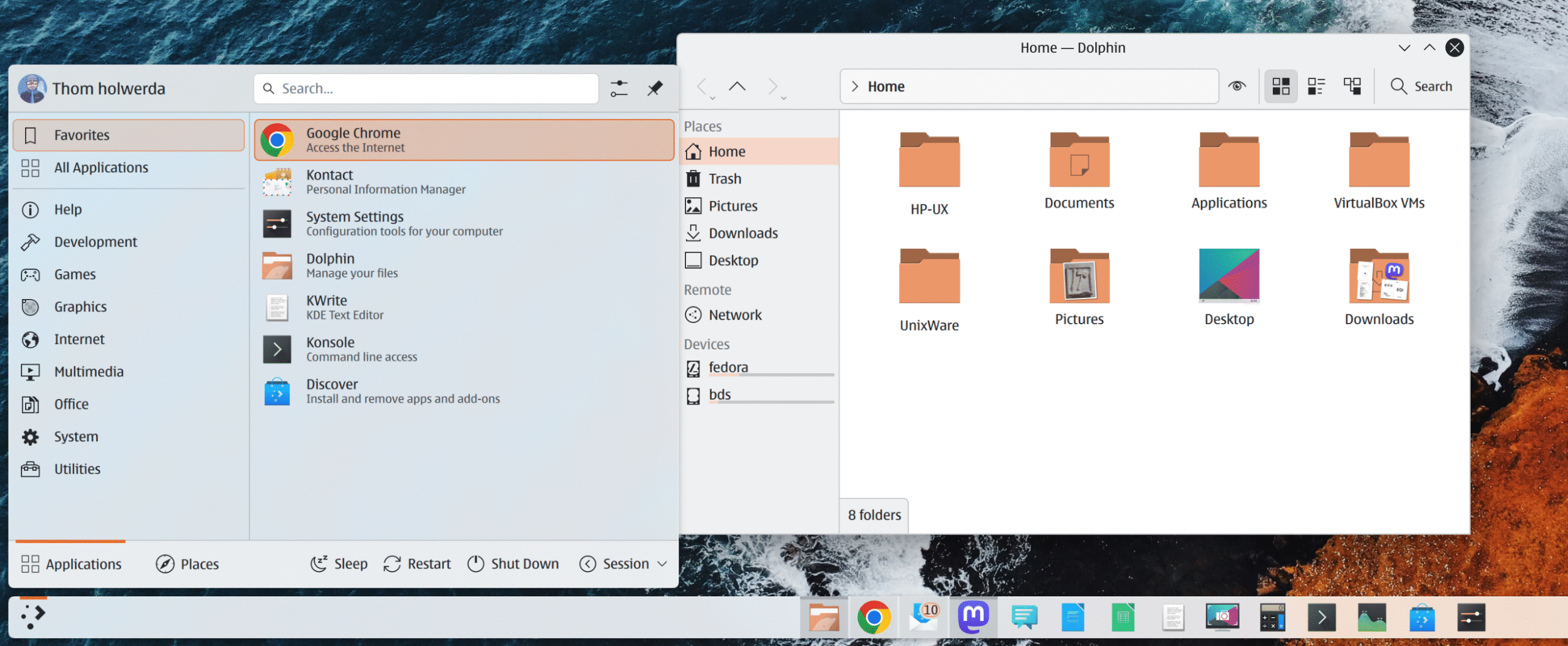
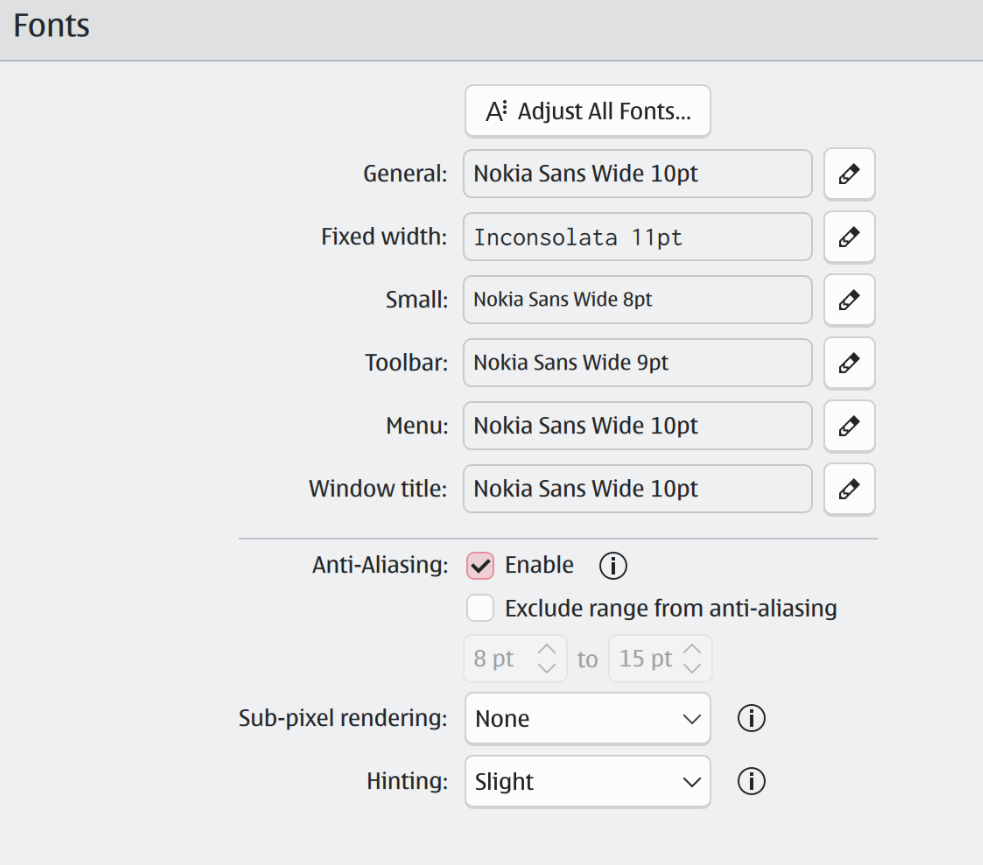
I can’t remember why, exactly, but I got majorly nostalgic for Nokia’s characteristic, recognisable font, and decided to see if it would work as a user interface font. Now, the font is still owned by Nokia and I couldn’t find a proper place to download it, but I eventually stumbled upon a site that had each individual variant listed for download. I downloaded each of them, installed them using KDE’s font installation method, and tried it out as my user interface font.
You’ll quickly discover you shouldn’t use the regular variant, but should instead opt for the Nokia Sans Wide variant. Back in 2011, when Nokia originally announced it was replacing Nokia Sans, the creator of the font, Erik Spiekermann, responded to the announcement on his blog. Apparently, one of the major reasons for Nokia to change fonts was that they claimed Nokia Sans wouldn’t work as a user interface font, but Spiekermann obviously disagrees, pointing specifically to the Wide variant. In fact, Spiekermann does not pull any punches.
After 10 years it was high time to look at Nokia’s typefaces as the dominant visual voice of the brand but whoever decided on a completely new direction was either not aware of what was available or was persuaded by Bruno Maag to start over. Bruno may not create the most memorable typefaces, but he certainly knows how to sell them. And technically, their fonts are excellent. Too bad they didn’t have the confidence to work with me on an update. Instead they’re throwing out ten years of brand recognition in favour of blandness.
I was pleasently surprised by just how nice the font looks when used as a general user interface font. It’s extremely legible at a variety of sizes, and has a ton of character without becoming gimmicky or overbearing. What originally started as mere curiosity has now become my UI font of choice on all my machines, finally displacing Inter after many years of uncontested service. Of course, all of this is deeply personal and 95% an issue of taste, but I wanted to write about it to see if I’m just entirely crazy, or if there’s some method to my madness.
Do note that I’m using high DPI displays, and KDE on Wayland, and that all of this may look different on Windows or macOS, or on displays with lower DPI. One of Inter’s strengths is that it renders great on both high and lower DPI displays, but since I don’t have any lower DPI displays anymore, I can’t test it in such an environment. I’m also not entirely sure about the legal status of downloading fonts like this, but I am fairly sure you’re at least allowed to use non-free fonts for personal, non-commercial use, but please don’t quote me on that. Since downloading each variant of these Nokia fonts is annoying, I’d love to create and upload a zip file containing all of them, but I’m sure that’s illegal.
I’m not a font connoisseur, so I may be committing a huge faux pas here? Not that I care, but reading about font nerds losing their minds over things I never even noticed is always highly entertaining.

 Login
Login