A threat group dubbed ShadyPanda exploited traditional extension processes in browser marketplaces by uploading legitimate extensions and then quietly weaponization them with malicious updates, infecting 4.3 million Chrome and Edge users with RCE malware and spyware.
Google has released an update for its Chrome browser that includes 13 security fixes, four of which are classified as high severity. One of these was found in Chrome’s Digital Credentials feature–a tool that lets you share verified information from your digital wallet with websites so you can prove who you are across devices.
Chrome is by far the world’s most popular browser, with an estimated 3.4 billion users. That scale means when Chrome has a security flaw, billions of users are potentially exposed until they update.
That’s why it’s important to install these patches promptly. Staying unpatched means you could be at risk just by browsing the web, and attackers often exploit these kinds of flaws before most users have a chance to update. Always let your browser update itself, and don’t delay restarting the browser as updates usually fix exactly this kind of risk.
How to update Chrome
The latest version number is 143.0.7499.40/.41 for Windows and macOS, and 143.0.7499.40 for Linux. So, if your Chrome is on version 143.0.7499.40 or later, it’s protected from these vulnerabilities.
The easiest way to update is to allow Chrome to update automatically, but you can end up lagging behind if you never close your browser or if something goes wrong—such as an extension stopping you from updating the browser.
To update manually, click the More menu (three dots), then go to Settings > About Chrome. If an update is available, Chrome will start downloading it. Restart Chrome to complete the update, and you’ll be protected against these vulnerabilities.
One of the vulnerabilities was found in the Digital Credentials feature and is tracked as CVE-2025-13633. As usual Google is keeping the details sparse until most users have updated. The description says:
Use after free in Digital Credentials in Google Chrome prior to 143.0.7499.41 allowed a remote attacker who had compromised the renderer process to potentially exploit heap corruption via a crafted HTML page.
That sounds complicated so let’s break it down.
Use after free (UAF) is a specific type of software vulnerability where a program attempts to access a memory location after it has been freed. That can lead to crashes or, in some cases, let an attackers run their own code.
The renderer process is the part of modern browsers like Chrome that turns HTML, CSS, and JavaScript into the visible webpage you see in a tab. It’s sandboxed for safety, separate from the browser’s main “browser process” that manages tabs, URLs, and network requests. So, for HTML pages, this is essentially the browser’s webpage display engine.
The heap is an area of memory made available for use by the program. The program can request blocks of memory for its use within the heap. In order to allocate a block of some size, the program makes an explicit request by calling the heap allocation operation.
A “remote attacker who had compromised the renderer” means the attacker would already need a foothold (for example, via a malicious browser extension) and then lure you to a site containing specially crafted HTML code.
So, my guess is that this vulnerability could be abused by a malicious extension to steal the information handled through Digital Credentials. The attacker could access information normally requiring a passkey, making it a tempting target for anyone trying to steal sensitive information.
Some of the fixes also apply to other Chromium browsers, so if you use Brave, Edge, or Opera, for example, you should keep an eye out for updates there too.
We don’t just report on threats—we help safeguard your entire digital identity
Cybersecurity risks should never spread beyond a headline. Protect your, and your family’s, personal information by using identity protection.
"Three years ago, Google removed JPEG XL support from Chrome, stating there wasn't enough interest at the time," writes the blog Windows Report. "That position has now changed."
In a recent note to developers, a Chrome team representative confirmed that work has restarted to bring JPEG XL to Chromium and said Google "would ship it in Chrome" once long-term maintenance and the usual launch requirements are met.
The team explained that other platforms moved ahead. Safari supports JPEG XL, and Windows 11 users can add native support through an image extension from Microsoft Store. The format is also confirmed for use in PDF documents. There has been continuous demand from developers and users who ask for its return.
Before Google ships the feature in Chrome, the company wants the integration to be secure and supported over time. A developer has submitted new code that reintroduces JPEG XL to Chromium. This version is marked as feature complete. The developer said it also "includes animation support," which earlier implementations did not offer.
Cisco has issued an urgent security advisory detailing two critical vulnerabilities affecting its Unified Contact Center Express (Unified CCX) platform. The flaws, identified as CVE-2025-20354 and CVE-2025-20358, could allow unauthenticated remote attackers to execute arbitrary code, bypass authentication, and potentially gain root-level access to affected systems.The vulnerabilities were disclosed in the advisory cisco-sa-cc-unauth-rce-QeN8h7mQ, published on November 5, 2025, at 16:00 GMT. Cisco has classified both flaws as critical with a CVSS base score of 9.8 and 9.4, respectively. According to the company, no workarounds currently exist, making software updates the only effective remediation.
Details of the Vulnerabilities: 2025-20354 and CVE-2025-20358
Cisco confirmed that the issues reside within the Java Remote Method Invocation (RMI) process and CCX Editor components of Unified CCX. Both vulnerabilities are independent, meaning one does not need to be exploited before the other can be used.CVE-2025-20354 is a remote code execution vulnerability stemming from improper authentication mechanisms within certain Unified CCX features. It allows an unauthenticated, remote attacker to upload arbitrary files and execute commands with root privileges. An attacker could exploit this flaw by sending a crafted file through the Java RMI process, effectively taking full control of the underlying operating system.This vulnerability, tracked under Cisco Bug ID CSCwq36528, received a CVSS score of 9.8, placing it among the highest severity levels. Cisco warned that successful exploitation could lead to complete system compromise, including the ability to elevate privileges to root.The second flaw, CVE-2025-20358, affects the CCX Editor application. This authentication bypass vulnerability arises from weaknesses in how the CCX Editor communicates with the Unified CCX server. An attacker could manipulate this process by redirecting authentication to a malicious server, deceiving the system into accepting unauthorized access.If successfully exploited, this vulnerability could enable an attacker to create and execute arbitrary scripts within the affected environment using an internal non-root account. Although this vulnerability is slightly less severe than the RCE flaw, its CVSS score of 9.4 still categorizes it as critical. The issue is documented under Cisco Bug ID CSCwq36573.
Impacted Products and Workarounds
Cisco stated that all versions of Unified CCX are vulnerable, regardless of device configuration. The company confirmed that its Packaged Contact Center Enterprise (Packaged CCE) and Unified Contact Center Enterprise (Unified CCE) products are not affected by CVE-2025-20354 or CVE-2025-20358.Cisco’s advisory noted that no workarounds or temporary mitigations are available for these vulnerabilities. The company strongly urges all customers to apply the newly released software updates as the only permanent solution.To fully remediate the flaws, Cisco recommends upgrading to fixed releases as follows:
Unified CCX 12.5 SU3 ES07 (and earlier versions)
Unified CCX 15.0 ES01
The Cisco Product Security Incident Response Team (PSIRT) validated the fixed versions and confirmed that these are the earliest builds containing the necessary patches.
No Known Exploitation Yet
As of publication, Cisco’s PSIRT reported no evidence of public exploitation or malicious activity related to CVE-2025-20354 or CVE-2025-20358. However, given the critical nature and remote attack vector of these vulnerabilities, security experts warn that exploitation attempts could surface soon after disclosure.Cisco credited security researcher Jahmel Harris for responsibly reporting the issues. The company’s acknowledgment reinforces the importance of coordinated vulnerability disclosure in protecting enterprise environments from high-impact cyber threats.
Google has rolled out an emergency update for its Chrome browser, version 142, to address a series of serious remote code execution (RCE) vulnerabilities that could allow attackers to take control of affected systems. The update, released on November 5, 2025, is being distributed gradually across desktop platforms, Windows, macOS, and Linux, as well as Android devices through Google Play and Chrome’s built-in update mechanism.The latest update fixes five distinct security flaws, three of which have been rated as high severity due to their potential for memory corruption and remote code execution. Among these, the most critical issue is CVE-2025-12725, a flaw found in WebGPU, Chrome’s graphics processing interface. This vulnerability, caused by an out-of-bounds write error, could allow malicious code to overwrite crucial system memory and execute arbitrary commands. An anonymous security researcher first discovered CVE-2025-12725 on September 9, 2025. Google has restricted technical details of the exploit to prevent attackers from leveraging it before most users have applied the update.
Other High-Severity Issues: CVE-2025-12726 and CVE-2025-12727
Two other high-severity vulnerabilities were also patched. CVE-2025-12726, reported by researcher Alesandro Ortiz on September 25, involves an inappropriate implementation in Chrome’s Views component, the part responsible for handling the browser’s user interface. Meanwhile, CVE-2025-12727, identified by researcher 303f06e3 on October 23, affects Chrome’s V8 JavaScript engine, the core of Chrome’s performance and execution environment.Both CVE-2025-12726 and CVE-2025-12727 could allow attackers to manipulate memory and potentially execute malicious code remotely. According to Google’s internal assessments, these vulnerabilities received CVSS 3.1 scores of 8.8, indicating direct risk.
Medium-Severity Omnibox Issues
Alongside these critical patches, Google addressed two medium-severity vulnerabilities in Chrome’s Omnibox, the combined search and address bar. CVE-2025-12728, reported by Hafiizh, and CVE-2025-12729, discovered by Khalil Zhani, both stem from inappropriate implementations that could lead to data exposure or UI manipulation. While not as severe as the WebGPU or V8 flaws, these issues still warrant prompt user updates to prevent potential misuse.According to Google’s official release notes:
Desktop (Windows, macOS, Linux): Version 142.0.7444.134/.135
Android: Version 142.0.7444.138
Google emphasized that the Android release contains the same security fixes as its desktop counterparts. The rollout will continue over the next few days and weeks as part of the company’s staged deployment process.
Official Statement and Update Details
In the official blog post, Chrome team member Krishna Govind confirmed the emergency patch for Android and desktop. The post highlighted ongoing efforts to enhance stability and performance, while ensuring that users receive timely security updates.“We’ve just released Chrome 142 (142.0.7444.138) for Android,” the statement read. “It’ll become available on Google Play over the next few days. If you find a new issue, please let us know by filing a bug.”The blog also reiterated that Chrome’s Stable Channel Update for Windows, macOS, and Linux began rolling out simultaneously on November 5, 2025.Google credited the security researchers who responsibly disclosed these vulnerabilities before they could be exploited. The company stated that detailed technical information will remain withheld until “a majority of users have updated,” reducing the risk of targeted attacks exploiting CVE-2025-12725, CVE-2025-12726, or CVE-2025-12727.
User Recommendations
It is recommended that all users update Chrome immediately. Desktop users should go to Settings → About Chrome to check for version 142.0.7444.134 or later, while Android users can verify updates via the Google Play Store. Enabling automatic updates is strongly advised to ensure future patches are applied as soon as they are released.Even though the two Omnibox vulnerabilities (CVE-2025-12728 and CVE-2025-12729) are less critical, delaying updates can still expose users to phishing or injection risks through manipulated browser interfaces.
Google has rolled out a new autofill feature for Chrome that goes beyond storing just your passwords, addresses, and credit card numbers. The new “enhanced autofill” can now stash your driver’s license, passport details, VIN, or license plate information. Sounds convenient, right?
But just because you can, it doesn’t mean you should.
Let’s face it: filling out government forms or travel bookings online is a pain. Anything that saves a few minutes—or spares you from hunting down your passport at the back of a drawer—feels like a win, especially if Chrome can neatly autofill those fields. And yes, Google promises encryption, explicit permission for autofill, and manual activation only if you want it.
But let’s think this through. Is storing your most personally identifiable information—like government-issued IDs—in the market-dominant browser a good idea? Because that’s what Chrome is.
Chrome’s market share (over 73% at the time of writing) makes it the internet’s biggest bullseye for criminals. Whether you’re using the enhanced autofill or the regular one, browser-based storage schemes are relentlessly hunted by password stealers, infostealers, and other types of malware.
And let’s not forget phishing attempts. Maybe having to dig through your drawer while you think about why a website needs that information isn’t such a bad thing after all.
Sure, Chrome encrypts autofill data, only saves your info with permission, and asks for confirmation before pasting it into a form. You can also ramp up security with two-factor authentication (2FA) and a Chrome sync passphrase. But when cybercriminals get the right kind of access (by stealing a browser session, finding an unlocked device, or getting you to install a rogue extension), your sensitive information is in danger. And with what Chrome can now store, that could mean your identity.
Chrome’s enhanced autofill promises a smoother online ride, but the consequences of storing government IDs in your browser could outweigh the perks. Cybercriminals love a big target—and with Chrome’s popularity, the bounty only grows. When the reward for a criminal is your passport, driver’s license, or identity, convenience should come second to caution.
Thankfully, someone decided it was a good idea to turn off this feature by default, but if you want to check, here’s how to find it:
Open Chrome.
In the main Chrome menu, click on Settings.
Under Autofill and passwords, select Enhanced autofill if present.
Better alternative: password managers
We would advise that if you must store this kind of information digitally, use a password manager. These tools are built for secure storage—they’re audited for security, separate from browser processes, and don’t automatically serve up your data to any site that happens to have the right input fields.
Stick to a dedicated password manager and stay in control of what’s stored and where it gets filled out. Remember: the less a browser knows about your life, the safer you are when someone eventually tries to break in.
Google has released an update for its Chrome browser to patch four security vulnerabilities, including one zero-day. A zero-day vulnerability refers to a bug that has been found and exploited by cybercriminals before the vendor even knew about it (they have “zero days” to fix it).
This update is crucial since it addresses one vulnerability which is already being actively exploited and, reportedly, can be abused when the user visits a malicious website. It probably doesn’t require any further user interaction, which means the user doesn’t need to click on anything in order for their system to be compromised.
The Chrome update brings the version number to 140.0.7339.185/.186 for Windows, Mac and 140.0.7339.185 for Linux. So, if your Chrome is on the version number 140.0.7339.185 or later, it’s protected against exploitation of these vulnerabilities.
The easiest way to update Chrome is to allow it to update automatically, but you can end up lagging behind if you never close your browser or if something goes wrong—such as an extension stopping you from updating the browser.
To manually get the update, click the more menu (three stacked dots), then choose Settings > About Chrome. If there is an update available, Chrome will notify you and start downloading it. Then all you have to do is reload Chrome in order for the update to complete, and for you to be safe from the vulnerabilities.
Google describes the zero-day vulnerability tracked as CVE-2025-10585 as a type confusion in V8. Reported by Google Threat Analysis Group on 2025-09-16.
Despite the short statement—Google never reveals a lot of details until everyone has had a chance to update—there are a few conclusions we can draw.
It helps to know that V8 is Google’s open-source Javascript engine.
A “type confusion” vulnerability happens when code doesn’t verify the object type passed to it and then uses the object without type-checking. So, a program mistakenly treats one type of data as if it were another, like confusing a list for a single value or interpreting a number as text. This mix-up can cause the software to behave unpredictably, creating opportunities for attackers to break in, steal data, crash programs, or even run malicious code.
Google’s Threat Analysis Group (TAG) focuses on spyware and nation-state attackers who abuse zero days for espionage purposes.
So, it stands to reason that an attacker used Javascript to create a malicious site that exploited this vulnerability and lured targeted victims to that website.
TAG reported the bug on September 16, and Google issued the patch one day later. That implies that the bug was urgent, or very easy to fix, and probably that both of those statements are true to some extent.
Usually, as more details become known or a patch gets reverse engineered, cybercriminals will start using the vulnerability in less targeted attacks.
Users of other Chromium-based browsers, such as Microsoft Edge, Brave, Opera, and Vivaldi, are also advised to keep an eye out for updates and install them when they become available.
We don’t just report on threats—we remove them
Cybersecurity risks should never spread beyond a headline. Keep threats off your devices by downloading Malwarebytes today.
Microsoft today released security updates to fix at least 67 vulnerabilities in its Windows operating systems and software. Redmond warns that one of the flaws is already under active attack, and that software blueprints showing how to exploit a pervasive Windows bug patched this month are now public.
The sole zero-day flaw this month is CVE-2025-33053, a remote code execution flaw in the Windows implementation of WebDAV — an HTTP extension that lets users remotely manage files and directories on a server. While WebDAV isn’t enabled by default in Windows, its presence in legacy or specialized systems still makes it a relevant target, said Seth Hoyt, senior security engineer at Automox.
Adam Barnett, lead software engineer at Rapid7, said Microsoft’s advisory for CVE-2025-33053 does not mention that the Windows implementation of WebDAV is listed as deprecated since November 2023, which in practical terms means that the WebClient service no longer starts by default.
“The advisory also has attack complexity as low, which means that exploitation does not require preparation of the target environment in any way that is beyond the attacker’s control,” Barnett said. “Exploitation relies on the user clicking a malicious link. It’s not clear how an asset would be immediately vulnerable if the service isn’t running, but all versions of Windows receive a patch, including those released since the deprecation of WebClient, like Server 2025 and Windows 11 24H2.”
Microsoft warns that an “elevation of privilege” vulnerability in the Windows Server Message Block (SMB) client (CVE-2025-33073) is likely to be exploited, given that proof-of-concept code for this bug is now public. CVE-2025-33073 has a CVSS risk score of 8.8 (out of 10), and exploitation of the flaw leads to the attacker gaining “SYSTEM” level control over a vulnerable PC.
“What makes this especially dangerous is that no further user interaction is required after the initial connection—something attackers can often trigger without the user realizing it,” said Alex Vovk, co-founder and CEO of Action1. “Given the high privilege level and ease of exploitation, this flaw poses a significant risk to Windows environments. The scope of affected systems is extensive, as SMB is a core Windows protocol used for file and printer sharing and inter-process communication.”
Beyond these highlights, 10 of the vulnerabilities fixed this month were rated “critical” by Microsoft, including eight remote code execution flaws.
Notably absent from this month’s patch batch is a fix for a newly discovered weakness in Windows Server 2025 that allows attackers to act with the privileges of any user in Active Directory. The bug, dubbed “BadSuccessor,” was publicly disclosed by researchers at Akamai on May 21, and several public proof-of-concepts are now available. Tenable’s Satnam Narang said organizations that have at least one Windows Server 2025 domain controller should review permissions for principals and limit those permissions as much as possible.
Adobe has released updates for Acrobat Reader and six other products addressing at least 259 vulnerabilities, most of them in an update for Experience Manager. Mozilla Firefox and Google Chrome both recently released security updates that require a restart of the browser to take effect. The latest Chrome update fixes two zero-day exploits in the browser (CVE-2025-5419 and CVE-2025-4664).
For a detailed breakdown on the individual security updates released by Microsoft today, check out the Patch Tuesday roundup from the SANS Internet Storm Center. Action 1 has a breakdown of patches from Microsoft and a raft of other software vendors releasing fixes this month. As always, please back up your system and/or data before patching, and feel free to drop a note in the comments if you run into any problems applying these updates.
A clever malware deployment scheme first spotted in targeted attacks last year has now gone mainstream. In this scam, dubbed “ClickFix,” the visitor to a hacked or malicious website is asked to distinguish themselves from bots by pressing a combination of keyboard keys that causes Microsoft Windows to download password-stealing malware.
ClickFix attacks mimic the “Verify You are a Human” tests that many websites use to separate real visitors from content-scraping bots. This particular scam usually starts with a website popup that looks something like this:
This malware attack pretends to be a CAPTCHA intended to separate humans from bots.
Clicking the “I’m not a robot” button generates a pop-up message asking the user to take three sequential steps to prove their humanity.
Executing this series of keypresses prompts Windows to download password-stealing malware.
Step 1 involves simultaneously pressing the keyboard key with the Windows icon and the letter “R,” which opens a Windows “Run” prompt that will execute any specified program that is already installed on the system.
Step 2 asks the user to press the “CTRL” key and the letter “V” at the same time, which pastes malicious code from the site’s virtual clipboard.
Step 3 — pressing the “Enter” key — causes Windows to download and launch malicious code through “mshta.exe,” a Windows program designed to run Microsoft HTML application files.
“This campaign delivers multiple families of commodity malware, including XWorm, Lumma stealer, VenomRAT, AsyncRAT, Danabot, and NetSupport RAT,” Microsoft wrote in a blog post on Thursday. “Depending on the specific payload, the specific code launched through mshta.exe varies. Some samples have downloaded PowerShell, JavaScript, and portable executable (PE) content.”
According to Microsoft, hospitality workers are being tricked into downloading credential-stealing malware by cybercriminals impersonating Booking.com. The company said attackers have been sending malicious emails impersonating Booking.com, often referencing negative guest reviews, requests from prospective guests, or online promotion opportunities — all in a bid to convince people to step through one of these ClickFix attacks.
In November 2024, KrebsOnSecurity reported that hundreds of hotels that use booking.com had been subject to targeted phishing attacks. Some of those lures worked, and allowed thieves to gain control over booking.com accounts. From there, they sent out phishing messages asking for financial information from people who’d just booked travel through the company’s app.
Earlier this month, the security firm Arctic Wolfwarned about ClickFix attacks targeting people working in the healthcare sector. The company said those attacks leveraged malicious code stitched into the widely used physical therapy video site HEP2go that redirected visitors to a ClickFix prompt.
An alert (PDF) released in October 2024 by the U.S. Department of Health and Human Services warned that the ClickFix attack can take many forms, including fake Google Chrome error pages and popups that spoof Facebook.
ClickFix tactic used by malicious websites impersonating Google Chrome, Facebook, PDFSimpli, and reCAPTCHA. Source: Sekoia.
The ClickFix attack — and its reliance on mshta.exe — is reminiscent of phishing techniques employed for years that hid exploits inside Microsoft Officemacros. Malicious macros became such a common malware threat that Microsoft was forced to start blocking macros by default in Office documents that try to download content from the web.
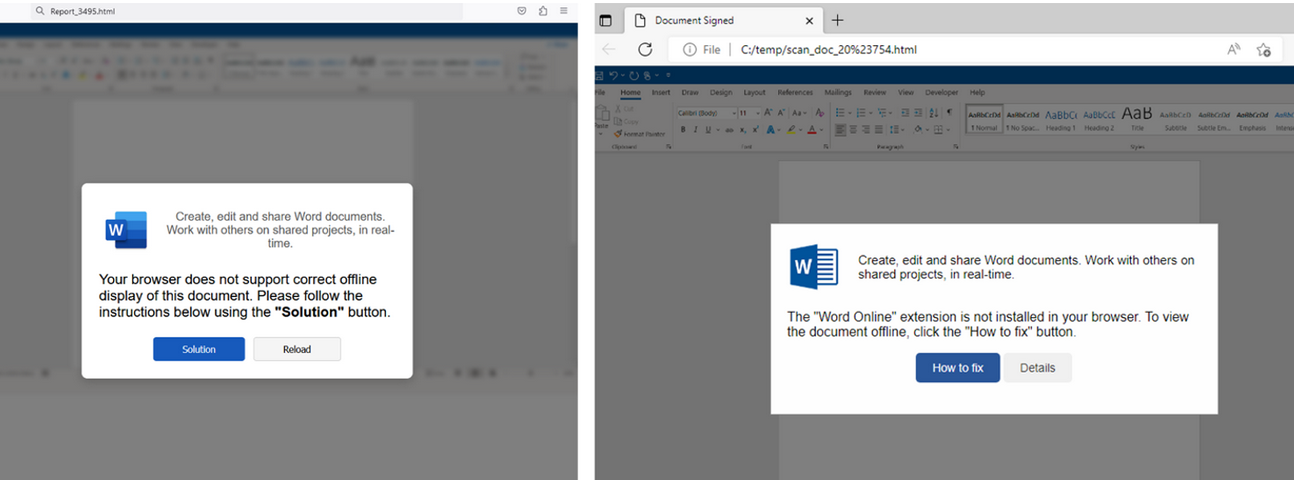
Alas, the email security vendor Proofpoint has documented plenty of ClickFix attacks via phishing emails that include HTML attachments spoofing Microsoft Office files. When opened, the attachment displays an image of Microsoft Word document with a pop-up error message directing users to click the “Solution” or “How to Fix” button.
HTML files containing ClickFix instructions. Examples for attachments named “Report_” (on the left) and “scan_doc_” (on the right). Image: Proofpoint.
Organizations that wish to do so can take advantage of Microsoft Group Policy restrictions to prevent Windows from executing the “run” command when users hit the Windows key and the “R” key simultaneously.

 Login
Login