
Normal view

Received before yesterday

New ClickFix wave infects users with hidden malware in images and fake Windows updates

25 November 2025 at 11:08

Several researchers have flagged a new development in the ongoing ClickFix campaign: Attackers are now mimicking a Windows update screen to trick people into running malware.

ClickFix campaigns use convincing lures, historically “Human Verification” screens, and now a fake “Windows Update” splash page that exactly mimics the real Windows update interface. Both require the user to paste a command from the clipboard, making the attack depend heavily on user interaction.

As shown by Joe Security, ClickFix now displays its deceptive instructions on a page designed to look exactly like a Windows update.

In full-screen mode, visitors running Windows see instructions telling them to copy and paste a malicious command into the Run box.

Fake Windows update

“Working on updates. Please do not turn off your computer.
Part 3 of 3: Check security
95% complete

Attention!
To complete the update, install
the critical Security Update

[… followed by the steps to open the Run box, paste “something” from your clipboard, and press OK to run it]

The “something” the attackers want you to run is an mshta command that downloads and runs a malware dropper. Usually, the final payload is the Rhadamanthys infostealer.

Technical details

If the user follows the displayed instructions this launches a chain of infection steps:

  • Stage 1: mshta.exe downloads a script (usually JScript). URLs consistently use hex-encoding for the second octet and often rotate URI paths to evade signature-based blocklists
  • Stage 2: The script runs PowerShell code, which is obfuscated with junk code to confuse analysis.
  • Stage 3: PowerShell decrypts and loads a .NET assembly acting as a loader.
  • Stage 4: The loader extracts the next stage (malicious shellcode) hidden within a resource image using custom steganography. In essence, we use the name steganography for every technique that conceals secret messages in something that doesn’t immediately cause suspicion. In this case, the malware is embedded in specific pixel color data within PNG files, making detection difficult.
  • Stage 5: The shellcode is injected into a trusted Windows process (like explorer.exe), using classic in-memory techniques like VirtualAllocEx, WriteProcessMemory, and CreateRemoteThread.
  • Final payload: Recent attacks delivered info-stealing malware like LummaC2 (with configuration extractors provided by Huntress) and the Rhadamanthys information stealer.

Details about the steganography used by ClickFix:

Malicious payloads are encoded directly into PNG pixel color channels (especially the red channel). A custom steganographic algorithm is used to extract the shellcode from the raw PNG file.

  • The attackers secretly insert parts of the malware into the image’s pixels, especially by carefully changing the color values in the red channel (which controls how red each pixel is).
  • To anyone viewing the picture, it still looks totally normal. No clues that it’s something more than just an image.
  • But when the malware script runs, it knows exactly where to “look” inside the image to find those hidden bits.
  • The script extracts and decrypts this pixel data, stitches the pieces together, and reconstructs the malware directly in your computer’s memory.
  • Since the malware is never stored as an obvious file on disk and is hidden inside an innocent-looking picture, it’s much harder for anti-malware or security programs to catch.

How to stay safe

With ClickFix running rampant—and it doesn’t look like it’s going away anytime soon—it’s important to be aware, careful, and protected.

  • Slow down. Don’t rush to follow instructions on a webpage or prompt, especially if it asks you to run commands on your device or copy-paste code. Attackers rely on urgency to bypass your critical thinking, so be cautious of pages urging immediate action. Sophisticated ClickFix pages add countdowns, user counters, or other pressure tactics to make you act quickly.
  • Avoid running commands or scripts from untrusted sources. Never run code or commands copied from websites, emails, or messages unless you trust the source and understand the action’s purpose. Verify instructions independently. If a website tells you to execute a command or perform a technical action, check through official documentation or contact support before proceeding.
  • Limit the use of copy-paste for commands. Manually typing commands instead of copy-pasting can reduce the risk of unknowingly running malicious payloads hidden in copied text.
  • Secure your devices. Use an up-to-date real-time anti-malware solution with a web protection component.
  • Educate yourself on evolving attack techniques. Understanding that attacks may come from unexpected vectors and evolve helps maintain vigilance. Keep reading our blog!

Pro tip: Did you know that the free Malwarebytes Browser Guard extension warns you when a website tries to copy something to your clipboard?


We don’t just report on scams—we help detect them

Cybersecurity risks should never spread beyond a headline. If something looks dodgy to you, check if it’s a scam using Malwarebytes Scam Guard, a feature of our mobile protection products. Submit a screenshot, paste suspicious content, or share a text or phone number, and we’ll tell you if it’s a scam or legit. Download Malwarebytes Mobile Security for iOS or Android and try it today!
Attackers are Using Fake Windows Updates in ClickFix Scams

24 November 2025 at 21:40
Lumma, infostealer RATs Reliaquest

Huntress threat researchers are tracking a ClickFix campaign that includes a variant of the scheme in which the malicious code is hidden in the fake image of a Windows Update and, if inadvertently downloaded by victims, will deploy the info-stealing malware LummaC2 and Rhadamanthys.

The post Attackers are Using Fake Windows Updates in ClickFix Scams appeared first on Security Boulevard.

Fake CAPTCHA sites now have tutorial videos to help victims install malware

7 November 2025 at 10:01

Early on in 2025, I described how criminals used fake CAPTCHA sites and a clipboard hijacker to provide instructions for website visitors that would effectively infect their own machines with an information stealer known as the Lumma Stealer.

ClickFix is the name researchers have since given to this type of campaign—one that uses the clipboard and fake CAPTCHA sites to trick users into running malicious commands themselves.

Later, we found that the cybercriminals behind it seemed to be running some A/B tests to figure out which infection method worked best: ClickFix, or the more traditional file download that disguises malware as a useful application.

The criminals probably decided to go with ClickFix, because they soon came up with a campaign that targeted Mac users to spread the infamous Atomic Stealer.

Now, as reported by researchers from Push Security, the attackers behind ClickFix have tried to make the campaign more “user-friendly.”  The latest fake CAPTCHA pages include embedded video tutorials showing exactly how to run the malicious code.

instructions for Mac users
Image courtesy of Push Security

The site automatically detects the visitor’s operating system and provides matching instructions, copying the right code for that OS straight to the clipboard—making typos less likely and infection more certain.

A countdown timer adds urgency, pressuring users to complete the “challenge” within a minute. When people rush instead of thinking things through, social engineering wins.

Unsurprisingly, most of these pages spread through SEO-poisoned Google search results, although they also circulate via email, social media, and in-app ads too.

How to stay safe

With ClickFix running rampant—and it doesn’t look like it’s going away anytime soon—it’s important to be aware, careful, and protected.

  • Slow down. Don’t rush to follow instructions on a webpage or prompt, especially if it asks you to run commands on your device or copy-paste code. Attackers rely on urgency to bypass your critical thinking, so be cautious of pages urging immediate action. Sophisticated ClickFix pages add countdowns, user counters, or other pressure tactics to make you act quickly.
  • Avoid running commands or scripts from untrusted sources. Never run code or commands copied from websites, emails, or messages unless you trust the source and understand the action’s purpose. Verify instructions independently. If a website tells you to execute a command or perform a technical action, check through official documentation or contact support before proceeding.
  • Limit the use of copy-paste for commands. Manually typing commands instead of copy-pasting can reduce the risk of unknowingly running malicious payloads hidden in copied text.
  • Secure your devices. Use an up-to-date real-time anti-malware solution with a web protection component.
  • Educate yourself on evolving attack techniques. Understanding that attacks may come from unexpected vectors and evolve helps maintain vigilance. Keep reading our blog!

Pro tip: Did you know that the free Malwarebytes Browser Guard extension warns you when a website tries to copy something to your clipboard?


We don’t just report on threats—we remove them

Cybersecurity risks should never spread beyond a headline. Keep threats off your devices by downloading Malwarebytes today.

ClickFix: How to Infect Your PC in Three Easy Steps

14 March 2025 at 18:15

A clever malware deployment scheme first spotted in targeted attacks last year has now gone mainstream. In this scam, dubbed “ClickFix,” the visitor to a hacked or malicious website is asked to distinguish themselves from bots by pressing a combination of keyboard keys that causes Microsoft Windows to download password-stealing malware.

ClickFix attacks mimic the “Verify You are a Human” tests that many websites use to separate real visitors from content-scraping bots. This particular scam usually starts with a website popup that looks something like this:

This malware attack pretends to be a CAPTCHA intended to separate humans from bots.

Clicking the “I’m not a robot” button generates a pop-up message asking the user to take three sequential steps to prove their humanity.

Executing this series of keypresses prompts Windows to download password-stealing malware.

Step 1 involves simultaneously pressing the keyboard key with the Windows icon and the letter “R,” which opens a Windows “Run” prompt that will execute any specified program that is already installed on the system.

Step 2 asks the user to press the “CTRL” key and the letter “V” at the same time, which pastes malicious code from the site’s virtual clipboard.

Step 3 — pressing the “Enter” key — causes Windows to download and launch malicious code through “mshta.exe,” a Windows program designed to run Microsoft HTML application files.

“This campaign delivers multiple families of commodity malware, including XWorm, Lumma stealer, VenomRAT, AsyncRAT, Danabot, and NetSupport RAT,” Microsoft wrote in a blog post on Thursday. “Depending on the specific payload, the specific code launched through mshta.exe varies. Some samples have downloaded PowerShell, JavaScript, and portable executable (PE) content.”

According to Microsoft, hospitality workers are being tricked into downloading credential-stealing malware by cybercriminals impersonating Booking.com. The company said attackers have been sending malicious emails impersonating Booking.com, often referencing negative guest reviews, requests from prospective guests, or online promotion opportunities — all in a bid to convince people to step through one of these ClickFix attacks.

In November 2024, KrebsOnSecurity reported that hundreds of hotels that use booking.com had been subject to targeted phishing attacks. Some of those lures worked, and allowed thieves to gain control over booking.com accounts. From there, they sent out phishing messages asking for financial information from people who’d just booked travel through the company’s app.

Earlier this month, the security firm Arctic Wolf warned about ClickFix attacks targeting people working in the healthcare sector. The company said those attacks leveraged malicious code stitched into the widely used physical therapy video site HEP2go that redirected visitors to a ClickFix prompt.

An alert (PDF) released in October 2024 by the U.S. Department of Health and Human Services warned that the ClickFix attack can take many forms, including fake Google Chrome error pages and popups that spoof Facebook.

ClickFix tactic used by malicious websites impersonating Google Chrome, Facebook, PDFSimpli, and reCAPTCHA. Source: Sekoia.

The ClickFix attack — and its reliance on mshta.exe — is reminiscent of phishing techniques employed for years that hid exploits inside Microsoft Office macros. Malicious macros became such a common malware threat that Microsoft was forced to start blocking macros by default in Office documents that try to download content from the web.

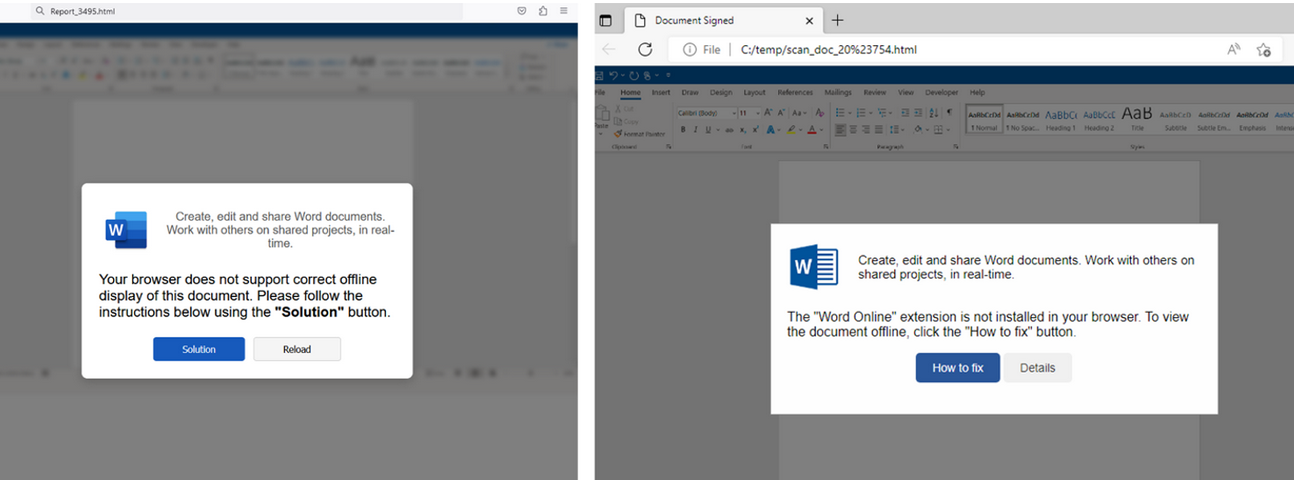
Alas, the email security vendor Proofpoint has documented plenty of ClickFix attacks via phishing emails that include HTML attachments spoofing Microsoft Office files. When opened, the attachment displays an image of Microsoft Word document with a pop-up error message directing users to click the “Solution” or “How to Fix” button.

HTML files containing ClickFix instructions. Examples for attachments named “Report_” (on the left) and “scan_doc_” (on the right). Image: Proofpoint.

Organizations that wish to do so can take advantage of Microsoft Group Policy restrictions to prevent Windows from executing the “run” command when users hit the Windows key and the “R” key simultaneously.

❌