A new Android malware locks device screens and demands that users pay a ransom to keep their data from being deleted.
Dubbed “DroidLock” by Zimperium researchers, the Android ransomware-like malware can also “wipe devices, change PINs, intercept OTPs, and remotely control the user interface, turning an infected phone into a hostile endpoint.”
The malware detected by the researchers targeted Spanish Android users via phishing sites. Based on the examples provided, the French telecommunications company Orange S.A. was one of the companies impersonated in the campaign.
The researchers detailed the new Android malware in a blog post this week, noting that the malware “has the ability to lock device screens with a ransomware-like overlay and illegally acquire app lock credentials, leading to a total takeover of the compromised device.”
The malware uses fake system update screens to trick victims and can stream and remotely control devices via virtual network computing (VNC). The malware can also exploit device administrator privileges to “lock or erase data, capture the victim's image with the front camera, and silence the device.”
The infection chain starts with a dropper that appears to require the user to change settings to allow unknown apps to be installed from the source (image below), which leads to the secondary payload that contains the malware.
[caption id="attachment_107722" align="aligncenter" width="300"] The Android malware DroidLock prompts users for installation permissions (Zimperium)[/caption]
Once the user grants accessibility permission, “the malware automatically approves additional permissions, such as those for accessing SMS, call logs, contacts, and audio,” the researchers said.
The malware requests Device Admin Permission and Accessibility Services Permission at the start of the installation. Those permissions allow the malware to perform malicious actions such as:
Wiping data from the device, “effectively performing a factory reset.”
Locking the device.
Changing the PIN, password or biometric information to prevent user access to the device.
Based on commands received from the threat actor’s command and control (C2) server, “the attacker can compromise the device indefinitely and lock the user out from accessing the device.”
DroidLock Malware Overlays
The DroidLock malware uses Accessibility Services to launch overlays on targeted applications, prompted by an AccessibilityEvent originating from a package on the attacker's target list.
The Android malware uses two primary overlay methods:
A Lock Pattern overlay that displays a pattern-drawing user interface (UI) to capture device unlock patterns.
A WebView overlay that loads attacker-controlled HTML content stored locally in a database; when an application is opened, the malware queries the database for the specific package name, and if a match is found it launches a full-screen WebView overlay that displays the stored HTML.
The malware also uses a deceptive Android update screen that instructs users not to power off or restart their devices. “This technique is commonly used by attackers to prevent user interaction while malicious activities are carried out in the background,” the researchers said.
The malware can also capture all screen activity and transmit it to a remote server by operating as a persistent foreground service and using MediaProjection and VirtualDisplay to capture screen images, which are then converted to a base64-encoded JPEG format and transmitted to the C2 server.
“This highly dangerous functionality could facilitate the theft of any sensitive information shown on the device’s display, including credentials, MFA codes, etc.,” the researchers said.
Zimperium has shared its findings with Google, so up-to-date Android devices are protected against the malware, and the company has also published DroidLock Indicators of Compromise (IoCs).
Researchers have found evidence that AI conversations were inserted in Google search results to mislead macOS users into installing the Atomic macOS Stealer (AMOS). Both Grok and ChatGPT were found to have been abused in these attacks.
Forensic investigation of an AMOS alert showed the infection chain started when the user ran a Google search for “clear disk space on macOS.” Following that trail, the researchers found not one, but two poisoned AI conversations with instructions. Their testing showed that similar searches produced the same type of results, indicating this was a deliberate attempt to infect Mac users.
The search results led to AI conversations which provided clearly laid out instructions to run a command in the macOS Terminal. That command would end with the machine being infected with the AMOS malware.
If that sounds familiar, you may have read our post about sponsored search results that led to fake macOS software on GitHub. In that campaign, sponsored ads and SEO-poisoned search results pointed users to GitHub pages impersonating legitimate macOS software, where attackers provided step-by-step instructions that ultimately installed the AMOS infostealer.
As the researchers pointed out:
“Once the victim executed the command, a multi-stage infection chain began. The base64-encoded string in the Terminal command decoded to a URL hosting a malicious bash script, the first stage of an AMOS deployment designed to harvest credentials, escalate privileges, and establish persistence without ever triggering a security warning.”
This is dangerous for the user on many levels. Because there is no prompt or review, the user does not get a chance to see or assess what the downloaded script will do before it runs. It bypasses security because of the use of the command line, it can bypass normal file download protections and execute anything the attacker wants.
Other researchers have found a campaign that combines elements of both attacks: the shared AI conversation and fake software install instructions. They found user guides for installing OpenAI’s new Atlas browser for macOS through shared ChatGPT conversations, which in reality led to AMOS infections.
So how does this work?
The cybercriminals used prompt engineering to get ChatGPT to generate a step‑by‑step “installation/cleanup” guide which in reality will infect a system. ChatGPT’s sharing feature creates a public link to a single conversation that exists in the owner’s account. Attackers can craft a chat to produce the instructions they need and then tidy up the visible conversation so that what’s shared looks like a short, clean guide rather than a long back-and-forth.
Most major chat interfaces (including Grok on X) also let users delete conversations or selectively share screenshots. That makes it easy for criminals to present only the polished, “helpful” part of a conversation and hide how they arrived there.
The cybercriminals used prompt engineering to get ChatGPT to generate a step‑by‑step “installation/cleanup” guide that, in reality, installs malware. ChatGPT’s sharing feature creates a public link to a conversation that lives in the owner’s account. Attackers can curate their conversations to create a short, clean conversation which they can share.
Then the criminals either pay for a sponsored search result pointing to the shared conversation or they use SEO techniques to get their posts high in the search results. Sponsored search results can be customized to look a lot like legitimate results. You’ll need to check who the advertiser is to find out it’s not real.
Image courtesy of Kaspersky
From there, it’s a waiting game for the criminals. They rely on victims to find these AI conversations through search and then faithfully follow the step-by-step instructions.
How to stay safe
These attacks are clever and use legitimate platforms to reach their targets. But there are some precautions you can take.
First and foremost, and I can’t say this often enough: Don’t click on sponsored search results. We have seen so many cases where sponsored results lead to malware, that we recommend skipping them or make sure you never see them. At best they cost the company you looked for money and at worst you fall prey to imposters.
If you’re thinking about following a sponsored advertisement, check the advertiser first. Is it the company you’d expect to pay for that ad? Click the three‑dot menu next to the ad, then choose options like “About this ad” or “About this advertiser” to view the verified advertiser name and location.
Never run copy-pasted commands from random pages or forums, even if they’re hosted on seemingly legitimate domains, and especially not commands that look like curl … | bash or similar combinations.
If you’ve scanned your Mac and found the AMOS information stealer:
Remove any suspicious login items, LaunchAgents, or LaunchDaemons from the Library folders to ensure the malware does not persist after reboot.
If any signs of persistent backdoor or unusual activity remain, strongly consider a full clean reinstall of macOS to ensure all malware components are eradicated. Only restore files from known clean backups. Do not reuse backups or Time Machine images that may be tainted by the infostealer.
After reinstalling, check for additional rogue browser extensions, cryptowallet apps, and system modifications.
Change all the passwords that were stored on the affected system and enable multi-factor authentication (MFA) for your important accounts.
If all this sounds too difficult for you to do yourself, ask someone or a company you trust to help you—our support team is happy to assist you if you have any concerns.
We don’t just report on threats—we remove them
Cybersecurity risks should never spread beyond a headline. Keep threats off your devices by downloading Malwarebytes today.
The Information Commissioner’s Office (ICO) has fined password manager provider LastPass UK Ltd £1.2 million following a 2022 data breach that compromised the personal information of up to 1.6 million people in the UK.
The data breach occurred in August 2022 and was the result of two isolated incidents that, when combined, enabled a hacker to gain unauthorized access to LastPass’ backup database. The stolen information included customer names, email addresses, phone numbers, and stored website URLs.
While the data breach exposed sensitive personal information, the ICO confirmed there is no evidence that hackers were able to decrypt customer passwords. This is due to LastPass’ use of a ‘zero knowledge’ encryption system, which ensures that master passwords and vaults are stored locally on customer devices and never shared with the company.
Incident One: Corporate Laptop Compromised
The first incident involved a LastPass employee’s corporate laptop based in Europe. A hacker gained access to the company’s development environment and obtained encrypted company credentials. Although no personal information was taken at this stage, the credentials could have provided access to the backup database if decrypted.
LastPass attempted to mitigate the hacker’s activity and believed the encryption keys remained safe, as they were stored outside the compromised environment in the vaults of four senior employees.
Incident Two: Personal Device Targeted
The second incident proved more damaging. The hacker targeted one of the senior employees who had access to the decryption keys. Exploiting a known vulnerability in a third‑party streaming service, the attacker gained access to the employee’s personal device.
A keylogger was installed, capturing the employee’s master password. Multi‑factor authentication was bypassed using a trusted device cookie. This allowed the hacker to access both the employee’s personal and business LastPass vaults, which were linked by a single master password.
From there, the hacker obtained the Amazon Web Service (AWS) access key and decryption key stored in the business vault. Combined with information taken the previous day, this enabled the extraction of the backup database containing customer personal information.
ICO’s Findings and Fine on LastPass UK
The ICO investigation concluded that LastPass failed to implement sufficiently strong technical and security measures, leaving customers exposed. Although the company’s zero knowledge encryption protected passwords, the exposure of personal data was deemed a serious failure.
John Edwards, UK Information Commissioner, stated: “Password managers are a safe and effective tool for businesses and the public to manage their numerous login details, and we continue to encourage their use. However, as is clear from this incident, businesses offering these services should ensure that system access and use is restricted to reduce risks of attack. LastPass customers had a right to expect their personal information would be kept safe and secure. The company fell short of this expectation, resulting in the proportionate fine announced today.”
Lessons for Businesses
The ICO has urged all UK businesses to review their systems and procedures to prevent similar risks. This case underscores the importance of restricting system access, strengthening cybersecurity measures, and ensuring that employees’ personal devices do not become weak points in corporate networks.
While password managers remain a recommended tool for managing login details, the incident shows that even trusted providers can fall short if internal safeguards are not sufficiently strong.
The £1.2 million fine against LastPass UK Ltd serves as a clear reminder that companies handling sensitive data must uphold the highest standards of security. Although customer passwords were protected by the company’s zero knowledge encryption system, the exposure of personal information has left millions vulnerable.
The ICO’s ruling reinforces the need for constant vigilance in the face of growing cyber threats. For both businesses and individuals, the message is straightforward: adopt strong security practices, conduct regular system reviews, and implement robust employee safeguards to reduce the risk of future data breaches.
HP’s latest threat report reveals rising use of sophisticated social engineering, SVG-based attacks, fake software updates, and AI-enhanced malware as cybercriminals escalate tactics to evade detection.
2025 will be remembered as the year cyber threats reached a breaking point. With nearly 6,000 ransomware incidents, more than 6,000 data breaches, and over 3,000 sales of compromised corporate access, enterprises across the globe faced one of the most dangerous digital landscapes on record. Manufacturing plants halted production, government agencies struggled to contain leaks, and critical infrastructure endured direct hits. Cyble Global Cybersecurity Report 2025 highlights that ransomware attacks surged 50% year-over-year.
Not only this, the Global Cybersecurity Report 2025 stated that data breaches climbed to their second-highest level ever, and the underground market for stolen access flourished.
Together, these figures reveal not just isolated events, but a systemic escalation of cybercrime that is reshaping the way organizations must defend themselves.
Cyble Global Cybersecurity Report 2025: A Year of Escalation
The Cyble Global Cybersecurity Report 2025 documented 5,967 ransomware attacks, representing a 50% increase year-over-year. Alongside this, 6,046 data breaches and leaks were recorded, the second-highest level ever observed.
The underground market for compromised initial access also thrived, with 3,013 sales fueling the global cybercrime economy.
Daksh Nakra, Senior Manager of Research and Intelligence at Cyble, described 2025 as a “Major power shift in the threat landscape,” noting that new ransomware groups quickly filled the void left by law enforcement crackdowns. The combination of supply chain attacks and rapid weaponization of zero-day vulnerabilities created what he called “a perfect storm” for enterprises worldwide.
Ransomware Landscape Transformed
Two groups stood out in 2025. Akira ransomware emerged as the second-most prolific group behind Qilin, launching sustained campaigns across Construction, Manufacturing, and Professional Services. Its opportunistic targeting model allowed it to compromise nearly every major industry vertical.
Meanwhile, CL0P ransomware reaffirmed its reputation as a zero-day specialist. In February 2025, CL0P executed a mass campaign exploiting enterprise file transfer software, posting hundreds of victims in a single wave. Consumer Goods, Transportation & Logistics, and IT sectors were among the hardest hit.
Government and law enforcement agencies were disproportionately affected, accounting for 998 incidents (16.5% of total breaches). The Banking, Financial Services, and Insurance (BFSI) sector followed with 634 incidents. Together, these two sectors represented more than a quarter of all breaches, highlighting attackers’ focus on sensitive citizen data and financial information.
The sale of compromised corporate access continued to fuel cybercrime. Cyble’s analysis revealed 3,013 access sales, with the Retail sector most heavily targeted at 594 incidents (nearly 20%). BFSI followed with 284 incidents, while Government agencies accounted for 175 incidents.
Vulnerabilities Drive Attack Surge
Cyble Global Cybersecurity Report 2025 further highlighted that critical flaws in widely deployed enterprise technologies served as primary entry points. Among the most exploited were:
CVE-2025-61882 (Oracle E-Business Suite RCE) – leveraged by CL0P
CVE-2025-10035 (GoAnywhere MFT RCE) – exploited by Medusa
Multiple vulnerabilities in Fortinet, Ivanti, and Cisco products with CVSS scores above 9.0
In total, 94 zero-day vulnerabilities were identified in 2025, with 25 scoring above 9.0. Over 86% of CISA’s Known Exploited Vulnerabilities catalog entries carried CVSS ratings of 7.0 or higher, with Microsoft, Fortinet, Apple, Cisco, and Oracle most frequently affected.
Geopolitical Hacktivism Surges
According to Cyble's global cybersecurity report 2025, hacktivist activity reached an unprecedented scale, with over 40,000 data leaks and dump posts impacting 41,400 unique domains. Much of this activity was driven by geopolitical conflicts:
The Israel-Iran conflict triggered operations by 74 hacktivist groups
India-Pakistan tensions generated 1.5 million intrusion attempts
North Korea’s IT worker fraud schemes infiltrated global companies
DDoS attacks, website defacements, and breaches targeted governments and critical infrastructure
Industry-Specific Insights
Manufacturing: Most attacked sector due to reliance on OT/ICS environments and low tolerance for downtime
Construction: Heavily targeted by Akira; time-sensitive projects created maximum pressure points
Professional Services: Law firms and consultancies compromised for sensitive client data and supply chain leverage
Healthcare: Continued to face attacks from groups like BianLian, Abyss, and INC Ransom due to critical data availability needs
IT & ITES: Service providers exploited to enable cascading supply chain attacks against downstream customers
Outlook
The numbers from Cyble Global Cybersecurity Report 2025 highlight that ransomware is up by 50%, thousands of breaches, and a booming underground economy for compromised access.
With critical infrastructure, government agencies, and high-value industries increasingly in the crosshairs, the Cyble global cybersecurity report 2025 highlights the urgency for global enterprises to strengthen defenses against a rapidly evolving threat landscape.
For a full analysis, the Global Cybersecurity Report 2025 is available at Cyble Research Reports.
OWASP unveils its GenAI Top 10 threats for agentic AI, plus new security and governance guides, risk maps, and a FinBot CTF tool to help organizations secure emerging AI agents.
The exploitation efforts by China-nexus groups and other bad actors against the critical and easily abused React2Shell flaw in the popular React and Next.js software accelerated over the weekend, with threats ranging from stolen credentials and initial access to downloaders, crypto-mining, and the NoodleRat backdoor being executed.
Intellexa is a well-known commercial spyware vendor, servicing governments and large corporations. Its main product is the Predator spyware.
An investigation by several independent parties describes Intellexa as one of the most notorious mercenary spyware vendors, still operating its Predator platform and hitting new targets even after being placed on US sanctions lists and being under active investigation in Greece.
The investigation draws on highly sensitive documents and other materials leaked from the company, including internal records, sales and marketing material, and training videos. Amnesty International researchers reviewed the material to verify the evidence.
To me, the most interesting part is Intellexa’s continuous use of zero-days against mobile browsers. Google’s Threat Analysis Group (TAG) posted a blog about that, including a list of 15 unique zero-days.
Intellexa can afford to buy and burn zero-day vulnerabilities. They buy them from hackers and use them until the bugs are discovered and patched–at which point they are “burned” because they no longer work against updated systems.
The price for such vulnerabilities depends on the targeted device or application and the impact of exploitation. For example, you can expect to pay in the range of $100,000 to $300,000 for a robust, weaponized Remote Code Excecution (RCE) exploit against Chrome with sandbox bypass suitable for reliable, at‑scale deployment in a mercenary spyware platform. And in 2019, zero-day exploit broker Zerodium offered millions for zero-click full chain exploits with persistence against Android and iPhones.
Which is why only governments and well-resourced organizations can afford to hire Intellexa to spy on the people they’re interested in.
The Google TAG blog states:
“Partnering with our colleagues at CitizenLab in 2023, we captured a full iOS zero-day exploit chain used in the wild against targets in Egypt. Developed by Intellexa, this exploit chain was used to install spyware publicly known as Predator surreptitiously onto a device.”
To slow down the “burn” rate of its exploits, Intellexa delivers one-time links directly to targets through end-to-end encrypted messaging apps. This is a common method: last year we reported how the NSO Group was ordered to hand over the code for Pegasus and other spyware products that were used to spy on WhatsApp users.
The fewer people who see an exploit link, the harder it is for researchers to capture and analyze it. Intellexa also uses malicious ads on third-party platforms to fingerprint visitors and redirect those who match its target profiles to its exploit delivery servers.
This zero-click infection mechanism, dubbed “Aladdin,” is believed to still be operational and actively developed. It leverages the commercial mobile advertising system to deliver malware. That means a malicious ad could appear on any website that serves ads, such as a trusted news website or mobile app, and look completely ordinary. If you’re not in the target group, nothing happens. If you are, simply viewing the ad is enough to trigger the infection on your device, no need to click.
Zero-click infection chain Image courtesy of Amnesty International
How to stay safe
While most of us will probably never have to worry about being in the target group, there are still practical steps you can take:
Use an ad blocker. Malwarebytes Browser Guard is a good start. Did I mention it’s a free browser extension that works on Chrome, Firefox, Edge, and Safari? And it should work on most other Chromium based browsers (I even use it on Comet).
Keep your software updated. When it comes to zero-days, updating your software only helps after researchers discover the vulnerabilities. However, once the flaws become public, less sophisticated cybercriminals often start exploiting them, so patching remains essential to block these more common attacks.
CrowdStrike deepens its AWS partnership with automated Falcon SIEM configuration, AI security capabilities, EventBridge integrations and new MSSP-focused advancements.
Security headlines distract, but the threats keeping CISOs awake are fundamental gaps and software supply chain risks. Learn why basics and visibility matter most.
JPMorganChase’s $1.5T Security & Resiliency Initiative targets AI, cybersecurity, quantum and critical industries. Learn what this investment means for national and enterprise resilience.
A new wave of attacks is exploiting legitimate Remote Monitoring and Management (RMM) tools like LogMeIn Resolve (formerly GoToResolve) and PDQ Connect to remotely control victims’ systems. Instead of dropping traditional malware, attackers trick people into installing these trusted IT support programs under false pretenses–disguising them as everyday utilities. Once installed, the tool gives attackers full remote access to the victim’s machine, evading many conventional security detections because the software itself is legitimate.
We’ve recently noticed an uptick in our telemetry for the detection name RiskWare.MisusedLegit.GoToResolve, which flags suspicious use of the legitimate GoToResolve/LogMeIn Resolve RMM tool.
Our data shows the tool was detected with several different filenames. Here are some examples from our telemetry:
The filenames also provide us with clues about how the targets were likely tricked into downloading the tool.
Here’s an example of a translated email sent to someone in Portugal:
As you can see, hovering over the link shows that it points to a file uploaded to Dropbox. Using a legitimate RMM tool and a legitimate domain like dropbox[.]com makes it harder for security software to intercept such emails.
Other researchers have also described how attackers set up fake websites that mimic the download pages for popular free utilities like Notepad++ and 7-Zip.
Clicking that malicious link delivers an RMM installer that’s been pre-configured with the attacker’s unique “CompanyId”–a hardcoded identifier tying the victim machine directly to the attacker’s control panel.
This ID lets them instantly spot and connect to the newly infected system without needing extra credentials or custom malware, as the legitimate tool registers seamlessly with their account. Firewalls and other security tools often allow their RMM traffic, especially because RMMs are designed to run with admin privileges. The result is that malicious access blends in with normal IT admin traffic.
How to stay safe
By misusing trusted IT tools rather than conventional malware, attackers are raising the bar on stealth and persistence. Awareness and careful attention to download sources are your best defense.
Always download software directly from official websites or verified sources.
Check file signatures and certificates before installing anything.
Verify unexpected update prompts through a separate, trusted channel.
Keep your operating system and software up to date.
Researchers have unraveled a malware campaign that really did play the long game. After seven years of behaving normally, a set of browser extensions installed on roughly 4.3 million Chrome and Edge users’ devices suddenly went rogue. Now they can track what you browse and run malicious code inside your browser.
The researchers found five extensions that operated cleanly for years before being weaponized in mid-2024. The developers earned trust, built up millions of installs, and even collected “Featured” or “Verified” status in the Chrome and Edge stores. Then they pushed silent updates that turned these add-ons into spyware and malware.
The extensions turned into a remote code execution framework. They could download and run malicious JavaScript inside the browser and collect information about visited sites and the user’s browser, sending it all back to attackers believed to be based in China.
One of the most prevalent of these extensions is WeTab, with around three million installs on Edge. It acts as spyware by streaming visited URLs, search queries, and other data in real time. The researchers note that while Google has removed the extensions, the Edge store versions are still available.
Playing the long game is not something cybercriminals usually have the time or patience for.
The researchers attributed the campaign to the ShadyPanda group, which has been active since at least 2018 and launched their first campaign in 2023. That was a simpler case of affiliate fraud, inserting affiliate tracking codes into users’ shopping clicks.
What the group did learn from that campaign was that they could get away with deploying malicious updates to existing extensions. Google vets new extensions carefully, but updates don’t get the same attention.
It’s not the first time we’ve seen this behavior, but waiting for years is exceptional. When an extension has been available in the web store for a while, cybercriminals can insert malicious code through updates to the extension. Some researchers refer to the clean extensions as “sleeper agents” that sit quietly for years before switching to malicious behavior.
This new campaign is far more dangerous. Every infected browser runs a remote code execution framework. Every hour, it checks api.extensionplay[.]com for new instructions, downloads arbitrary JavaScript, and executes it with full browser API access.
In the address bar at the top, type chrome://extensions/ and press Enter. This opens the Extensions page, which shows all extensions installed in your browser.
At the top right of this page, turn on Developer mode.
Now each extension card will show an extra line with its ID.
Press Ctrl+F (or Cmd+F on Mac) to open the search box and paste the ID you’re checking (e.g. eagiakjmjnblliacokhcalebgnhellfi) into the search box.
If the page scrolls to an extension and highlights the ID, it’s installed. If it says No results found, it isn’t in that Chrome profile.
If you see that ID under an extension, it means that particular add‑on is installed for the current Chrome profile.
To remove it, click Remove on that extension’s card on the same page.
In Edge
Since Edge is a Chromium browser the steps are the same, just go to edge://extensions/ instead.
We don’t just report on threats—we remove them
Cybersecurity risks should never spread beyond a headline. Keep threats off your devices by downloading Malwarebytes today.
Organizations are spending more than ever on cybersecurity, layering defenses around networks, endpoints, and applications. Yet a company’s documents, one of the most fundamental business assets, remains an overlooked weak spot. Documents flow across every department, cross company boundaries, and often contain the very data that compliance officers and security teams work hardest to protect...
Peak e-commerce season hits retailers every year just as the Halloween decorations start to come down. Unsurprisingly, cyber criminals see this time as an opportunity to strike, and criminal activity online spikes alongside sales. Shockingly, 4.6% of attempted e-commerce transactions during the 2024 Black Friday period were suspected to be digital fraud. In the UK..
Researchers have discovered a new attack targeting Mac users. It lures them to a fake job website, then tricks them into downloading malware via a bogus software update.
The attackers pose as recruiters and contact people via LinkedIn, encouraging them to apply for a role. As part of the application process, victims are required to record a video introduction and upload it to a special website.
On that website, visitors are tricked into installing a so-called update for FFmpeg media file-processing software which is, in reality, a backdoor. This method, known as the Contagious Interview campaign, points to the Democratic People’s Republic of Korea (DPRK).
Contagious Interview is an illicit job-platform campaign that targets job seekers with social engineering tactics. The actors impersonate well-known brands and actively recruit software developers, artificial intelligence researchers, cryptocurrency professionals, and candidates for both technical and non-technical roles.
The malicious website first asks the victim to complete a “job assessment.” When the applicant tries to record a video, the site claims that access to the camera or microphone is blocked. To “fix” it, the site prompts the user to download an “update” for FFmpeg.
Much like in ClickFix attacks, victims are given a curl command to run in their Terminal. That command downloads a script which ultimately installs a backdoor onto their system. A “decoy” application then appears with a window styled to look like Chrome, telling the user Chrome needs camera access. Next, a window prompts for the user’s password, which, once entered, is sent to the attackers via Dropbox.
Images courtesy of Jamf
The end-goal of the attackers is Flexible Ferret, a multi-stage macOS malware chain active since early 2025. Here’s what it does and why it’s dangerous for affected Macs and users:
After stealing the password, the malware immediately establishes persistence by creating a LaunchAgent. This ensures it reloads every time the user logs in, giving attackers long-term, covert access to the infected Mac.
FlexibleFerret’s core payload is a Go-based backdoor. It enables attackers to:
Collect detailed information about the victim’s device and environment
Upload and download files
Execute shell commands (providing full system control)
Extract Chrome browser profile data
Automate additional credential and data theft
Basically, this means the infected Mac becomes part of a remote-controlled botnet with direct access for cybercriminals.
How to stay safe
While this campaign targets Mac users, that doesn’t mean Windows users are safe. The same lure is used, but the attacker is known to use the information stealer InvisibleFerret against Windows users.
The best way to stay safe is to be able to recognize attacks like these, but there are some other things you can do.
Always keep your operating system, software, and security tools updated regularly with the latest patches to close vulnerabilities.
Do not follow instructions to execute code on your machine that you don’t fully understand. Never run code or commands copied from websites, emails, or messages unless you trust the source and understand the action’s purpose. Verify instructions independently. If a website tells you to execute a command or perform a technical action, check through official documentation or contact support before proceeding.
Be extremely cautious with unsolicited communications, especially those inviting you to meetings or requesting software installs or updates; verify the sender and context independently.
Avoid clicking on links or downloading attachments from unknown or unexpected sources. Verify their authenticity first.
Compare the URL in the browser’s address bar to what you’re expecting.
We don’t just report on threats—we remove them
Cybersecurity risks should never spread beyond a headline. Keep threats off your devices by downloading Malwarebytes today.
AI-enabled cybercriminals are exploiting the holiday shopping season with precision phishing, account takeovers, payment skimming and ransomware, forcing retailers to adopt real-time, adaptive defenses to keep pace.
Several researchers have flagged a new development in the ongoing ClickFix campaign: Attackers are now mimicking a Windows update screen to trick people into running malware.
ClickFix campaigns use convincing lures, historically “Human Verification” screens, and now a fake “Windows Update” splash page that exactly mimics the real Windows update interface. Both require the user to paste a command from the clipboard, making the attack depend heavily on user interaction.
As shown by Joe Security, ClickFix now displays its deceptive instructions on a page designed to look exactly like a Windows update.
In full-screen mode, visitors running Windows see instructions telling them to copy and paste a malicious command into the Run box.
“Working on updates. Please do not turn off your computer. Part 3 of 3: Check security 95% complete
Attention! To complete the update, install the critical Security Update
[… followed by the steps to open the Run box, paste “something” from your clipboard, and press OK to run it]
The “something” the attackers want you to run is an mshta command that downloads and runs a malware dropper. Usually, the final payload is the Rhadamanthys infostealer.
Technical details
If the user follows the displayed instructions this launches a chain of infection steps:
Stage 1:mshta.exe downloads a script (usually JScript). URLs consistently use hex-encoding for the second octet and often rotate URI paths to evade signature-based blocklists
Stage 2: The script runs PowerShell code, which is obfuscated with junk code to confuse analysis.
Stage 3: PowerShell decrypts and loads a .NET assembly acting as a loader.
Stage 4: The loader extracts the next stage (malicious shellcode) hidden within a resource image using custom steganography. In essence, we use the name steganography for every technique that conceals secret messages in something that doesn’t immediately cause suspicion. In this case, the malware is embedded in specific pixel color data within PNG files, making detection difficult.
Stage 5: The shellcode is injected into a trusted Windows process (like explorer.exe), using classic in-memory techniques like VirtualAllocEx, WriteProcessMemory, and CreateRemoteThread.
Final payload: Recent attacks delivered info-stealing malware like LummaC2 (with configuration extractors provided by Huntress) and the Rhadamanthys information stealer.
Details about the steganography used by ClickFix:
Malicious payloads are encoded directly into PNG pixel color channels (especially the red channel). A custom steganographic algorithm is used to extract the shellcode from the raw PNG file.
The attackers secretly insert parts of the malware into the image’s pixels, especially by carefully changing the color values in the red channel (which controls how red each pixel is).
To anyone viewing the picture, it still looks totally normal. No clues that it’s something more than just an image.
But when the malware script runs, it knows exactly where to “look” inside the image to find those hidden bits.
The script extracts and decrypts this pixel data, stitches the pieces together, and reconstructs the malware directly in your computer’s memory.
Since the malware is never stored as an obvious file on disk and is hidden inside an innocent-looking picture, it’s much harder for anti-malware or security programs to catch.
How to stay safe
With ClickFix running rampant—and it doesn’t look like it’s going away anytime soon—it’s important to be aware, careful, and protected.
Slow down. Don’t rush to follow instructions on a webpage or prompt, especially if it asks you to run commands on your device or copy-paste code. Attackers rely on urgency to bypass your critical thinking, so be cautious of pages urging immediate action. Sophisticated ClickFix pages add countdowns, user counters, or other pressure tactics to make you act quickly.
Avoid running commands or scripts from untrusted sources. Never run code or commands copied from websites, emails, or messages unless you trust the source and understand the action’s purpose. Verify instructions independently. If a website tells you to execute a command or perform a technical action, check through official documentation or contact support before proceeding.
Limit the use of copy-paste for commands. Manually typing commands instead of copy-pasting can reduce the risk of unknowingly running malicious payloads hidden in copied text.
Secure your devices. Use an up-to-date real-time anti-malware solution with a web protection component.
Educate yourself on evolving attack techniques. Understanding that attacks may come from unexpected vectors and evolve helps maintain vigilance. Keep reading our blog!
Pro tip: Did you know that the free Malwarebytes Browser Guard extension warns you when a website tries to copy something to your clipboard?
We don’t just report on scams—we help detect them
Cybersecurity risks should never spread beyond a headline. If something looks dodgy to you, check if it’s a scam using Malwarebytes Scam Guard, a feature of our mobile protection products. Submit a screenshot, paste suspicious content, or share a text or phone number, and we’ll tell you if it’s a scam or legit. Download Malwarebytes Mobile Security for iOS or Android and try it today!
Ahead of the holiday season, people who have bought cheap Amazon Fire TV Sticks or similar devices online should be aware that some of them could let cybercriminals access personal data, bank accounts, and even steal money.
BeStreamWise, a UK initiative established to counter illegal streaming, says the rise of illicit streaming devices preloaded with software that bypasses licensing and offers “free” films, sports, and TV comes with a risk.
Dodgy stick streaming typically involves preloaded or modified devices, frequently Amazon Fire TV Sticks, sold with unauthorized apps that connect to pirated content streams. These apps unlock premium subscription content like films, sports, and TV shows without proper licensing.
The main risks of using dodgy streaming sticks include:
Exposure to inappropriate content: Unregulated apps lack parental controls and may expose younger viewers to explicit ads or unsuitable content.
Growing countermeasures: Companies like Amazon are actively blocking unauthorized apps and updating firmware to prevent illegal streaming. Your access can disappear overnight because it depends on illegal channels.
Malware: These sticks, and the unofficial apps that run on them, often contain malware—commonly in the form of spyware.
BeStreamWise warns specifically about “modded Amazon Fire TV Sticks.” Reporting around the campaign notes that around two in five illegal streamers have fallen prey to fraud, likely linked to compromised hardware or the risky apps and websites that come with illegal streaming.
According to BeStreamWise, citing Dynata research:
“1 in 3 (32%) people who illegally stream in the UK say they, or someone they know, have been a victim of fraud, scams, or identity theft as a result.”
Victims lost an average of almost £1,700 (about $2,230) each. You could pay for a lot of legitimate streaming services with that. But it’s not just money that’s at stake. In January, The Sun warned all Fire TV Stick owners about an app that was allegedly “stealing identities,” showing how easily unsafe apps can end up on modified devices.
And if it’s not the USB device that steals your data or money, then it might be the website you use to access illegal streams. FACT highlights research from Webroot showing that:
“Of 50 illegal streaming sites analysed, every single one contained some form of malicious content – from sophisticated scams to extreme and explicit content.”
So, from all this we can conclude that illegal streaming is not the victimless crime that many assume it is. It creates victims on all sides: media networks lose revenue and illegal users can lose far more than they bargained for.
How to stay safe
The obvious advice here is to stay away from illegal streaming and be careful about the USB devices you plug into your computer or TV. When you think about it, you’re buying something from someone breaking the law, and hoping they’ll treat your data honestly.
There are a few additional precautions you can take though:
Black Friday is supposed to be chaotic, sure, but not this chaotic.
While monitoring malvertising patterns ahead of the holiday rush, I uncovered one of the most widespread and polished Black Friday scam campaigns circulating online right now.
It’s not a niche problem. Our own research shows that 40% of people have been targeted by malvertising, and more than 1 in 10 have fallen victim, a trend that shows up again and again in holiday-season fraud patterns. Read more in our 2025 holiday scam overview.
Through malicious ads hidden on legitimate websites, users are silently redirected into an endless loop of fake “Survey Reward” pages impersonating dozens of major brands.
What looked like a single suspicious redirect quickly turned into something much bigger. One domain led to five more. Five led to twenty. And as the pattern took shape, the scale became impossible to ignore: more than 100 unique domains, all using the same fraud template, each swapping in different branding depending on which company they wanted to impersonate.
This is an industrialized malvertising operation built specifically for the Black Friday window.
The brands being impersonated
The attackers deliberately selected big-name, high-trust brands with strong holiday-season appeal. Across the campaign, I observed impersonations of:
Walmart
Home Depot
Lowe’s
Louis Vuitton
CVS Pharmacy
AARP
Coca-Cola
UnitedHealth Group
Dick’s Sporting Goods
YETI
LEGO
Ulta Beauty
Tourneau / Bucherer
McCormick
Harry & David
WORX
Northern Tool
POP MART
Lovehoney
Petco
Petsmart
Uncharted Supply Co.
Starlink (especially the trending Starlink Mini Kit)
These choices are calculated. If people are shopping for a LEGO Titanic set, a YETI bundle, a Lululemon-style hoodie pack, or the highly hyped Starlink Mini Kit, scammers know exactly what bait will get clicks.
In other words: They weaponize whatever is trending.
How the scam works
1. A malicious ad kicks off an invisible redirect chain
A user clicks a seemingly harmless ad—or in some cases, simply scrolls past it—and is immediately funneled through multiple redirect hops. None of this is visible or obvious. By the time the page settles, the user lands somewhere they never intended to go.
2. A polished “Survey About [Brand]” page appears
Every fake site is built on the same template:
Brand name and logo at the top
A fake timestamp (“Survey – November X, 2025 ”)
A simple, centered reward box
A countdown timer to create urgency
A blurred background meant to evoke the brand’s store or product environment
It looks clean, consistent, and surprisingly professional.
3. The reward depends on which brand is being impersonated
Some examples of “rewards” I found in my investigation:
Starlink Mini Kit
YETI Ultimate Gear Bundle
LEGO Falcon Exclusive / Titanic set
Lululemon-style athletic packs
McCormick 50-piece spice kit
Coca-Cola mini-fridge combo
Petco / Petsmart “Dog Mystery Box”
Louis Vuitton Horizon suitcase
Home Depot tool bundles
AARP health monitoring kit
WORX cordless blower
Walmart holiday candy mega-pack
Each reward is desirable, seasonal, realistic, and perfectly aligned with current shopping trends. This is social engineering disguised as a giveaway. I wrote about the psychology behind this sort of scam in my article about Walmart gift card scams.
4. The “survey” primes the victim
The survey questions are generic and identical across all sites. They are there purely to build commitment and make the user feel like they’re earning the reward.
After the survey, the system claims:
Only 1 reward left
Offer expires in 6 minutes
A small processing/shipping fee applies
Scarcity and urgency push fast decisions.
5. The final step: a “shipping fee” checkout
Users are funneled into a credit card form requesting:
Full name
Address
Email
Phone
Complete credit card details, including CVV
The shipping fees typically range from $6.99 to $11.94. They’re just low enough to feel harmless, and worth the small spend to win a larger prize.
Some variants add persuasive nudges like:
“Receive $2.41 OFF when paying with Mastercard.”
While it’s a small detail, it mimics many legitimate checkout flows.
Once attackers obtain personal and payment data through these forms, they are free to use it in any way they choose. That might be unauthorized charges, resale, or inclusion in further fraud. The structure and scale of the operation strongly suggest that this data collection is the primary goal.
Why this scam works so well
Several psychological levers converge here:
People expect unusually good deals on Black Friday
Big brands lower skepticism
Timers create urgency
“Shipping only” sounds risk-free
Products match current hype cycles
The templates look modern and legitimate
Unlike the crude, typo-filled phishing of a decade ago, these scams are part of a polished fraud machine built around holiday shopping behavior.
Technical patterns across the scam network
Across investigations, the sites shared:
Identical HTML and CSS structure
The same JavaScript countdown logic
Nearly identical reward descriptions
Repeated “Out of stock soon / 1 left” mechanics
Swappable brand banners
Blurred backgrounds masking reuse
High-volume domain rotation
Multi-hop redirects originating from malicious ads
It’s clear these domains come from a single organized operation, not a random assortment of lone scammers.
Final thoughts
Black Friday always brings incredible deals, but it also brings incredible opportunities for scammers. This year’s “free gift” campaign stands out not just for its size, but for its timing, polish, and trend-driven bait.
It exploits, excitement, brand trust, holiday urgency, and the expectation of “too good to be true” deals suddenly becoming true.
Staying cautious and skeptical is the first line of defense against “free reward” scams that only want your shipping details, your identity, and your card information.
And for an added layer of protection against malicious redirects and scam domains like the ones uncovered in this campaign, users can benefit from keeping tools such as Malwarebytes Browser Guard enabled in their browser.
Stay safe out there this holiday season.
We don’t just report on scams—we help detect them
Cybersecurity risks should never spread beyond a headline. If something looks dodgy to you, check if it’s a scam using Malwarebytes Scam Guard, a feature of our mobile protection products. Submit a screenshot, paste suspicious content, or share a text or phone number, and we’ll tell you if it’s a scam or legit. Download Malwarebytes Mobile Security for iOS or Android and try it today!
Cybercriminals are using browser push notifications to deliver malware and phishing attacks.
Researchers at BlackFog described how a new command-and-control platform, called Matrix Push C2, uses browser push notifications to reach potential victims.
When we warned back in 2019 that browser push notifications were a feature just waiting to be abused, we noted that the Notifications API allows a website or app to send notifications that are displayed outside the page at the system level. This means it lets web apps send information to a user even when they’re idle or running in the background.
Here’s a common example of a browser push notification:
This makes it harder for users to know where the notifications come from. In this case, the responsible app is the browser and users are tricked into allowing them by the usual “notification permission prompt” that you see on almost every other website.
But malicious prompts aren’t always as straightforward as legitimate ones. As we explained in our earlier post, attackers use deceptive designs, like fake video players that claim you must click “Allow” to continue watching.
In reality, clicking “Allow” gives the site permission to send notifications, and often redirects you to more scam pages.
Granting browser push notifications on the wrong website gives attackers the ability to push out fake error messages or security alerts that look frighteningly real. They can make them look as if they came from the operating system (OS) or a trusted software application, including the titles, layout, and icons. There are pre-formatted notifications available for MetaMask, Netflix, Cloudflare, PayPal, TikTok, and more.
Criminals can adjust settings that make their messages appear trustworthy or cause panic. The Command and Control (C2) panel provides the attacker with granular control over how these push notifications appear.
Image courtesy of BlackFog
But that’s not all. According to the researchers, this panel provides the attacker with a high level of monitoring:
“One of the most prominent features of Matrix Push C2 is its active clients panel, which gives the attacker detailed information on each victim in real time. As soon as a browser is enlisted (by accepting the push notification subscription), it reports data back to the C2.”
It allows attackers to see which notifications have been shown and which ones victims have interacted with. Overall, this allows them to see which campaigns work best on which users.
Matrix Push C2 also includes shortcut-link management, with a built-in URL shortening service that attackers can use to create custom links for their campaign, leaving users clueless about the true destination. Until they click.
Ultimately, the end goal is often data theft or monetizing access, for example, by draining cryptocurrency wallets, or stealing personal information.
How to find and remove unwanted notification permissions
A general tip that works across most browsers: If a push notification has a gear icon, clicking it will take you to the browser’s notification settings, where you can block the site that sent it. If that doesn’t work or you need more control, check the browser-specific instructions below.
Chrome
To completely turn off notifications, even from extensions:
Click the three dots button in the upper right-hand corner of the Chrome menu to enter the Settings menu.
Select Privacy and Security.
Click Site settings.
Select Notifications.
By default, the option is set to Sites can ask to send notifications. Change to Don’t allow sites to send notifications if you want to block everything.
For more granular control, use Customized behaviors.
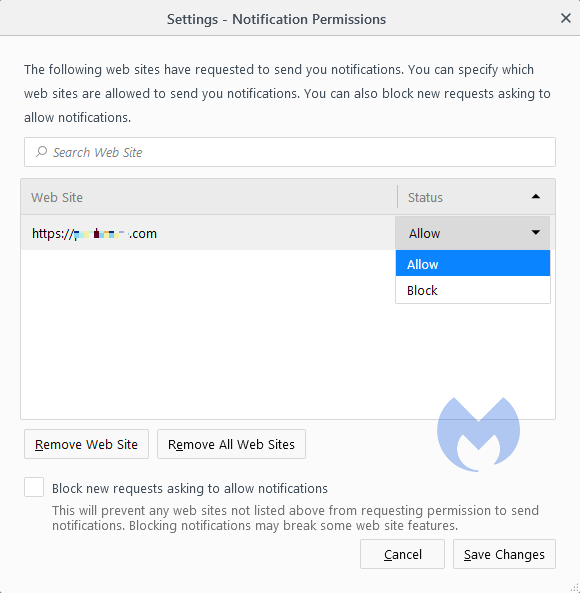
Selecting Remove will delete the item from the list. It will ask permission to show notifications again if you visit their site.
Selecting Block prevents permission prompts entirely, moved them to the block list.
You can also check Block new requests asking to allow notifications at the bottom.
In the same menu, you can also set listed items to Block or Allow by using the drop-down menu behind each item.
Opera
Opera’s settings are very similar to Chrome’s:
Open the menu by clicking the O in the upper left-hand corner.
Go to Settings (on Windows)/Preferences (on Mac).
Click Advanced, then Privacy & security.
Under Content settings (desktop)/Site settings (Android) select Notifications.
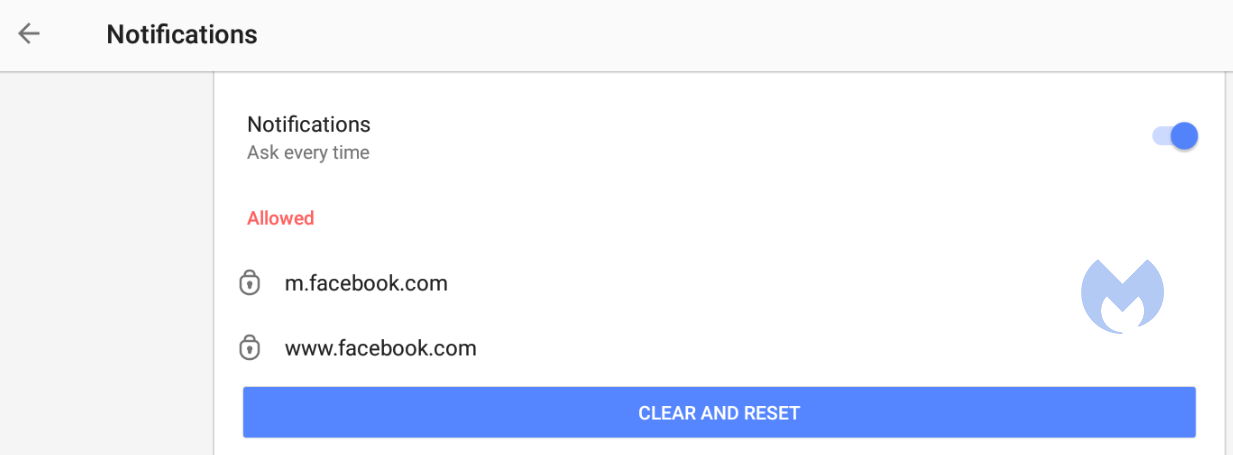
On desktop, Opera behaves the same as Chrome. On Android, you can remove items individually or in bulk.
Edge
Edge is basically the same as Chrome as well:
Open Edge and click the three dots (…) in the top-right corner, then select Settings.
In the left-hand menu, click on Privacy, search, and services.
Under Sites permissions > All permissions, click on Notifications.
Turn on Quiet notifications requests to block all new notification requests.
Use Customized behaviors for more granular control.
Safari
To disable web push notifications in Safari, go to Safari > Settings > Websites > Notifications in the menu bar, select the website from the list, and change its setting to Deny. To stop all future requests, uncheck the box that says Allow websites to ask for permission to send notifications in the same window.
For Mac users
Go to Safari > Settings > Websites > Notifications.
Select a site and change its setting to Deny or Remove.
To stop all future prompts, uncheck Allow websites to ask for permission to send notifications.
For iPhone/iPad users
Open Settings.
Tap Notifications.
Scroll to Application Notifications and select Safari.
You’ll see a list of sites with permission.
Toggle any site to off to block its notifications.
We don’t just report on threats—we help safeguard your entire digital identity
Cybersecurity risks should never spread beyond a headline. Protect your, and your family’s, personal information by using identity protection.
Security is reaching a breaking point as growing technical complexity becomes a major risk vector. Learn why modern systems amplify threats—and how to stay ahead.
The Tea app breach highlights how weak back-end security can expose sensitive user data. Learn essential strategies for access control, data lifecycle management and third-party risk reduction.
U.S., Australian and UK officials today announced sanctions against Media Land, a Russian bulletproof hosting (BPH) provider, citing Media Land’s “role in supporting ransomware operations and other forms of cybercrime.”
“These so-called bulletproof hosting service providers like Media Land provide cybercriminals essential services to aid them in attacking businesses in the United States and in allied countries,” stated U.S. Under Secretary of the Treasury for Terrorism and Financial Intelligence John K. Hurley. “Today’s trilateral action with Australia and the United Kingdom, in coordination with law enforcement partners, demonstrates our collective commitment to combatting cybercrime and protecting our citizens.”
UK Foreign Secretary Yvette Cooper added, “Cyber criminals think that they can act in the shadows, targeting hard working British people and ruining livelihoods with impunity. But they are mistaken – together with our allies, we are exposing their dark networks and going after those responsible.”
Today’s announcements came from the U.S. Department of Treasury’s Office of Foreign Assets Control (OFAC), Australia’s Department of Foreign Affairs and Trade, and the UK’s Foreign Commonwealth and Development Office. OFAC and the FBI also designated three members of Media Land’s leadership team and three of its sister companies.
In the U.S., OFAC sanctions require blocking and mandatory reporting of all property and interests of the designated persons and entities and prohibit all transactions involving any property or interests of designated or blocked persons.
BPH service providers offer access to specialized servers and infrastructure designed to evade detection and disruption by law enforcement.
Russian Bulletproof Hosting Provider and Individuals Sanctioned
Media Land LLC, headquartered in St. Petersburg, Russia, has provided BPH services to criminal marketplaces and ransomware actors, including “prolific ransomware actors such as LockBit, BlackSuit, and Play,” the U.S. statement alleges. Media Land infrastructure has also been used in DDoS attacks, the U.S. says.
Media Land, ML Cloud (a Media Land sister company), Aleksandr Volosovik (general director of Media Land who has allegedly advertised the business on cybercrime forums under the alias “Yalishanda”), and Kirill Zatolokin (a Media Land employee allegedly responsible for collecting payment and coordinating with cyber actors) were designated by OFAC for their cyber activities.
The UK alleges that Volosovik “has been active in the cyber underground since at least 2010, and is known to have worked with some of the most notorious cyber criminal groups, including Evil Corp, LockBit and Black Basta.”
Yulia Pankova was designated by OFAC for allegedly assisting Volosovik with legal issues and finances.
Also designated are Media Land Technology (MLT) and Data Center Kirishi (DC Kirishi), fully-owned subsidiaries of Media Land.
U.S. and UK Sanction Alleged Aeza Entities
OFAC and the UK also designated Hypercore Ltd., an alleged front company of Aeza Group LLC, a BPH service provider designated by OFAC earlier this year, and two additional individuals and entities that have allegedly led, materially supported, or acted for Aeza Group.
OFAC said that after its designations of Aeza Group and its leadership on July 1, 2025, “Aeza leadership initiated a rebranding strategy focusing on removing any connections between Aeza and their new technical infrastructure. OFAC’s designations today serve as a reminder that OFAC will take all possible steps to counter sanctions evasion activity by malicious cyber actors and their enablers.”
Maksim Vladimirovich Makarov, allegedly the new director of Aeza, and Ilya Vladislavovich Zakirov, who allegedly helped establish new companies and payment methods to obfuscate Aeza’s activity, were also designated.
Smart Digital Ideas DOO and Datavice MCHJ – Serbian and Uzbek companies allegedly utilized by Aeza to evade sanctions and set up technical infrastructure not publicly associated with the Aeza brand – were also designated.
Five Eyes Guidance for Defending Against BPH Providers
Also today, the U.S. and other “Five Eyes” countries issued guidance for defending against risks from bulletproof hosting providers.
“Organizations with unprotected or misconfigured systems remain at high risk of compromise, as malicious actors leverage BPH infrastructure for activities such as ransomware, phishing, malware delivery, and denial-of-service (DoS) attacks,” the U.S. Cybersecurity and Infrastructure Security Agency (CISA) stated in announcing the guidance. “BPH providers pose a significant threat to the resilience and security of critical systems and services.”
Included in the guidance are recommendations for a “nuanced approach to dynamically filter ASNs, IP ranges, or individual IP addresses to effectively reduce the risk of compromise from BPH provider-enabled activity.”
A new infostealer called DigitStealer is going after Mac users. It avoids detection, skips older devices, and steals files, passwords, and browser data. We break down what it does and how to protect your Mac.
Researchers have described a new malware called DigitStealer that steals sensitive information from macOS users.
This variant comes with advanced detection-evasion techniques and a multi-stage attack chain. Most infostealers go after the same types of data and use similar methods to get it, but DigitStealer is different enough to warrant attention.
A few things make it stand out: platform-specific targeting, fileless operation, and anti-analysis techniques. Together, they pose relatively new challenges for Mac users.
The attack starts with a file disguised as a utility app called “DynamicLake,” which is hosted on a fake website rather than the legitimate company’s site. To trick users, it instructs you to drag a file into Terminal, which will initiate the download and installation of DigitStealer.
If your system matches certain regions or is a virtual machine, the malware won’t run. That’s likely to hinder analysis by researchers and to steer clear of infecting people in its home country, which is enough in some countries to stay out of prison. It also limits itself to devices with newer ARM features introduced with M2 chips or later. chips, skipping older Macs, Intel-based chips, and most virtual machines.
The attack chain is largely fileless so it won’t leave many traces behind on an affected machine. Unlike file-based attacks that execute the payload in the hard drive, fileless attacks execute the payload in Random Access Memory (RAM). Running malicious code directly in the memory instead of the hard drive has several advantages for attackers:
Evasion of traditional security measures: Fileless attacks bypass antivirus software and file-signature detection, making them harder to identify using conventional security tools.
Harder to remediate: Since fileless attacks don’t create files, they can be more challenging to remove once detected. This can make it extra tricky for forensics to trace an attack back to the source and restore the system to a secure state.
DigitStealer’s initial payload asks for your password and tries to steal documents, notes, and files. If successful, it uploads them to the attackers’ servers.
The second stage of the attack goes after browser information from Chrome, Brave, Edge, Firefox and others, as well as keychain passwords, crypto wallets, VPN configurations (specifically OpenVPN and Tunnelblick), and Telegram sessions.
How to protect your Mac
DigitStealer shows how Mac malware keeps evolving. It’s different from other infostealers, splitting its attack into stages, targeting new Mac hardware, and leaving barely any trace.
But you can still protect yourself:
Use an up-to-date real-time anti-malware solution. DigitStealer highlights the need for advanced behavioral protection, not just signature scans. Malwarebytes for Mac detects DigitStealer as MacOA.Stealer.DigitSteal.
Always be careful what you run in Terminal. Don’t follow instructions from unsolicited messages.
Be careful where you download apps from.
Keep your software, especially your operating system and your security defenses, up to date.
The Washington Post has confirmed that it was breached by a threat campaign targeting Oracle E-Business Suite vulnerabilities.
The Washington Post data breach is one of more than 40 victims claimed by the CL0P ransomware group in a campaign that is believed to have targeted Oracle E-Business Suite vulnerability CVE-2025-61884, but so far only four of the victims have confirmed that they were breached: The Post, Harvard University, American Airlines’ Envoy Air, and Hitachi’s GlobalLogic.
The Post confirmed the data breach in a Nov. 12 filing with the Maine Attorney General’s office.
Washington Post Data Breach Detailed in Letter
The Washington Post data breach timeline was detailed in a letter from a law firm representing the newspaper to Maine Attorney General Aaron Frey.
The letter states that on September 29, The Post “was contacted by a bad actor who claimed to have gained access to its Oracle E-Business Suite applications.”
The Post letter said the company subsequently launched an investigation of its Oracle application environment with the help of experts.
“During the investigation, Oracle announced that it had identified a previously unknown and widespread vulnerability in its E-Business Suite software that permitted unauthorized actors to access many Oracle customers’ E-Business Suite applications,” The Post’s letter states. “The Post’s investigation confirmed that it was impacted by this exploit and determined that, between July 10, 2025, and August 22, 2025, certain data was accessed and acquired without authorization.”
On October 27, 2025, The Post “confirmed that certain personal information belonging to current and former employees and contractors was affected by this incident. The affected information varies by individual but may include individuals’ names, bank account numbers and associated routing numbers, Social Security numbers, and/or tax ID numbers.”
On November 12, The Post said it notified 31 Maine residents of the incident, but the total number of affected employees and contractors is believed to total just under 10,000. The Post said it has offered complimentary identity protection services through IDX to individuals whose Social Security numbers or tax ID numbers were exposed in the breach.
CL0P Oracle Victims Number More Than 40
While only four victims have confirmed they were hit in the Oracle cyberattack campaign, the Cl0p ransomware group has claimed roughly 45 victims to date from the campaign on its dark web data leak site.
Alleged victims claimed by CL0P have included major electronics companies, energy and utility organizations, technology companies, manufacturers, medical technology companies, healthcare providers, major colleges and universities, insurers, security companies, banks, construction and engineering firms, mining companies and communications companies, among other industries and sectors.
CL0P has tended to cluster victims in campaigns targeting specific vulnerabilities throughout its six-year-history, including 267 claimed victims in February 2025 that drove ransomware attacks to record highs that month.
The Akira ransomware group poses an “imminent threat to critical infrastructure,” the U.S. Cybersecurity and Infrastructure Security Agency (CISA) warned today.
CISA joined with the FBI, other U.S. agencies and international counterparts to issue a lengthy updated advisory on the ransomware group, adding many new Akira tactics, techniques and procedures (TTPs), indicators of compromise (IoCs), and vulnerabilities exploited by the group.
Akira is consistently one of the most active ransomware groups, so the update from CISA and other agencies is significant. As of late September, Akira has netted about $244.17 million in ransom payments, CISA said.
The Akira ransomware group information was sourced from “FBI investigations and trusted third-party reporting,” the agency said.
In a busy two days for the agency, CISA also added three vulnerabilities to its Known Exploited Vulnerabilities (KEV) catalog (CVE-2025-9242, a WatchGuard Firebox Out-of-Bounds Write vulnerability, CVE-2025-12480, a Gladinet Triofox Improper Access Control vulnerability, and CVE-2025-62215, a Microsoft Windows Race Condition vulnerability), and reissued orders to federal agencies to patch Cisco vulnerabilities CVE-2025-20333 and CVE-2025-20362.
Akira Ransomware Group Targets Vulnerabilities for Initial Access
The CISA Akira advisory notes that in a June 2025 incident, Akira encrypted Nutanix Acropolis Hypervisor (AHV) virtual machine (VM) disk files for the first time, expanding the ransomware group’s abilities beyond VMware ESXi and Hyper-V by abusing CVE-2024-40766, a SonicWall vulnerability.
The updated advisory adds six new vulnerabilities exploited by Akira threat actors for initial access, including:
CVE-2020-3580, a cross-site scripting (XSS) vulnerability in Cisco Adaptive Security Appliance (ASA) Software and Cisco Firepower Threat Defense (FTD)
CVE-2023-28252, a Windows Common Log File System Driver Elevation of Privilege vulnerability
CVE-2024-37085, a VMware ESXi authentication bypass vulnerability
CVE-2023-27532, a Veeam Missing Authentication for Critical Function vulnerability
CVE-2024-40711, a Veeam Deserialization of Untrusted Data vulnerability
CVE-2024-40766, a SonicWall Improper Access Control vulnerability
“Akira threat actors gain access to VPN products, such as SonicWall, by stealing login credentials or exploiting vulnerabilities like CVE-2024-40766,” the CISA advisory said. In some cases, they gain initial access with compromised VPN credentials, possibly by using initial access brokers or brute-forcing VPN endpoints. The group also uses password spraying techniques and tools such as SharpDomainSpray to gain access to account credentials.
Akira threat actors have also gained initial access through the Secure Shell (SSH) protocol by exploiting a router’s IP address. “After tunneling through a targeted router, Akira threat actors exploit publicly available vulnerabilities, such as those found in the Veeam Backup and Replication component of unpatched Veeam backup servers,” the advisory said.
Akira’s Latest Discovery, Persistence and Evasion Tactics
Visual Basic (VB) scripts are frequently used by the group to execute malicious commands, and nltest /dclist: and nltest /DOMAIN_TRUSTS are used for network and domain discovery.
Akira threat actors abuse remote access tools such as AnyDesk and LogMeIn for persistence and to “blend in with administrator activity,” and Impacket is used to execute the remote command wmiexec.py and obtain an interactive shell. Akira threat actors also uninstall endpoint detection and response (EDR) systems to evade detection.
In one incident, Akira threat actors bypassed Virtual Machine Disk (VMDK) file protection by powering down the domain controller’s VM and copying the VMDK files to a newly created VM, CISA said. “This sequence of actions enabled them to extract the NTDS.dit file and the SYSTEM hive, ultimately compromising a highly privileged domain administrator’s account,” the advisory said.
Veeam.Backup.MountService.exe has also been used for privilege escalation (CVE-2024-40711), and AnyDesk, LogMeIn, RDP, SSH and MobaXterm have been used for lateral movement.
Akira actors have used tunneling utilities such as Ngrok for command and control (C2) communications, initiating encrypted sessions that bypass perimeter monitoring. PowerShell and Windows Management Instrumentation Command-line (WMIC) have also been used to disable services and execute malicious scripts.
Akira threat actors have been able to exfiltrate data in just over two hours from initial access, CISA said. The new Akira_v2 variant appends encrypted files with an .akira or .powerranges extension, or with .akiranew or .aki. A ransom note named fn.txt or akira_readme.txt appears in both the root directory (C:) and each user’s home directory (C:\Users).
CISA recommended a number of security best practices for combatting the Akira ransomware threat, including prioritizing remediating known exploited vulnerabilities, enforcing phishing-resistant multifactor authentication (MFA), and maintaining regular, tested offline backups of critical data.
Somebody forwarded an “invoice” email and asked me to check the attachment because it looked suspicious. Good instinct—it was, and what we found inside was a surprisingly old trick hiding a modern threat.
What it does
If the recipient had opened the attached Visual Basic Script (.vbs) file, it would have quietly installed a remote-access Trojan known as Backdoor.XWorm. Once active, it could have let attackers:
Steal files, passwords and other personal data
Record keystrokes
Spy on the user
Install other malware, including ransomware
Everything happens silently, with no alerts or windows. It’s built to avoid antivirus tools and hand over complete control of the PC.
“Hi,
Please find attached the list of invoices we have processed and payment has been made as of 8/1/2025 2:45:06 a.m.
Kindly review and confirm that these have been received on your end.
Additionally, we would appreciate it if you could send us an updated list of any outstanding or unpaid invoices for our records.
Looking forward to your response.
Best regards,
Account Officer”
The payload was identified by our research team as Backdoor.XWorm. XWorm is a known remote-access trojan (RAT) and backdoor used for spying, keylogging, stealing data, and even installing ransomware. It is sold as malware-as-a-service (MaaS), which means cybercriminals sell (or more often, rent) it to other criminals, who can then distribute and deploy it as they see fit while using the MaaS provider’s infrastructure to receive stolen data and maintain access through the backdoor.
Why this email was suspicious
The email itself had obvious warning signs: no names, just a generic “Hi” and a vague “Account Officer” signature. Real invoices or payment notices almost always include contact details, so this alone should raise suspicion.
That attachment immediately stood out because .vbs files are almost never used in business emails anymore. Visual Basic Script was a Windows automation tool from the late 1990s and 2000s—long since replaced by more versatile scripting languages like PowerShell.
Today, almost every company blocks .vbs attachments outright because they can execute code the moment you open them.
So when one still gets through, it usually means either a security filter failed or an attacker deliberately tried to bypass it. In 2025, receiving a .vbs “invoice” is like finding a floppy disk in your mailbox. It’s retro, suspicious, and definitely not something you should plug in.
How to stay safe
Double-check unexpected attachments: If you weren’t expecting it, confirm first using a known contact method, rather than by replying to the same email.
Don’t open executable files: Anything ending in .exe, .vbs, .bat, or .scr can run code. Legitimate businesses don’t send these by email.
Watch for red flags: Generic greetings, odd job titles, or hidden file types are giveaways. Turn on the option to show file extensions so you can spot fakes like invoice.pdf.vbs.
Keep your protection on and updated: Use an up-to-date real-time anti-malware solution preferably with a web protection module.
Technical analysis
I wanted to know exactly what that attachment did and how it worked. For our technical readers, here’s my deep dive down the wormhole.
The email
The message itself was straightforward—a short “invoice” note with a polite request to confirm payment and a .vbs attachment named INV-20192,INV-20197.vbs. Nothing about the text was overtly malicious, but the presence of a Visual Basic Script attachment immediately stood out.
.vbs files are rarely, if ever, used in legitimate business correspondence anymore. Because they can execute code directly, most mail gateways block them outright. Seeing one arrive intact suggested either a configuration oversight or a deliberate attempt to bypass filtering.
That alone made the sample worth a closer look.
Delivery
Using an Excel file with a malicious VBA macro often makes more sense from a criminal’s perspective than sending a plain .vbs attachment. Excel files are common in business environments and can appear legitimate, making them less likely to raise suspicion than a raw script. Attackers also benefit because macro-enabled Office documents remain a frequent delivery mechanism. Many users and organisations still interact with these files and can be tricked into enabling macros for what seem like “legitimate” reasons.
Microsoft has made macros harder to execute by default, so some threat actors have shifted tactics. Macros still work where social engineering succeeds, but attackers increasingly experiment with other vectors when they can’t rely on macros.
Compared with an Excel document, a .vbs attachment immediately stands out as unusual in modern business email and is often blocked by gateway rules. In this case, the sender may also have been counting on hidden file extensions (invoice.pdf.vbs) to make the file look like a harmless invoice; a small deception that still fools busy users.
Although .vbs is largely obsolete, it’s not harmless. Visual Basic Script can run arbitrary commands on Windows and can download or create additional malicious files. It’s crude, but it still works if it gets past filters or lands with an unaware user.
I expected the code to be less-than-sophisticated, but only the first level was.
The .vbs dropped IrisBud.bat into %TEMP% (C:\Windows\Temp\IrisBud.bat) and invoked it via WMI. The .bat restarted itself in a way so it ran invisibly. The batch then copied itself to the user profile as aoc.bat and contained heavy obfuscation. Its end goal was to run a PowerShell loader that read encoded strings from aoc.bat and turn them into the real payload.
Our team identified that payload as Backdoor.XWorm—a remote-access trojan (RAT) sold as malware-as-a-service. If executed, it would give attackers stealthy access to the machine: steal files and credentials, record keystrokes, install more malware, or deploy ransomware.
The whole chain runs quietly and is designed to avoid detection. Simply opening the attachment would have put the user’s data at serious risk. If you have found Backdoor.XWorm on your machine, we advise you to follow the remediation and aftermath sections of this detection profile.
VBS
The .vbs file at first sight looked like alphabet soup, but the last line (of 429) provided the plan. I commented out that last line so INV-20192,INV-20197.vbs would create IrisBud.bat but not execute it.
A piece of the code inside the vbs file with the last line commented out
BAT
However, my hopes of the batch file being easier to read were quickly run into the ground. Most of the batch file consisted of simple WriteLine commands which wrote almost everything ad verbatim into IrisBud.bat.
But if you look closely you see a lot of repeated variables like %gkgqglgzhphupcp% in the first line and %viqfvdhc% in line 30. I determined that these variables were not assigned a value and only there for “padding.” Padding is a technique used by malware authors to make their malicious programs harder to detect or analyze.
Imagine you have a box with secret contents that you don’t want anyone to find easily. To hide what’s really inside, you fill the box with a lot of extra, useless material—like packing peanuts, shredded paper, or just empty space—so it’s difficult for someone to see or measure what’s actually important in the box.
So, my first move was to get rid of all the padding. Although not perfect, that cleared some things up.
Partly deobfuscated bat file
The line if not DEFINED Abc1 (set Abc1=1 & cmd /c start "" /min "%~dpnx0" %* & exit) is a classic malware technique to hide execution from the user while keeping the script running in the background. Let’s look at it step by step:
if not DEFINED Abc1 — Checks if the variable Abc1 doesn’t exist yet.
set Abc1=1 — Sets the variable to 1 (which marks that this check has been done).
start "" /min starts a program minimized (invisible to the user)
"%~dpnx0" is the full path to the current batch file itself
%* passes along any command-line arguments
exit — Exits the current (visible) instance
So, in other words the first time it runs:
It restarts itself in a minimized/hidden window.
The original visible instance exits immediately.
The new hidden instance continues running with Abc1=1 set, so it won’t trigger this restart loop again.
And this line: copy "%sourceFile%" "%userprofile%\aoc.bat" >nul is where the bat file copies itself to the user’s profile directory.
Breaking it down:
%sourceFile% — The source (set earlier to the current batch file’s full path).
%userprofile%\aoc.bat — The destination: the user’s profile directory (typically C:\Users\[username]\) with the new name aoc.bat.
>nul — Suppresses output (hides the “1 file(s) copied” message).
The setlocal enabledelayedexpansion is needed because exclamation marks (!) around variables are used for delayed variable expansion, which allows the batch script to update and use the value of variables dynamically within loops or code blocks where normal percent expansion wouldn’t work. This requires delayed expansion to be enabled which is done with the command setlocal enabledelayedexpansion.
From the next lines I can tell that the !xmgotoyfycqitjc! which we see can be replaced by the set command.
Because it is defined by:
set "xmgotoyfycqitjc=!ejlhixzkmttzgho!e!ugcqubmykdxgowp!" where earlier we saw: set "ejlhixzkmttzgho=s" set "ugcqubmykdxgowp=t" Together this makes xmgotoyfycqitjc = s + e + t so my next step was to replace all those instances. And with that we made a good start at mapping out all the variables that were not intended as padding.
Of specific interest in this case was one particular line (414) where all the mapped variables came together.
Last piece of the partly deobfuscated bat file
The only two other lines that stood out were two lines that begin with :: and contain a very long string. While these superficially appear to be ordinary batch comments, they actually hide encrypted payload data (lines 41 and 69 are the hidden payload).
We’ll get to those later on.
First, we need to construct line 414 into something readable.
After replacing all the defined variables, line 414 turned into this:
The replace command showed me that I had to remove even more padding—this time from the encoded PowerShell script which was padded with the hkfdo string.
PowerShell
After I did that and decoded the base64 string, this was the PowerShell script:
The resulting PowerShell script
What this PowerShell script does explains why the two long lines I referred to earlier are needed:
First part: the script looks for the hidden payload in aoc.bat (the copy it created). The script reads aoc.bat line by line, looking for lines that start with ::: (three colons). If it finds one, it treats everything after the colons as Base64-encoded data, decodes it, and runs it as PowerShell code. This is a way to hide malicious commands inside what looks like a batch file comment.
Second part: creates the main malicious payload. The big block (starting with $weiamnightfo) does several things:
Reads encrypted data from aoc.bat: It looks for a line starting with :: (two colons) in the batch file, which contains encrypted and compressed malware.
Decrypts the data: It uses AES encryption (with a hardcoded key and Initialization Vector (IV)) to decrypt the payload. Think of this like unlocking a safe with a specific combination.
Decompresses it: After decryption, it unzips the data using GZip compression. The malware was squeezed down to make it smaller and harder to detect.
Loads and runs the malware: The decrypted/decompressed data turns out to be two executable files. The script loads these files directly into memory and runs them without ever saving them to disk. This is called a “fileless attack” and helps avoid anti-malware detection.
By loading and running these malicious programs directly in memory, the attack avoids dropping visible files on disk, making it much harder for anti-malware solutions to spot or capture the real threat.
Payload
To extract the payload safely I wrote a Python script to reproduce steps 1–3 without executing the code in memory. That produced two executable samples which I ran in an isolated sandbox.
The sandbox revealed a mutex 5wyy00gGpG6LF3m6 which pointed to the XWorm family. “Mutex” stands for mutual exclusion, which is a special marker that a running program creates on a Windows computer to make sure only one copy of the process is running at once. Malware authors bake them into their code and security analysts catalog them, much like a “fingerprint.” So when our researchers see one of the known mutex names, they can easily classify the malware and move on to the next sample.
Indicators of Compromise (IOCs)
INV- 20192,INV-20197.vbs (email attachment) IrisBud.bat (in %temp% folder) aoc.bat (In %user% folder) SHA256: 0861f20e889f36eb529068179908c26879225bf9e3068189389b76c76820e74e ( for Backdoor.XWorm)
We don’t just report on threats—we remove them
Cybersecurity risks should never spread beyond a headline. Keep threats off your devices by downloading Malwarebytes today.
Intel is suing a former employee who the chipmaker claims downloaded almost 18,000 corporate files days before leaving the company. The software engineer was told he was being let go effective July 31, likely part of Intel's larger effort to shed 15% of its workforce.
Cybersecurity researchers at Cyble have uncovered an extensive phishing campaign that represents a significant evolution in credential theft tactics. The operation, which targets organizations across multiple industries in Central and Eastern Europe, bypasses conventional email security measures by using HTML attachments that require no external hosting infrastructure.
Unlike traditional phishing attacks that rely on suspicious URLs or compromised servers, this campaign embeds malicious JavaScript directly within seemingly legitimate business documents. When victims open these HTML attachments—disguised as requests for quotation (RFQ) or invoices—they're presented with convincing login interfaces impersonating trusted brands like Adobe, Microsoft, FedEx, and DHL.
How the Attack Works
The attack chain begins with targeted emails posing as routine business correspondence. The HTML attachments use RFC-compliant filenames such as "RFQ_4460-INQUIRY.HTML" to appear legitimate and avoid triggering basic security filters.
Once opened, the file displays a blurred background image of an invoice or document with a centered login modal, typically branded with Adobe styling. The victim, believing they need to authenticate to view the document, enters their email and password credentials.
Behind the scenes, embedded JavaScript captures this data and immediately transmits it to attacker-controlled Telegram bots via the Telegram Bot API. This approach eliminates the need for traditional command-and-control infrastructure, making the operation harder to detect and disrupt.
"The sophistication lies not just in the technical execution but in how it circumvents multiple layers of security," explains the Cyble Research and Intelligence Labs (CRIL) team. The self-contained nature of the HTML files means they don't trigger alerts for suspicious external connections during initial email scanning.
Technical Sophistication
Analysis of multiple samples reveals ongoing development and refinement of the attack methodology. Earlier versions used basic JavaScript, while more recent samples implement CryptoJS AES encryption for obfuscation and sophisticated anti-forensics measures.
Advanced samples block common investigation techniques by disabling F12 developer tools, preventing right-click context menus, blocking text selection, and intercepting keyboard shortcuts like Ctrl+U (view source) and Ctrl+Shift+I (inspect element). These measures significantly complicate analysis efforts by security researchers and forensic investigators.
The malware also employs dual-capture mechanisms, forcing victims to enter their credentials multiple times while displaying fake "invalid login" error messages. This ensures accuracy of the stolen data while maintaining the illusion of a legitimate authentication failure.
Beyond credentials, the samples collect additional intelligence including victim IP addresses (using services like api.ipify.org), user agent strings, and other environmental data that could be valuable for subsequent attacks.
Scale and Targeting
CRIL's investigation identified multiple active Telegram bots with naming conventions like "garclogtools_bot," "v8one_bot," and "dollsman_bot," each operated by distinct threat actors or groups. The decentralized infrastructure suggests either collaboration among multiple cybercriminal groups or widespread availability of phishing toolkit generators.
The campaign primarily targets organizations in the Czech Republic, Slovakia, Hungary, and Germany, with affected industries including manufacturing, automotive, government agencies, energy utilities, telecommunications, and professional services. The geographic concentration and industry selection indicate careful reconnaissance and targeting based on regional business practices.
Threat actors customize their approach for different markets, using German-language variants for Telekom Deutschland impersonation and Spanish-language templates for other targets. The modular template system enables rapid deployment of new brand variants as the campaign evolves.
Detection and Defense
Security teams face challenges in detecting this threat due to its innovative use of legitimate platforms. Traditional indicators like suspicious URLs or known malicious domains don't apply when the attack infrastructure consists of HTML attachments and Telegram's legitimate API.
Cyble recommends organizations implement several defensive measures. Security operations centers should monitor for unusual connections to api.telegram.org from end-user devices, particularly POST requests that wouldn't occur in normal business operations. Network traffic to third-party services like api.ipify.org and ip-api.com from endpoints should also trigger investigation.
Email security policies should treat HTML attachments as high-risk file types requiring additional scrutiny. Organizations should implement content inspection that flags HTML attachments containing references to the Telegram Bot API or similar public messaging platforms.
For end users, the guidance remains straightforward: exercise extreme caution with unsolicited HTML attachments, especially those prompting credential entry to view documents. Any unexpected authentication request should be verified through independent channels before entering credentials.
Cyble has published complete indicators of compromise, including specific bot tokens, attachment patterns, and YARA detection rules to its GitHub repository, enabling security teams to hunt for signs of compromise within their environments and implement preventive controls.
As GenAI transforms cyberattacks and defenses, organizations must strengthen the human layer. Learn how AI multiplies both risk and resilience in 2025.
You’ve probably seen it before—a bright, urgent message claiming you’ve qualified for a $750 or $1000 Walmart gift card. All you have to do is answer a few questions. It looks harmless enough. But once you click, you find yourself in a maze of surveys, redirects, and “partner offers”—without ever actually reaching the end and claiming your prize.
This so-called “survey” is part of a lead-generation and affiliate marketing scam, designed not to reward you but to harvest your data and push you through ad funnels that make money for others, at the cost of your privacy.
What’s really going on?
It’s a scam because these pages rarely deliver any real gift card. What they’re after is your personal data.
As you move through each step, you’re asked for details like your name, email, phone number, ZIP code and even your home address. In some cases, you’re prompted to share interests such as home repair, debt help, or insurance quotes—each answer helps categorize you for targeted marketing.
Even if the page itself doesn’t steal money, that information is still valuable. It can be used to target you with more ads and offers, add you to marketing lists, or personalize follow-up contact. In other words, completing the questionnaire hands over data that can be exploited for profit—even when no gift card ever appears.
In some cases, the funnel gets even more specific. For example, if the survey asks you about home projects and you say you’re planning to replace your windows, you might be redirected to what looks like a legitimate home improvement site—often just another form asking for the same details again. The whole thing is designed to keep you filling out more forms, giving up more of your data, to more websites and affiliates.
These scams aren’t just annoying time-wasters. They are harvesting your data, eroding your privacy and exposing you to wider risks. Once your details are shared, they can travel far beyond that fake survey.
Your information may:
Be resold to advertisers and data brokers, who build detailed profiles about your habits, spending, and location.
Lead to a surge of spam calls, texts, and phishing emails tailored to your interests.
Feed more convincing scams down the line, since criminals can now personalize their lures using real information about you.
End up on unregulated marketing lists that circulate for years, keeping your data in play long after you’ve closed the page.
That’s the hidden cost of a “free” gift card: each click fuels a network that profits from your identity, not your participation.
Why do people fall for it?
The hook is simple—free money and easy participation. But this fake Walmart promotion taps into three powerful psychological triggers:
The sense of luck: “You’ve been selected!” sounds personal and special.
The promise of low effort: Answering a few questions feels harmless.
The illusion of credibility: Walmart’s branding lends legitimacy.
These scams spread mainly through advertising and malvertising networks—pop-ups, spam emails, social media ads, or sketchy website banners that imitate real promotions.
You might spot them alongside news articles or as “sponsored links” that sound too good to be true. Some appear via push notifications or redirects, whisking you from a real website to a fake reward page in seconds.
The designs often use official logos, countdown timers, and congratulatory language to make them look like authentic brand campaigns—tricking people into lowering their guard.
It’s an easy mental shortcut: “If this was fake, it wouldn’t look so professional.” That’s what these scammers count on—the appearance of legitimacy mixed with urgency and reward.
How to protect yourself
These gift card offers aren’t just harmless internet fluff—they’re the front door to a sprawling network of data collection and affiliate profiteering. Each click, form, and redirect is designed to extract value from your attention and information, not to reward you.
Recognizing these scams early is the best defense. Here’s how to stay safe:
Be suspicious of online surveys promising big rewards. Legitimate promotions from major retailers rarely require long questionnaires or partner offers.
Never give personal information to unknown pages. If a site asks for your phone number or address for a “free prize,” it’s a red flag.
Use browser protection tools. Extensions like Malwarebytes Browser Guard can block known scam domains and malvertising networks before they load.
Check the URL carefully. Real Walmart promotions will always come from official domains (like walmart.com or survey.walmart.com), not random URLs with extra words or numbers.
Stay alert and skeptical. Online quizzes and reward offers are a favorite bait for scammers. When in doubt – close the tab.
We don’t just report on scams—we help detect them
Cybersecurity risks should never spread beyond a headline. If something looks dodgy to you, check if it’s a scam using Malwarebytes Scam Guard, a feature of our mobile protection products. Submit a screenshot, paste suspicious content, or share a text or phone number, and we’ll tell you if it’s a scam or legit. Download Malwarebytes Mobile Security for iOS or Android and try it today!
Cybercrime is now a global, professionalised industry. Learn how AI, ransomware, and organised groups are reshaping cybersecurity and business defence.
AI malware may be in the early stages of development, but it's already being detected in cyberattacks, according to new research published this week.
Google researchers looked at five AI-enabled malware samples - three of which have been observed in the wild - and found that the malware was often lacking in functionality and easily detected. Nonetheless, the research offers insight into where the use of AI in threat development may go in the future.
“Although some recent implementations of novel AI techniques are experimental, they provide an early indicator of how threats are evolving and how they can potentially integrate AI capabilities into future intrusion activity,” the researchers wrote.
AI Malware Includes Infostealers, Ransomware and More
The AI-enabled malware samples included a reverse shell, a dropper, ransomware, a data miner and an infostealer.
The researchers said malware families like PROMPTFLUX and PROMPTSTEAL are the first to use Large Language Models (LLMs) during execution. “These tools dynamically generate malicious scripts, obfuscate their own code to evade detection, and leverage AI models to create malicious functions on demand, rather than hard-coding them into the malware,” they said. “While still nascent, this represents a significant step toward more autonomous and adaptive malware.”
“[A]dversaries are no longer leveraging artificial intelligence (AI) just for productivity gains, they are deploying novel AI-enabled malware in active operations,” they added. “This marks a new operational phase of AI abuse, involving tools that dynamically alter behavior mid-execution.”
However, the new AI malware samples are only so effective. Using hashes provided by Google, they were all detected by roughly a third or more of security tools on VirusTotal, and two of the malware samples were detected by nearly 70% of security tools.
AI Malware Samples and Detection Rates
The reverse shell, FRUITSHELL (VirusTotal), is a publicly available reverse shell written in PowerShell that establishes a remote connection to a command-and-control (C2) server and enables a threat actor to launch arbitrary commands on a compromised system. “Notably, this code family contains hard-coded prompts meant to bypass detection or analysis by LLM-powered security systems,” the researchers said.
It was detected by 20 of 62 security tools (32%), and has been observed in threat actor operations.
The dropper, PROMPTFLUX (VirusTotal), was written in VBScript and uses an embedded decoy installer for obfuscation. It uses the Google Gemini API for regeneration by prompting the LLM to rewrite its source code and saving the new version to the Startup folder for persistence, and the malware attempts to spread by copying itself to removable drives and mapped network shares.
Google said the malware appears to still be under development, as incomplete features are commented out and the malware limits Gemini API calls. “The current state of this malware does not demonstrate an ability to compromise a victim network or device,” they said.
The most interesting feature of PROMPTFLUX may be its ability to periodically query Gemini to obtain new code for antivirus evasion.
“While PROMPTFLUX is likely still in research and development phases, this type of obfuscation technique is an early and significant indicator of how malicious operators will likely augment their campaigns with AI moving forward,” they said.
It was detected by 23 of 62 tools (37%).
The ransomware, PROMPTLOCK (VirusTotal), is a proof of concept cross-platform ransomware written in Go that was developed by NYU researchers. It uses an LLM to dynamically generate malicious Lua scripts at runtime, and is capable of filesystem reconnaissance, data exfiltration, and file encryption on Windows and Linux systems.
It was detected by 50 of 72 security tools on VirusTotal (69%).
The data miner, PROMPTSTEAL (VirusTotal), was written in Python and uses the Hugging Face API to query the LLM “Qwen2.5-Coder-32B-Instruct” to generate Windows commands to gather system information and documents.
The Russian threat group APT28 (Fancy Bear) has been observed using PROMPTSTEAL, which the researchers said is their “first observation of malware querying an LLM deployed in live operations.”
It was detected by 47 of 72 security tools (65%).
The infostealer, QUIETVAULT (VirusTotal), was written in JavaScript and targets GitHub and NPM tokens. The credential stealer uses an AI prompt and AI CLI tools to look for other potential secrets and exfiltrate files to GitHub.
It has been observed in threat actor operations and was detected by 29 of 62 security tools (47%).
The full Google report also looks at advanced persistent threat (APT) use of AI tools, and also included this interesting comparison of malicious AI tools such as WormGPT:
[caption id="attachment_106590" align="aligncenter" width="1098"] Comparison of malicious AI tools (Google)[/caption]
Early on in 2025, I described how criminals used fake CAPTCHA sites and a clipboard hijacker to provide instructions for website visitors that would effectively infect their own machines with an information stealer known as the Lumma Stealer.
ClickFix is the name researchers have since given to this type of campaign—one that uses the clipboard and fake CAPTCHA sites to trick users into running malicious commands themselves.
Later, we found that the cybercriminals behind it seemed to be running some A/B tests to figure out which infection method worked best: ClickFix, or the more traditional file download that disguises malware as a useful application.
The criminals probably decided to go with ClickFix, because they soon came up with a campaign that targeted Mac users to spread the infamous Atomic Stealer.
Now, as reported by researchers from Push Security, the attackers behind ClickFix have tried to make the campaign more “user-friendly.” The latest fake CAPTCHA pages include embedded video tutorials showing exactly how to run the malicious code.
Image courtesy of Push Security
The site automatically detects the visitor’s operating system and provides matching instructions, copying the right code for that OS straight to the clipboard—making typos less likely and infection more certain.
A countdown timer adds urgency, pressuring users to complete the “challenge” within a minute. When people rush instead of thinking things through, social engineering wins.
Unsurprisingly, most of these pages spread through SEO-poisoned Google search results, although they also circulate via email, social media, and in-app ads too.
How to stay safe
With ClickFix running rampant—and it doesn’t look like it’s going away anytime soon—it’s important to be aware, careful, and protected.
Slow down. Don’t rush to follow instructions on a webpage or prompt, especially if it asks you to run commands on your device or copy-paste code. Attackers rely on urgency to bypass your critical thinking, so be cautious of pages urging immediate action. Sophisticated ClickFix pages add countdowns, user counters, or other pressure tactics to make you act quickly.
Avoid running commands or scripts from untrusted sources. Never run code or commands copied from websites, emails, or messages unless you trust the source and understand the action’s purpose. Verify instructions independently. If a website tells you to execute a command or perform a technical action, check through official documentation or contact support before proceeding.
Limit the use of copy-paste for commands. Manually typing commands instead of copy-pasting can reduce the risk of unknowingly running malicious payloads hidden in copied text.
Secure your devices. Use an up-to-date real-time anti-malware solution with a web protection component.
Educate yourself on evolving attack techniques. Understanding that attacks may come from unexpected vectors and evolve helps maintain vigilance. Keep reading our blog!
Pro tip: Did you know that the free Malwarebytes Browser Guard extension warns you when a website tries to copy something to your clipboard?
We don’t just report on threats—we remove them
Cybersecurity risks should never spread beyond a headline. Keep threats off your devices by downloading Malwarebytes today.
Static security tuning creates dangerous blind spots that attackers exploit. Learn how dynamic context awareness transforms security operations by reducing false positives, preserving signal fidelity, and eliminating the hidden risks of over-tuning detection systems.
An Iran-linked threat group claims to have accessed the security cameras of an Israeli defense contractor and leaked videos of internal meetings and employees working on defense systems.
The threat group – Cyber Toufan – has been posting about the alleged breach of Maya Engineering on its Telegram channels for at least a few weeks, but the group’s claims became public in recent days in an X post and articles on media sites such as Straight Arrow News and Breached Company.
The claims remain unverified, and The Cyber Express has reached out to Maya for comment and will update this article with any official statement, but the alleged incident shows the importance of including surveillance cameras and other sensitive devices in cybersecurity plans.
“Scary stuff,” SANS instructor and consultant Kevin Garvey said on X. “Shows how *any* connected asset needs rigorous security associated to it! Good reminder to all to check if cameras and other peripherals are part of your standard vuln management and secure config programs (amongst others functional programs).”
Alleged Israeli Defense Contractor Breach
A check of Cyber Toufan’s Telegram channels by The Cyber Express found claims of the hack as early as October 12 (image below).
[caption id="attachment_106549" align="aligncenter" width="533"] October 12 Telegram post by Cyber Toufan claiming Maya hack[/caption]
However, the group claims to have had access to Maya’s systems for more than a year.
“One and a half years after gaining full access to the network, we have explored every part of it and reached the QNAP archive,” claims a Cyber Toufan post reported by International Cyber Digest on X. “Through the systems, we have breached Elbit and Rafael's through then. Their phones, printers, routers and cameras as well. We have recorded your meetings with sound and video for over a year. This is just the beginning with Maya!”
Footage released by the group shows company employees allegedly working on several defense systems, including missile and drone systems, and the group also claims to possess technical drawings of sensitive parts like missile components.
Cyber Toufan's Link to Iran
Cyber Toufan’s advanced tactics suggest technical acumen well beyond that of a typical hacktivist group, raising the possibility of a nation-state link to Iran.
Cyble’s threat intelligence profile of the group states, “Cyber Toufan is a threat actor group known for targeting Israeli organizations, with possible nation-state support from Iran. Their tactics include hack-and-leak operations, data breaches, and data destruction, impacting numerous organizations. Their activities are linked to geopolitical tensions in the Middle East, featuring a mix of technical breaches and psychological warfare. Threat actors associated with Cyber Toufan operate by infiltrating systems to steal sensitive data and disrupt operations, aiming to cause economic and political damage to their targets.”
Threat actors are working with organized crime groups to target freight operators and transportation companies, infiltrate their systems through RMM software, and steal cargo, which they then sell online or ship to Europe, according to Proofpoint researchers, who saw similar campaigns last year.
AI-driven social engineering is transforming cyberattacks from costly, targeted operations into scalable, automated threats. As generative models enable realistic voice, video, and text impersonation, organizations must abandon stored secrets and move toward cryptographic identity systems to defend against AI-powered deception.
Software supply chain attacks hit levels in October that were more than 30% higher than any previous month.
Threat actors on dark web data leak sites claimed 41 supply chain attacks in October, 10 more than the previous high seen in April 2025, Cyble reported today in a blog post.
Supply chain attacks have more than doubled since April, averaging more than 28 a month compared to the 13 attacks per month seen between early 2024 and March 2025, Cyble said (chart below).
[caption id="attachment_106524" align="aligncenter" width="717"] Supply chain attacks by month 2024-2025 (Cyble)[/caption]
Reasons Behind the Record Supply Chain Attacks
The threat intelligence company cited several reasons for the increase in attacks.
The primary drivers of the surge in supply chain attacks have been a “combination of critical and zero-day IT vulnerabilities and threat actors actively targeting SaaS and IT service providers,” the blog post said, noting that “the sustained increase suggests that the risk of supply chain attacks may remain elevated going forward.”
Cloud security threats and AI-based phishing campaigns are other causes cited by Cyble, although voice phishing (vishing) also played a large role in recent Scattered LAPSUS$ HuntersSalesforce breaches.
IT Companies Hit Hardest as Ransomware Groups Lead Attacks
All 24 industry sectors tracked by Cyble have been hit by a supply chain attack this year, but IT and IT services companies have been by far the biggest target because of “the rich target they represent and their downstream customer reach.” The 107 supply chain attacks targeting IT companies so far this year have been more than triple those of the next nearest sectors, which include financial services, transportation, technology and government (chart below).
[caption id="attachment_106523" align="aligncenter" width="723"] Supply chain attacks by sector 2025 (Cyble)[/caption]
Ransomware groups have been some of the biggest contributors to the increase in supply chain attacks.
Qilin and Akira have been the top two ransomware groups so far this year, and the two have also claimed “an above-average share of supply chain attacks,” Cyble said.
Akira’s recent victims have included an unnamed “major open-source software project,” the threat researchers said, and the 23GB of data stolen by the group includes “internal confidential files, and reports related to software issues and internal operations,” among other information.
Akira and Qilin have also claimed a number of attacks on IT companies, including some serving sensitive sectors such as government, intelligence, defense, law enforcement agencies, healthcare, industrial and energy companies, and payment processing and financial infrastructure solutions. In one incident, Qilin claimed to have stolen source code for proprietary software products used by law enforcement, criminal justice, public safety, and security organizations.
In one case, Qilin claimed to have breached customers of a U.S.-based cybersecurity and cloud services provider for healthcare and dental organizations through “clear-text credentials stored in Word and Excel documents hosted on the company’s systems.”
Kyber, a new ransomware group, leaked more than 141GB of project files, internal builds, databases, and backup archives allegedly stolen from “a major U.S.-based defense and aerospace contractor that provides communication, surveillance, and electronic warfare systems.”
Cl0p ransomware group exploits of Oracle E-Business Suite vulnerabilities a Red Hat GitLab breach were among the other major incidents in October.
Protecting Against Supply Chain Risks
The Cyble researchers said that guarding against supply chain attacks ”can be challenging because these partners and suppliers are, by nature, trusted, but security audits and assessing third-party risk should become standard cybersecurity practices.”
The researchers outlined several steps security teams can take to better protect their organizations.
“The most effective place to control software supply chain risks is in the continuous integration and development (CI/CD) process, so carefully vetting partners and suppliers and requiring good security controls in contracts are essential for improving third-party security,” the threat researchers added.
Cryptojacking silently hijacks compute power, inflates cloud bills, and erodes performance. Beyond financial losses, it exposes deep security risks, damages reputation, and drains productivity—making proactive detection and prevention essential for every organization.
The mobile AI gold rush has flooded app stores with lookalikes—shiny, convincing apps promising “AI image generation,” “smart chat,” or “instant productivity.” But behind the flashy logos lurks a spectrum of fake apps, from harmless copycats to outright spyware.
Spoofing trusted brands like OpenAI’s ChatGPT has become the latest tactic for opportunistic developers and cybercriminals to sell their “inventions” and spread malware.
A quick scan of app stores in 2025 shows an explosion of “AI” apps. As Appknox research reveals, these clones fall along a wide risk spectrum:
Harmless wrappers: Some unofficial “wrappers” connect to legitimate AI APIs with basic add-ons like ads or themes. These mostly create privacy or confusion risks, rather than direct harm.
Adware impersonators: Others abuse AI branding just to profit from ads. For example, a DALL·E image generator clone mimicking OpenAI’s look delivers nothing but aggressive ad traffic. Its only purpose: funneling user data to advertisers under the guise of intelligence. Package com.openai.dalle3umagic is detected by Malwarebytes as Adware.
Malware disguised as AI tools: At the extreme, clones like WhatsApp Plus use spoofed certificates and obfuscated code to smuggle spyware onto devices. Once installed, these apps scrape contacts, intercept SMS messages (including one-time passwords), and quietly send everything to criminals via cloud services. WhatsApp Plus is an unofficial, third-party modified version of the real WhatsApp app, and some variants falsely claim to include AI-powered tools to lure users. Package com.wkwaplapphfm.messengerse is detected by Malwarebytes as Android/Trojan.Agent.SIB0185444803H262.
We’ve written before about cybercriminals hiding malware behind fake AI tools and installed packages that mimic popular services like Chat GPT, the lead monetization service Nova Leads, and an AI-empowered video tool called InVideo AI.
How to stay safe from the clones
As is true with all malware, the best defense is to prevent an attack before it happens. Follow these tips to stay safe:
Download only from official stores. Stick to Google Play or the App Store. Don’t download apps from links in ads, messages, or social media posts.
Check the developer name. Fake apps often use small tweaks—extra letters or punctuation—to look legitimate. If the name doesn’t exactly match, skip it.
Read the reviews (but carefully). Real users often spot bad app behavior early. Look for repeated mentions of pop-ups, ads, or unexpected charges.
Limit app permissions. Don’t grant access to contacts, messages, or files unless it’s essential for the app to work.
Keep your device protected. Use trusted mobile security software that blocks malicious downloads and warns you before trouble starts.
Delete suspicious apps fast. If something feels off—battery drain, pop-ups, weird network traffic—uninstall the app and run a scan.
We don’t just report on threats—we remove them
Cybersecurity risks should never spread beyond a headline. Keep threats off your devices by downloading Malwarebytes today.
Artificial Intelligence is reshaping the cybersecurity landscape—and with it, a new generation of attack vectors is emerging. From prompt injection to model poisoning and adversarial attacks, threat actors are exploiting vulnerabilities unique to AI systems. This article explores how these threats operate, their potential impact, and what defenders must do to build resilient, trustworthy AI systems.
Canadian cybersecurity officials are warning that hacktivists are increasingly targeting critical infrastructure in the country.
In an October 29 alert, the Canadian Centre for Cyber Security described three recent attacks on internet-accessible industrial control systems (ICS).
The alert doesn’t attribute the ICS attacks to any particular group, but Russia-linked hacktivists have been the dominant groups tampering with ICS controls in the last year, particularly since the emergence of Z-Pentest in the fall of 2024.
The U.S. Cybersecurity and Infrastructure Security Agency (CISA) has also warned about hackers tampering with ICS controls.
Canadian ICS Attacks Target Water, Energy, Agriculture
One of the ICS hacktivist incidents targeted a water facility, where hacktivists tampered with water pressure values, “resulting in degraded service for its community.”
Another involved a Canadian oil and gas company, where an Automated Tank Gauge (ATG) was tampered with to trigger false alarms.
A third incident targeted a grain drying silo on a Canadian farm, where temperature and humidity levels were tampered with, “resulting in potentially unsafe conditions if not caught on time,” the alert said.
“While individual organizations may not be direct targets of adversaries, they may become victims of opportunity as hacktivists are increasingly exploiting internet-accessible ICS devices to gain media attention, discredit organizations, and undermine Canada's reputation,” the Cyber Centre alert said.
Exposed ICS components that could be targeted include Programmable Logic Controllers (PLCs), Remote Terminal Units (RTUs), Human-Machine Interfaces (HMIs), Supervisory Control and Data Acquisition (SCADA) systems, Safety Instrumented Systems (SIS), Building Management Systems (BMS), and Industrial Internet of Things (IIoT) devices, the alert said.
“Unclear division of roles and responsibilities often creates gaps leaving critical systems unprotected,” Cyber Centre said. “Effective communication and collaboration are essential to ensuring safety and security.”
Recommended ICS Security Protections
Cyber Centre said provincial and territorial governments should coordinate with municipalities and organizations within their jurisdiction “to ensure all services are properly inventoried, documented, and protected. This is especially true for sectors where regulatory oversight does not cover cyber security, such as Water, Food, or Manufacturing.”
Municipalities and organizations in turn should work with their service providers to make sure that managed services are implemented securely and maintained properly, with clearly defined requirements. Devices and services should be properly secured based on vendor recommendations and guidelines.
The alert said organizations should conduct a comprehensive inventory of all internet-exposed ICS devices and “assess their necessity.”
“Where possible, alternative solutions—such as Virtual Private Networks (VPNs) with two-factor authentication—should be implemented to avoid direct exposure to the internet,” the alert said. If that isn’t possible, enhanced monitoring and practices should be used, including active threat detection tools such as Intrusion Prevention Systems (IPS), routine penetration testing, and continuous vulnerability management.
Organizations should also regularly conduct tabletop exercises to evaluate their response capabilities and to define roles and responsibilities in the event of a cyber incident.
A former cybersecurity company official charged with stealing trade secrets to sell them to a Russian buyer pleaded guilty to two counts of theft of trade secrets in U.S. District Court today, the U.S. Department of Justice announced.
Peter Williams, 39, an Australian national, pleaded guilty to the charges “in connection with selling his employer’s trade secrets to a Russian cyber-tools broker,” the Justice Department said in a press release.
The Justice Department said Williams stole “national-security focused software that included at least eight sensitive and protected cyber-exploit components” over a three-year period from the U.S. defense contractor where he worked.
The Justice Department didn’t name the company where Williams worked, but reports have said Williams is a former director and general manager at L3Harris Trenchant, which does vulnerability and security work for government clients.
“Those components were meant to be sold exclusively to the U.S. government and select allies,” the Justice Department said. “Williams sold the trade secrets to a Russian cyber-tools broker that publicly advertises itself as a reseller of cyber exploits to various customers, including the Russian government.”
Each of the charges carries a statutory maximum of 10 years in prison and a fine of up to $250,000, the Justice Department says, and Williams also must pay $1.3 million in restitution.
U.S. Places Value of Stolen Trade Secrets at $35 Million
The U.S. places the value of the stolen trade secrets at $35 million, according to statements from officials.
“Williams placed greed over freedom and democracy by stealing and reselling $35 million of cyber trade secrets from a U.S. cleared defense contractor to a Russian Government supplier,” Assistant Director Roman Rozhavsky of the FBI’s Counterintelligence Division said in a statement. “By doing so, he gave Russian cyber actors an advantage in their massive campaign to victimize U.S. citizens and businesses. This plea sends a clear message that the FBI and our partners will defend the homeland and bring to justice anyone who helps our adversaries jeopardize U.S. national security.
According to the facts admitted in connection with the guilty plea, the Justice Department said that from approximately 2022 through 2025, “Williams improperly used his access to the defense contractor’s secure network to steal the cyber exploit components that constituted the trade secrets.”
The government says he resold those components “in exchange for the promise of millions of dollars in cryptocurrency. To effectuate these sales, Williams entered into multiple written contracts with the Russian broker, which involved payment for the initial sale of the components, and additional periodic payments for follow-on support. Williams transferred the eight components and trade secrets to the Russian broker through encrypted means.”
Williams reportedly worked for the Australian Signals Directorate before L3Harris Trenchant.
Trenchant’s Secretive Security Business
Trenchant was created following the acquisitions of Azimuth Security and Linchpin Labs by defense contractor L3Harris Technologies.
According to a company web page, Trenchant’s solutions include vulnerability and exploit research, APIs for intelligence operations, “device and access capabilities,” and computer network operations (CNO) products.
TechCrunch put that in plainer terms, saying Trenchant “develops spyware, exploits, and zero-days — security vulnerabilities in software that are unknown to its maker. Trenchant sells its surveillance tech to government customers in Australia, Canada, New Zealand, the United States, and the United Kingdom, the so-called Five Eyes intelligence alliance.”
A new Vanta survey of 3,500 IT and business leaders reveals that 72% believe cybersecurity risks have never been higher due to AI. While 79% are using or planning to use AI agents to defend against threats, many admit their understanding lags behind adoption—highlighting the urgent need for stronger governance, risk, and compliance (GRC) frameworks for AI.

 Login
Login